Learn Vector Databases for Beginners – Embeddings, Similarity Search & ChromaDB
A vector database stores data as lists of numbers called embeddings, which lets it search by meaning instead of matching exact keywords. It's the piece behind a lot of recommendation systems, RAG apps, and AI agents.
We just published a comprehensive course on the freeCodeCamp.org YouTube channel that will teach you how vector databases work, starting with the math and ending with a working semantic search project. This course is from codeEdx, whose instructor has worked as a software engineer for 15 years and as a lead AI engineer for the last four. No prior knowledge is required.
In this course, you will learn:
Vectors & Similarity Math
Learn what a vector is and how cosine similarity and Euclidean distance measure how close two pieces of data are.
Tokens & Tokenization
See why AI models can't read raw text and how a tokenizer splits a word like "indivisible" into more than one token.
Embeddings & Embedding Models
Understand how text becomes vectors that capture meaning, including the classic king minus man plus woman equals queen example.
Generating Embeddings with Gemini
Follow a live demo using Google's Gemini embedding model, then visualize the results in 3D with principal component analysis (PCA).
Inside a Vector Database
Explore the storage, indexing, and query processing layers, and how IVF and HNSW indexes avoid slow brute force search.
Semantic Search with ChromaDB
Create a Chroma client and collection, store your embeddings, and run queries that return results based on meaning.
Watch the full course on the freeCodeCamp.org YouTube channel (1.5-hour watch).
https://www.freecodecamp.org/news/learn-vector-databases-for-beginners-embeddings-similarity-search-chromadb/
#vectordatabases #search #embeddings #semanticsearch #chromadb #mathlearn #gemini #tokenizationsee #models #modelsunderstand
#rss #feeds #linksharing #qwibbit
How to Partner with Design Studios on Client Builds: A Freelance Developer's Guide
Let's say a design studio gets a new client project. The branding is ready, the wireframes are approved, the Figma file is polished, and every screen looks pretty much perfect. Then the developer joins the project. You say, “Here are the designs. Can you build this?”
That sounds simple, until the first question appears. What happens when the mobile version doesn't exist? What if the animation that looks perfect in Figma performs badly on a real phone? Who decides what happens when the client requests Google login three days before launch? And when a technical problem appears, does the developer speak directly to the client or go through the studio?
These questions aren't unimportant side issues. They're part of building the product. Research on designer-developer collaboration supports this. A 2025 systematic review covering 45 papers found recurring challenges around how designers and developers communicate, coordinate work, and understand each other's responsibilities.
If you're a freelance developer, your job isn't just about writing code. You also need to make sure that design, technology, scope, communication and client expectations are moving in the same direction.
In this guide, we'll look at how you can work effectively with design studios, from understanding project requirements and handling design handoffs to managing client expectations and technical challenges. We'll also cover some practical ways to make sure projects move smoothly from the initial design to the final launch.
What We'll Cover Here:
First, Understand What the Design Studio Is Actually Hiring You For
Are You the Developer, the Technical Partner, or Just the Implementer?
Don't Start Coding Until You Understand the Project
Ask Questions Before Opening Your Code Editor
Treat the Figma File as a Conversation, Not a Contract
Define Who Owns Which Decisions
The One Question Every Freelancer Should Ask
Set Up a Workflow That Doesn't Depend on Constant Messages
Give Every Stage a Clear "Done"
Create a Single Source of Truth
Handle Design Handoffs Like an Engineer
Look for the Screens That Don't Exist
Scope Creep Is Easier to Prevent Than to Fight
Use a Simple Change Rule
Don't Hide Technical Problems Until the Deadline
Review the Build Together, Not Just at the End
Learn to Push Back Without Becoming Difficult to Work With
Keep the Relationship Healthy After Launch
A Simple Collaboration Checklist for Freelance Developers
Final Thoughts
First, Understand What the Design Studio Is Actually Hiring You For
This is an important section because freelancers often misunderstand their exact role in a project. A design studio or a branding agency might hire you for frontend development, full-stack development, prototyping, or straight design to code implementation. They might also bring you in for CMS integration, API integration, performance optimization, or ongoing maintenance after launch.
But the role can vary dramatically depending on the studio's internal capabilities and the client's specific needs.
Are You the Developer, the Technical Partner, or Just the Implementer?
You must explain the difference and define your boundaries.
As an implementer, you simply receive finished designs and build them exactly as specified without questioning the logic. As a developer, you build the product but also actively raise technical concerns when you spot potential issues. As a technical partner, you get involved much earlier in the process and help determine what can actually be built within the budget and timeline.
Clarifying this exact dynamic before starting the work prevents many structural problems later.
Don't Start Coding Until You Understand the Project
A Figma file can tell you exactly what something looks like on a screen. It doesn't necessarily tell you how it should behave in the real world.
It won't show you what happens when data is missing from the server. It doesn't explain what happens on slow cellular networks or what happens on obscure mobile devices. It also leaves out what happens when user-generated text becomes too long or when users make critical mistakes. And it doesn't talk about which interactions are absolutely essential, and which parts are merely visual prototypes rather than final requirements.
Ask Questions Before Opening Your Code Editor
You need a practical checklist to run through before touching your keyboard.
Regarding the product, ask: What problem is the product solving? Who is using it? What's the single most important user action?
Regarding the design, ask: Are these designs entirely final? Are there dedicated mobile and tablet versions available? Are all the shown animations part of the strict requirement?
Regarding the technical side, ask: Is there an existing backend in place? What specific technology stack is expected? Are all necessary APIs already available? Who handles the hosting environment?
Regarding the client, ask: Who communicates directly with the client? Who ultimately approves changes? Who gives you final feedback?
Google's engineering guidance similarly stresses clear objectives and requirements because poor communication and vague expectations directly contribute to project failures
Treat the Figma File as a Conversation, Not a Contract
Explain to your partners that developers shouldn't treat design files as sacred objects that must be reproduced pixel for pixel regardless of technical reality. Instead, treat them as a starting point for an ongoing discussion.
For example, a designer creates a complex scrolling animation that looks genuinely great in the initial prototype. But during implementation you discover that it causes massive performance issues on lower-end mobile devices.
The wrong approach is saying something like: "The design says so, so I'll build it anyway." Another wrong approach is shutting it down by saying: "That simply won't work."
A much better approach is saying something along the lines of: "This interaction is entirely possible, but it may affect performance on mobile devices. Could we simplify the animation specifically for smaller screens?" That's constructive technical feedback without turning the conversation into a hostile design vs development argument.
This dynamic is supported by a comprehensive 2025 systematic review of designer-developer collaboration, which revealed that separate decision-making procedures and a lack of mutual understanding are persistent challenges in the field.
Define Who Owns Which Decisions
This is especially important when you're a freelancer working directly between a studio and its end client. You need to create a simple, clear responsibility framework. Usually, visual design is led solely by the design studio. UX decisions are generally handled by the design studio alongside the client.
Technical architecture, database structure and API implementation are led exclusively by the developer. Product priorities are decided by the client and the studio. Technical feasibility falls entirely to the developer. Final design approval rests with the client and the studio.
Emphasize that this framework isn't totally rigid. The important thing is universally knowing who has the final say in any given category.
The One Question Every Freelancer Should Ask
"If we disagree about a design or technical decision, who makes the final call?" That one specific question can save countless hours of confusion and resentment later in the process.
Set Up a Workflow That Doesn't Depend on Constant Messages
A simple, predictable workflow eliminates chaos, and you can systematically organize a standard workflow.
First is the brief, followed by the design review. Next comes technical planning and then the actual development phase. After that is the internal review, followed by client feedback. This leads to the revision stage, moving into QA and finally culminating in the launch.
Explaining each phase briefly ensures everyone knows where the project stands at any given moment.
Give Every Stage a Clear "Done"
For example, a design review is officially complete when desktop and mobile designs exist, missing interactive states are identified, visual assets are available, and complex interactions are understood.
The development phase is complete when the feature actually works, responsive behavior is thoroughly checked, known bugs are actively documented, and the studio has a functional review build.
This clarity inherently prevents the classic miscommunication of: "I thought you were still working on it."
Create a Single Source of Truth
The core problem with freelance collaborations is that crucial information can become quickly scattered across Slack, email, WhatsApp, Figma comments, GitHub, Notion, Google Docs, random video calls, and text messages. Then six days later someone inevitably asks: "Why did we decide to remove that specific feature?" Nobody likely remembers the exact reason.
Recommend having one centralized place for core requirements, open questions, finalized decisions, technical constraints, scope changes, project deadlines and feedback.
An observational study of software developers' work practices found that developers spend about 45% of their time collaborating with colleagues and seeking information, making information visibility an essential part of software work. Google's SRE guidance also recommends writing decisions and project information down to heavily reduce problems caused by distance and fragmented communication.
Handle Design Handoffs Like an Engineer
Instead of simply receiving a Figma link and guessing what to do, create a proper, methodical handoff checklist. Check typography, colors, spacing and breakpoints. Verify all assets, icons, component states and hover states. Confirm loading states, error states and empty states. Double-check mobile behavior, accessibility requirements and complex animations.
Look for the Screens That Don't Exist
Designers naturally often show the happy path where everything works perfectly. But developers absolutely have to build the empty dashboards and the failed API requests. You must account for loading screens, invalid forms, expired sessions, and missing images. You have to handle long usernames breaking the layout and slow connections timing out. This is precisely where developers add tangible value beyond simply translating a Figma canvas into HTML, CSS, and JavaScript.
Scope Creep Is Easier to Prevent Than to Fight
The studio might initially say: "The client also wants a small dashboard." Then a few days later: "Can we subtly add notifications?" Then the next week: "Could we also seamlessly add Google login?"
None of these requests sound huge individually. But together, they can easily turn a straightforward two week project into an exhausting month-long project.
Use a Simple Change Rule
Whenever something new appears in the pipeline, ask a series of questions. Is this part of the original scope? How much active work will it require? Does it negatively affect the deadline? Does it conflict with another feature? Who formally approves the change?
Don't make the section sound like aggressive negotiation advice. Frame it entirely as protecting the overall project from unclear expectations and budget overruns.
Don't Hide Technical Problems Until the Deadline
Explain the freelancer's ethical and professional responsibility here. If you discover the API isn't actually ready, state it immediately. If the animation isn't practical, the design doesn't account for accessibility, the database structure needs completely changing, or a feature will take three days instead of three hours, say it early. Not two agonizing days before the scheduled launch. You can introduce a very simple principle: bad news gets significantly more expensive when you delay it.
Review the Build Together, Not Just at the End
Explain clearly why continuous reviews are infinitely better than one giant final review at the very end of the timeline. A suggested review rhythm keeps everyone in the loop.
After a major component is finished, conduct a studio review. After the main page is completed, run a design review. After responsive implementation is coded, initiate a mobile review. Before the actual launch, perform a full QA.
This creates significantly smaller, highly manageable feedback loops. Instead of hearing: "The entire website is completely wrong," you get: "The spacing on this specific card is 4px too large." This is much easier and cheaper to fix.
Learn to Push Back Without Becoming Difficult to Work With
Developers sometimes respond to highly unrealistic requirements with a flat: "That's impossible."
Instead, you should frame it differently: "We can certainly build this, but there are two distinct trade-offs." Then explain the available paths clearly. Option A is visually closer to the design, but requires much more development time. Option B is a much simpler implementation, delivering significantly better performance. Option C is to keep the current approach for desktop interfaces and drastically simplify it on mobile devices.
This directly makes the developer a strategic problem solver rather than someone who simply says yes or no to every request.
Keep the Relationship Healthy After Launch
The professional relationship shouldn't abruptly end the exact second the site goes live on the server. Clarify the boundaries of the bug-fix period and ongoing maintenance. Discuss future features, hosting responsibilities and comprehensive documentation. Manage the handover of access credentials and establish clear code ownership.
Most importantly, don't ever leave ownership ambiguous. The design studio should confidently know what happens if the client comes back three months later aggressively asking for a brand new feature.
A Simple Collaboration Checklist for Freelance Developers
Before the project officially starts, thoroughly define the core business logic, clarify your exact engineering responsibilities, and audit the UI/UX designs for edge cases or missing interactive states.
Once you understand the primary goals, confirm the complete technology stack, from the frontend framework to the database architecture, while setting strict boundaries around API dependencies, version control repositories, and sprint deadlines.
As you move into active development, consistently flag performance bottlenecks or query inefficiencies early, ensuring you document all major architectural shifts within your codebase. Rather than jumping straight into writing, break down the visual files into reusable component logic and shared design tokens before implementation begins. You should also share live staging builds frequently, track scope creep meticulously through an issue tracker, and continuously test how your DOM renders across various viewport breakpoints to catch responsive errors.
Finally, before pushing to the production environment, audit the compiled build against the original designs to ensure high-fidelity accuracy. Rigorously test state management across critical user routing flows, debug any layout shifts on mobile browsers, and verify that your semantic HTML meets baseline WCAG accessibility standards.
To wrap up the collaboration seamlessly, lock down the CI/CD deployment pipeline responsibilities and hand over a comprehensively documented repository that clearly explains the environmental variables, build scripts, and third-party integrations the studio will need moving forward.
Final Thoughts
A Figma file shows how a product should look, while development reveals everything it needs to handle when real people start using it.
That's why working with a design studio involves more than a simple design-to-code handoff. You'll also need to catch technical problems early, keep responsibilities clear, and make decisions before small issues become launch-day problems.
Throughout the project, stay in touch with the design team, share your technical concerns, and discuss changes before they affect the timeline. This will make it easier to handle unexpected problems and deliver a product that works well for the client and the people who will eventually use it.
https://www.freecodecamp.org/news/freelance-developer-design-studios/
#designstudio #freelancedeveloper #client #guide #technicalpartner #designhandoffs #figmafile #project #actuallyhiring #builds
#rss #feeds #linksharing #qwibbit
How to Automate Docker Image Creation for Postgres Using Shell Commands
If you have certain lines of code that repeat over and over again in a project, there's a pretty standard solution for it: using a function.
But what about when you have the same project file setup that gets repeated over and over? How do you solve that?
Meet bash scripting. Bash scripts are written to execute certain sequences of commands on your machine automatically without you having to do anything. This is known as workflow automation, and that's what I'll be teaching you how to do in this article.
Table Of Contents
Prerequisites
What Motivated This Project?
Introduction
Conditions in bash
Interactive Shell
How to Create and Write to a File
Bash Arguments and Flags
How to Make Your Scripts Executable and Available on Your PC's Path
Conclusion
Prerequisites
To follow along with this article, you should have:
Git-bash installed on your machine
Some experience using a terminal or command prompt to run and execute commands (helpful but not required)
Understanding of basic programming concepts (like conditions and loops)
Docker installed on your machine
Basic understanding of Docker concepts (like images and containers)
Experience using Postgres (optional but recommended)
What Motivated This Project?
I was recently setting up a Docker image for Postgres on a few projects I was working on, and I noticed that I was following the same pattern in creating the images. The only difference was that they had different database credentials and database names.
I also realized that a large portion of today's rapidly developed apps tend to use Supabase as their backend, which can come with resource limits such as database storage, bandwidth, concurrent connections, and API request quotas (depending on the service tier and size of the project). And these issues can be solved by setting up your database.
So I thought, why not make a CLI tool that could automate creating Docker images for Postgres? That's when I learned about writing executable shell commands using bash to create workflow automations.
You can find the full working example used in this guide in this git-repo.
Introduction
Bash is a shell and scripting language used to write and execute commands or scripts that perform operations on a computer, such as creating directories and files, manipulating files, automating tasks, and managing system processes.
In this guide, you'll learn to automate the process of creating a Docker image for a Postgres database so that you don't have to create the image from scratch for each new project.
Bash Scripting File Setup
To get started, open you preferred text-editor and create a directory or folder there. Then within that directory, create a file with the extension .sh.
At the beginning of a file, type:
#!/bin/bash
#!/bin/bash (known as a "shebang") tells the operating system to run the script using the Bash shell, so the commands inside the file are executed as Bash/terminal commands.
Conditions in bash
After you've finished creating a script file and adding shebang, let's start by exploring how if statements are used in bash.
The syntax of if looks like this:
if [[ condition ]];
then
command to execute
fi
The if in bash is no different from what you're used to in other programming languages:
You use double square braces ([]) to add a condition you're checking against and a semicolon (;).
You use then after the if declaration to specify what should be executed if the condition is true.
You use the fi to close the condition statement.
When you're writing the condition inside the square braces, make sure you leave a space before the condition and another one after it (as you can see in the code above). If you omit these spaces, you'll get errors.
Working Example:
Since we are automating Postgres database Docker image creation, first check if the file exists and has content. If it does have content, end the script. If not, we'll proceed with the next script.
#!/bin/bash
if [[ -s docker-compose.yml ]];
then
echo "The file already exists"
exit 0
fi
echo "Next command"
In the if condition, we use the flag -s to check if the file exists and has contents. File flags check file availability and permissions, and include but aren't limited to:
-f: used to check if the file exists
-s: used to check if the file exists and has contents
-d: used to check if a directory exists
-r: used to check if a file is readable
-w: used to check if a file is writable
-x: used to check if a file is executable
In the script, we're using -s to check if a file named docker-compose.yml exists in the directory where we're executing the command. If it's false, we use the echo keyword to print the text "Next command". If it's true, we print the text "The file already exists".
exit acts as a return keyword for bash scripting, 0 is used for success, and 1 is used for failure.
Let's test all this by creating a Docker Compose file and adding some content in the same directory where we're writing the bash script. In your terminal type bash name-of-file.sh, and you should see "The file already exists":
But if we delete the content in the file and run the command again, we should see the output saying "Next command":
Interactive Shell
To make an automation dynamic and flexible you will need to receive inputs, take an example of a database name you won't always have the same database name, the name will change based on the project,
you do need to setup away to use a given name of the database when creating a new docker image for that you read inputs using the read keyword.
There are different types of inputs based on the operation. And there are flags that are used to specify which type of input you're expecting, such as:
-p: for prompting the user to write a text
-s: used on passwords when you want the user input to stay hidden when writing it in the terminal
-a: used when you're expecting the user to pass in multiple inputs or if you're expecting an array from user.
Here's the syntax for reading user input:
read -p 'input_label: ' variable_name
Working Example:
Now let's create scripts to receive user input about the Postgres database image you're going to create.
#!/bin/bash
# database credentials
read -p 'DataBase-name(*): ' db
read -p 'DataBase-user(*): ' user
read -sp 'DataBase-password(*): ' pwd
echo
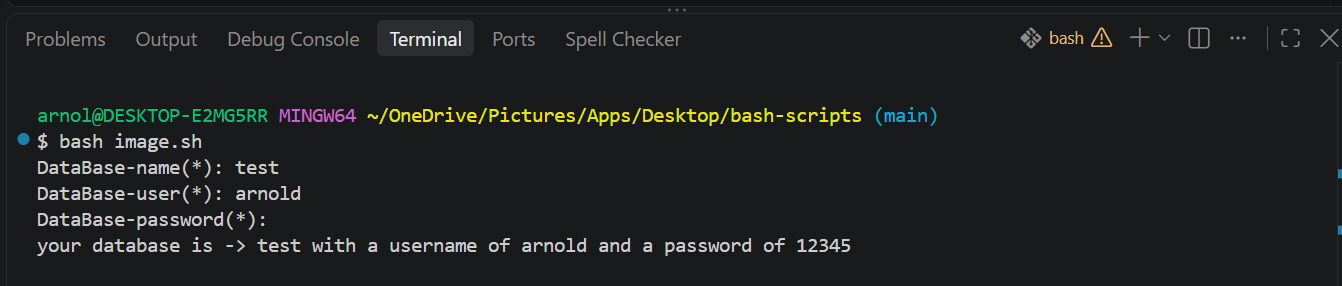
echo "your database is -> $db with a username of $user and a password of $pwd"
The script uses -p on the read keyword that prompts a string of text and -sp that prompts the user to enter a string of text that's hidden (because the -s hides what's being typed).
If you don't use the -p option together with -s, you won't be able to display a prompt asking the user to enter a password. With -s alone, the input is hidden, but no prompt is shown unless you print one using echo or printf.
To print or use the input the user has added, use the dollar sign ($) followed with a variable name for the input you're expecting from the user. In the example above, we named the variable for getting the database name db, so we'll use $db when we want to access the name of the database the user has input.
Now if you run the script in the terminal, you should see a sequence of terminal prompts waiting for inputs. Once they're filled, you'll see all the input's values in the terminal:
How to Validate and Sanitize Input
You'll also need to validate input before executing anything. This is important because sometimes crucial field might be missing or mistyped. For example, you might forget to input the database name for the image you're trying to create.
When validating input, you'll use one of these flags (among others):
-z: checks if a variable value is empty
-n: checks if a variable value is not empty
-lt: checks if a number is less than a given number
-gt: checks if a number is greater than a given number
-eq: checks for equality of two values
You can use the -z flag on every input that you need to make sure isn't empty before moving on to the next step:
#!/bin/bash
# database credentials
read -p 'DataBase-name(*): ' db
if [[ -z $db ]]
then
echo "The database field cannot be empty!"
exit 1
fi
read -p 'DataBase-user(*): ' user
if [[ -z $user ]]
then
echo "The user field cannot be empty!"
exit 1
fi
read -sp 'DataBase-password(*): ' pwd
if [[ -z $pwd ]]
then
echo "The password field cannot be empty!"
exit 1
fi
This script helps you make sure that all critical information about the database is present before proceeding to another input.
Default Values
You may want some fields to use default value (for example, the container name of the image, port, or volume of the container). For such scenarios you can use := to assign a variable default value:
#!/bin/bash
# container information
read -p 'Container-name: ' container_name
read -p 'Container-port(if omitted, the container will use default postgresql default port of 5432): ' port
read -p 'Volume-name: ' vol_name
echo "container-name-> ${container_name:=cont_one}, port->${port:=5432}, volume_name->${vol_name:=backend_data}"
When you run the script and skip all three of those inputs, bash will use the default value(s) you've used as fallbacks.
But if you pass value for those inputs, bash uses the provided values. For example, supply all three inputs and see the output you get:
How to Create and Write to a File
Now that you know how to create a Docker image for a Postgres database, you need to create a docker-compose.yml file that will be executed when starting and stopping your containers.
In Bash, there are multiple ways of creating a file:
First, you can use > filename. This creates a file if it doesn't exist. If it exists, its contents are overwritten (replaced).
There's also >> filename: This appends contents to a file or creates a file if one doesn't exist.
Finally, there's touch filename: This creates a file if it doesn't exist. If the file already exists, its contents are preserved and only the file's timestamps are updated.
How to Use > to Create and Write to a File
When you want to create a file and write content to it at the same time, you'll want to use echo in front of > and then add the filename, like this:
#!/bin/bash
echo Hello> test.txt
This will create a test.txt file with "hello" as content inside.
How to Use >> to Append Contents to an Existing File
To append contents to an existing file, add the contents before the >> and then follow with the filename you want to append content onto. Let's add Africa after Hello in the test.txt file we created in the previous script.
#!/bin/bash
echo Africa!>> test.txt
Now test.txt will have Hello and Africa! on the new line.
Using those symbols, let's create a docker-compose.yml file that will hold contents about our Postgres database setup.
#!/bin/bash
> docker-compose.yml
And just like that you have your docker-compose file created in your directory.
How to Write Multiple Different Contents to a File
You can also use the cat keyword to write to a file. Typically, cat is used for reading the contents of a file. But when you combine it with <> (that we just discussed), you can add multiple contents to a file in the format you want. The syntax looks like this:
# writing docker compose contents
cat <> docker-compose.yml
# file contents
EOF
The <> filename to append the contents to the file. With a Docker compose setup it would look like this:
#!/bin/bash
#file creation and writing
> docker-compose.yml
cat<>docker-compose.yml
services:
postgres:
image: postgres:18-alpine
container_name: ${container_name:= $db}
environment:
POSTGRES_USER: $user
POSTGRES_PASSWORD: $pwd
POSTGRES_database: $db
ports:
- ${port:=5432}:5432
volumes:
- ${vol_name:=database-data}:/var/postgresql
volumes:
${vol_name:=database-data}:
EOF
Bash Arguments and Flags
With Bash arguments, you can pass values in the same line while executing a script. To use arguments, add the values while executing the script on the same line, like this:
bash script val1 val2
To read arguments value(s), use the dollar sign ($) followed by the position in which you inputted your values (positions start at 1, not 0).
In the example, if you want to echo the content of the second argument value, you can use echo $2.
To understand this better, let's enhance data input experience by passing the database credentials on the fly using arguments:
#!/bin/bash
# database credentials
if [[ -z $1 ]]; then
read -p 'DataBase-name(*): ' db
else
db="$1"
fi
# database checking and validating
if [[ -z $2 ]]; then
read -p 'DataBase-user(*): ' user
else
user="$2"
fi
# user checking and validating
if [[ -z $1 ]]; then
read -sp 'DataBase-password(*): ' pwd
else
pwd=$3
fi
# password vaidation and checking
The snippet first checks if there's an argument. If there aren't any, you use the prompt to input the value. If there are arguments, you assign the argument value to a variable that represents the given database credentials (database name, password, and so on...). Now you can run the script with arguments:
bash image.sh customers ABC-Company secret123!
The image that will be created from the above script will have a database of customers, user ABC-Company, and a password of secret123!.
Bash Flags/Options
The script has a section that asks for information about the image that you're creating, but the info can be optional. With bash option/flags, you can skip the step that prompts for container information input using the -D option. This lets you explicitly keep the default container info before the script runs.
Here's an example:
#!/bin/bash
while getopts "ny" options; do
case "$options" in
n) echo "You choose no";;
y) echo "You choose yes";;
*) echo "No such option/flag"; exit 1;;
esac
done
shift $((OPTIND - 1))
In the above script:
The while loop keeps running as long as getopts isn't empty
getopts gets the passed option in the script
"ny" are the options we're expecting from user when running the script
options is a variable that will keep track of the input option between "n" and "y"
do starts the loop
case checks if the selected option is in the defined option using the in keyword
We then define what happens when we call the script with the option -n or -y and use a double semi-colon (;;) to close the option definition
The * is used in case the input options aren't defined.
esac then closes the case
done ends the loop so the loop doesn't continue running forever
shift $((OPTIND - 1)) helps avoid a conflict that may occur when the script also expects arguments by shifting the remaining arguments left over the flags, effectively discarding the flags from the parameter list.
You can then apply the syntax in the script to skip the step that asks for container info when -D is passed as an option during the script execution.
#!/bin/bash
ask_container_info=true
while getopts "D" options; do
case "$options" in
D) ask_container_info=false;;
*) echo "No such option/flag"; exit 1;;
esac
done
shift $((OPTIND - 1))
if [[ $ask_container_info == true ]]; then
#Prompt the user to input custom container information
read -p 'Container-name: ' container_name
read -p 'Container-port(if omitted, the container will use default postgresql default port of 5432): ' port
read -p 'Volume-name: ' vol_name
fi
There is one option here, which is why the option section only has D. ask_container_info starts as true, meaning unless the option is passed, the script will prompt the user to enter the container information. We then change the value of ask_container_info to false when the -D is passed with the script's execution.
How to Make Your Scripts Executable and Available on Your PC's Path
The next step is to make the script available and executable in every terminal you use on your machine. At the moment, the script just works in the current directory you're using to create and write your scripts.
We'll start by making the script file executable and remove the file extension from the file, so we don't need to always call our script with the .sh extension.
How to Make a File Executable
To make a file executable, use the Linux chmod command. It stands for change mode. Mode includes file permissions like write, read, and execute.
chmod +x image
Here, x makes the file executable, and then you've listed the file name you want to make executable (image).
How to Add Your Directory to the system
https://www.freecodecamp.org/news/how-to-automate-docker-image-creation-for-postgres-using-shell/
#rss #feeds #linksharing #qwibbit
#file
#prompt
#rss
#feeds
#linksharing
freeCodeCamp.org (Unofficial)6h
How to Find and Fix Common Technical SEO Issues on Your Website
Let's say you've built a website. You've invested in the design, bought a domain, and so on. But a website isn't only what you see on the screen. A lot happens behind the scenes. You have to understand how the internet works, as well as how Search Engine Optimization (SEO) works.
Speed is a key part of it, too. A slow site can have very weak SEO, because most people won't spend much time waiting for a page to load, especially these days.
Site speed is a well-known topic with many problems of its own to consider, like Largest Contentful Paint (LCP), Cumulative Layout Shift (CLS), and server speed. But I'll leave those for another article.
This one is about the problems that stop search engines from reaching and reading your pages.
In my opinion, technical SEO is much harder to apply than regular SEO, which focuses on content and keywords. The technical side usually requires a developer's knowledge, and might need some changes that can feel a bit uncomfortable if you don't have a technical background.
A technical problem can stay unnoticed for months, because you usually don't see it. It's not a design problem. You only find it when you run specific checks, for example with Google PageSpeed Insights.
In this tutorial, you'll find and fix the most common ones on a small practice site. I didn't want to take a real website and shame its owners, so I built a practice site with the problems already in it.
Table of Contents
Prerequisites
What Is Technical SEO?
How Common Are These Problems on Real Websites?
How to Set Up the Practice Site
How to Check a Page's HTTP Status Code
What Is a Soft 404?
How to Find and Fix Redirect Chains
How to Make Sure robots.txt Isn't Blocking Important Pages
How to Find an Accidental noindex
How to Check the Robots Meta Tag
How to Check the X-Robots-Tag Header
How to Use Canonical Tags Correctly
How to Fix Missing and Duplicate Titles and Meta Descriptions
How to Make Your Links Crawlable
How to Check Whether Your Content Needs JavaScript to Appear
Can You Check a Page in Five Minutes?
Conclusion
Prerequisites
You don't need to be an experienced programmer to follow along. You'll need:
A web browser, such as Chrome, Firefox, Edge or Safari. In Safari, first turn on Show features for web developers under Settings > Advanced.
A terminal: Terminal on macOS, PowerShell on Windows, or any terminal on Linux.
curl, a small program that downloads web pages. It comes with macOS, most Linux distributions, and Windows 10 (version 1803 and later) and Windows 11.
Node.js, to run the practice site. The code was tested with Node.js 26.8 and curl 8.7.
On Windows PowerShell, type curl.exe instead of curl, because there curl is a shortcut to a different command. Replace | grep -i "text" with | Select-String "text", and /dev/null with NUL.
What Is Technical SEO?
Google has programs called crawlers. They search the internet all the time for new websites and new pages. When Google discovers a new address, it may crawl the page and process what's on it (the text, images, and videos).
If Google decides the page is worth indexing, it may add it to a very big database of web pages, called the index. Google can then consider the pages in its index for its search results, when they're relevant to what someone searches for. Google's guide to how Search works calls these three steps crawling, indexing, and serving.
So crawling doesn't guarantee indexing, and indexing doesn't guarantee a place in the results. The same guide says Google doesn't guarantee any of the three stages, even for a page that follows all of its rules.
Fixing technical problems won't necessarily make your site rank first on Google. But it does strengthen your chances of ranking higher, because every problem you fix makes your site better.
Technical SEO has to come together with regular SEO, like keywords, backlinks, engagement on social media, and so on.
How Common Are These Problems on Real Websites?
The numbers below come from audits run with the site-auditing tool I build. Each website counts once, using its first audit, and this data comes from October 25th.
Crawls check many pages on one site (a median of 10 pages here). Single-page audits check one page, usually the home page.
Problem
How often
Sample
At least one page with no canonical tag
64.2% of sites
53 crawled sites, Aug 2025 to Oct 2026
Two or more pages with exactly the same title
61.8% of sites
34 crawled sites with two or more pages that loaded
At least one page with no meta description
49.1% of sites
53 crawled sites
At least one link leading to a page that returns 404
18.9% of sites
53 crawled sites
Page built mostly with JavaScript
17.7% of pages
277 single-page audits, May to Oct 2026
At least one page with no title
13.2% of sites
53 crawled sites
A link that search engines may not be able to follow
8.3% of pages
278 single-page audits
A robots.txt file with errors, or one that failed to load
7.9% of sites
252 single-page audits, Jul to Oct 2026
Page blocked by noindex or by robots.txt
4.8% of pages
251 single-page audits, Jul to Oct 2026
These are all technical problems, but they don't all weigh the same. Missing canonical tags are at the top, but Google doesn't require a canonical tag, so a page without one isn't broken by itself. It matters when the same or very similar content is reachable at more than one URL, as you'll see in the canonical section.
Duplicate titles are something I had myself: when you write code, it's easy to miss things like that. That's why there are tools that check for these problems.
Let's go over each issue in the table to make sure they're all clear:
Missing canonical tag: a canonical tag is basically one of the many tags you put in the of your HTML. When two or three pages have pretty much the same content, it tells search engines like Google which URL is the original, main version, the one you prefer to get indexed. It's not required, though: without it, Google picks the main version itself, so it matters mostly for pages that have duplicates.
Duplicate titles: it's really easy to end up with the same title on two pages. You don't want a duplicated title because it's not helpful and can confuse Google. Each page should say what it's about.
Missing meta description: this one is really important, because it helps search engines as well as AI tools like ChatGPT. The meta description is there to explain very briefly what the page is about and what it's for. If you go to Google and search for a website, you'll see it under the actual link to the site.
A link to a 404 page: this basically means you have a broken link (maybe a link you probably don't use anymore) to a page that isn't there. So there's no reason for it to lead to something that doesn't exist. Use it to lead to something similar, or to something that does exist, so your links remain relevant.
A page built mostly with JavaScript: Google can run JavaScript, so this alone doesn't keep a page out of Google. But the content appears only after the JavaScript loads and runs, which is slower for visitors and one more step that can fail, and not every crawler runs JS. That's why I prefer server-side rendering for the content that matters most.
A link search engines can't follow: this isn't a huge deal, and it really depends where the link goes. But say I wrote a really nice article and I want it to help me rank on Google. If search engines can't follow the link to it, then you invested all this time and energy in this article that relatively few people will likely see.
Errors in robots.txt: robots.txt basically helps you talk to search engines. If there are errors in this file, you might stop search engines from crawling pages you do want in search results.
A page blocked by noindex or robots.txt: these are two different things. A noindex rule asks search engines to keep a page out of their results, while a robots.txt rule only stops them from crawling it. You'll learn more about both, and why the difference matters, later in this tutorial.
Soft 404s, redirect chains, and wrong canonical tags aren't in the table, because the audits don't record them.
How to Set Up the Practice Site
The practice site is a tiny website for a made-up shoe store called Acme Shoes. Every page on it has one problem built in. You don't need to understand every line of the code.
Create a new folder, add a file called server.js, and paste in this code:
// server.js: a tiny practice site with common technical SEO problems built in
const http = require('node:http');
const PORT = 8080;
const BASE = 'http://localhost:' + PORT;
// Builds a simple HTML page. Leave out a field to leave that tag out.
function page({ title, description, canonical, robots, body, script }) {
return [
'',
'',
'',
'',
title && '' + title + '',
description && '',
canonical && '',
robots && '',
'',
'',
body,
script && '',
'',
'',
]
.filter(Boolean)
.join('\n');
}
const routes = {
'/': {
html: page({
title: 'Acme Shoes: Running Shoes for Every Runner',
description: 'Lightweight running shoes for road and trail, with free returns.',
canonical: '/',
body: [
'
Acme Shoes
',
'Blue Runner',
'Summer sale',
].join('\n'),
}),
},
// Problem: a vague title and no meta description
'/products/blue-runner': {
html: page({
title: 'Acme Shoes',
canonical: '/products/blue-runner',
body: '
Blue Runner
',
}),
},
// Problem: a missing product that still answers "200 OK" (a soft 404)
'/products/red-runner': {
html: page({
title: 'Acme Shoes',
body: '
Sorry, that product could not be found.
',
}),
},
// Problem: a redirect chain, /old-sale -> /sale-2025 -> /sale
'/old-sale': { redirect: '/sale-2025' },
'/sale-2025': { redirect: '/sale' },
'/sale': {
html: page({
title: 'Summer Sale: Up to 40% Off Running Shoes | Acme Shoes',
description: "Save up to 40% on last season's running shoes until August 31.",
canonical: '/sale',
body: '
Summer sale
',
}),
},
// Problem: a noindex header nobody can see in the page itself
'/about': {
headers: { 'X-Robots-Tag': 'noindex' },
html: page({
title: 'About Acme Shoes',
description: 'How a two-person workshop became a running shoe brand.',
canonical: '/about',
body: '
About us
',
}),
},
// Problem: a canonical tag that points to the home page
'/blog/choosing-trail-shoes': {
html: page({
title: 'How to Choose Trail Running Shoes | Acme Shoes',
description: 'Grip, drop and fit: what to look for in a trail running shoe.',
canonical: '/',
body: '
How to choose trail running shoes
',
}),
},
// Problem: the content only exists after JavaScript runs
'/catalog': {
html: page({
title: 'All Running Shoes | Acme Shoes',
description: 'Browse every Acme running shoe.',
canonical: '/catalog',
body: '
' }));
}
if (route.redirect) {
res.writeHead(301, { Location: route.redirect });
return res.end();
}
res.writeHead(200, {
'Content-Type': (route.type || 'text/html') + '; charset=utf-8',
...route.headers,
});
res.end(route.html);
})
.listen(PORT, () => console.log('Practice site running at ' + BASE));
Each key in routes is a page address. The comments that start with Problem: say what's wrong with each page.
Start the server from the same folder:
node server.js
You should see:
Practice site running at http://localhost:8080
Leave the server running and open a second terminal for the commands below. When you change server.js, stop the server with Ctrl+C and start it again.
How to Check a Page's HTTP Status Code
I remember when I started building websites, I built all kinds of small things. I'm a full stack developer, and I kept trying experiments.
Once I had a problem on the server side and saw in the Network tab that it returned a 500 error. Another time I removed a page on purpose, because I wanted to see if I'd get a 404 or other problems. If you just play around with the site you're building, you'll learn a lot from the results.
HTTP status codes are the first thing a search engine reads. They're the server's way of talking to the client, such as your browser. The codes are split into five ranges: 1xx, 2xx, 3xx, 4xx, and 5xx. A 5xx code is a server problem, for example, and a 4xx code is a client-side problem.
404 is the most common error. It means a page on the site wasn't found. You see 404s all the time, and the fix is typically just to maintain your site and your links.
The codes you'll see in this tutorial are:
200 OK: here's the page.
301 Moved Permanently: the page lives at another address.
404 Not Found: there's no page here.
Google doesn't index URLs that return a 4xx code, according to its documentation on HTTP status codes.
To see the status code of the practice site's home page, use -I, which shows only the headers, and -s, which hides curl's progress meter:
curl -sI http://localhost:8080/
HTTP/1.1 200 OK
Content-Type: text/html; charset=utf-8
Date: Sun, 25 Oct 2026 17:42:53 GMT
Connection: keep-alive
Keep-Alive: timeout=5
Now ask for an address that isn't in routes, to see what a correct 404 looks like:
curl -sI http://localhost:8080/products/does-not-exist
HTTP/1.1 404 Not Found
Content-Type: text/html; charset=utf-8
Date: Sun, 25 Oct 2026 17:42:53 GMT
Connection: keep-alive
Keep-Alive: timeout=5
In the browser, open the developer tools (F12, or Cmd+Option+I on a Mac), go to the Network tab, and reload. The Status column shows the code.
What Is a Soft 404?
Check a product the store no longer sells:
curl -sI http://localhost:8080/products/red-runner
HTTP/1.1 200 OK
Content-Type: text/html; charset=utf-8
Date: Sun, 25 Oct 2026 17:42:53 GMT
Connection: keep-alive
Keep-Alive: timeout=5
In the browser, the same page says "Sorry, that product could not be found."
A soft 404 is basically a "page not found", but the server still answers 200. It confuses Google, because the address is still there, but what's on it isn't current anymore.
To fix it, make missing pages return a real 404, which is what Google recommends. In the practice site, delete the '/products/red-runner' entry from routes. The server then answers 404.
Broken links lead to the same dead end. In the data, 18.9% of the 53 crawled sites had at least one link to a page that returned 404.
So don't leave links that lead to something that doesn't exist. Update them to lead to something similar, or to something that does exist.
If the page moved, add a 301 redirect from the old address to the new one. A 404 is the right answer only for a page that's really gone.
How to Find and Fix Redirect Chains
A redirect is basically when you want to send one URL (perhaps one that no longer exists) to another URL (that does exist). You might set up a redirect if, for example, you change your domain from example-x.com to example-y.com. You'll want everyone who types example-x.com to be redirected to example-y.com automatically.
Redirects are fine, and they can be quite helpful when used properly. A 301 means the page moved for good. A 302 means the move is temporary. Google's documentation on redirects explains how it treats each one, and its crawlers follow up to 10 redirect hops.
But a redirect chain happens when an old address, such as a domain you used in the past, redirects to a new one, and then that one redirects again, and again...you get the picture. A few redirects aren't a big deal, but five,
https://www.freecodecamp.org/news/fix-common-technical-seo-issues/
#seoissues #technicalseo #fixcommon #check #practicesite #windows #problems #search #fixredirect
#rss #feeds #linksharing #qwibbit
How to Detect Financial Fraud Patterns
with Knowledge Graphs: A Production
Guide
Most anti-fraud architectures in enterprise payment workflows evaluate transactions in isolation.
When an invoice arrives, an automated rules engine checks it against static thresholds. It checks whether the dollar amount falls within normal limits, whether the vendor is on an approved vendor list, and whether the submitting IP address looks familiar. If the individual attributes look plausible, the payment clears.
The problem with this approach is structural. Sophisticated fraud schemes like money mule rings, circular invoicing loops, and vendor collision rarely produce transactions that alert individual thresholds. A shell company invoicing $4,800 to stay under a $5,000 dual sign-off threshold looks completely fine in isolation. But when 25 seemingly independent vendors all route disbursements to the same bank account, the coordinated pattern starts to become clear.
You won't find the warning in the attributes of an isolated transaction. It lives in the topology of the payment network.
In a relational database, tracing these multi-entity relationships requires recursive cell joins across tables of vendors, invoices, payments, and bank accounts. But as tables grow into millions of rows, deep path traversals quickly degrade query performance. Graph databases solve this by storing relationships as first-class, index-free adjacency pointers, turning multi-hop traversals into constant-time lookups.
In this tutorial, you'll explore the architecture of an end-to-end relational fraud detection pipeline built on Neo4j. You'll see how to model financial entities as a graph, precompute derived edges to optimize query latency, and write parameterized Cypher queries to uncover five core procurement fraud schemes.
The complete reference implementation is available in the fraud-detection-knowledge-graphs repository.
What We'll Cover:
Why Tabular Rules Miss Relational Fraud
Prerequisites
How to Model the Financial Graph and Ingestion Schema
How to Detect Five Fraud Patterns with Cypher Queries
How to Run the End-to-End Pipeline and Validate Results
Production Architecture: How to Scale the Graph Pipeline
Key Architectural Lessons and Takeaways
Conclusion
Why Tabular Rules Miss Relational Fraud
In accounts payable pipelines, risk checks typically operate on isolated records:
# Transaction-level view — nothing suspicious
transactions = [
{"vendor": "Alpha Corp", "amount": 5200.00, "date": "2025-08-01"},
{"vendor": "Beta LLC", "amount": 4800.00, "date": "2025-08-02"},
{"vendor": "Gamma Inc", "amount": 5100.00, "date": "2025-08-03"},
]
# All amounts within normal range ($1K–$15K). All vendors valid.
# Dates are sequential. Nothing triggers any rule.
When you map those same records to an interconnected graph, the hidden structure becomes clear right away:
# Graph view — all three vendors pay to the same account
connections = {
"ACC-MULE-001": ["Alpha Corp", "Beta LLC", "Gamma Inc"],
"ACC-0042": ["Delta Corp", "Epsilon LLC"],
"ACC-0099": ["Zeta GmbH"],
}
# ACC-MULE-001 receives from 25+ vendors. That's a money mule ring.
# The convergence is the red flag.
The underlying data hasn't changed. But when you evaluate transactions within an entity graph, the coordinated funnel stands out.
In a relational database, connecting these dots requires multiple joins across separate table. In a knowledge graph, the connections are stored directly as edges connecting nodes, which allows you to query them in a single traversal.
Pattern
What It Is
What Traditional Tools Don't Catch
Duplicate Invoices
Same invoice and vendor, near-identical amount, close dates
Exact match misses slight variations
Circular Rings
Vendors invoicing each other in a closed loop
Each invoice looks legitimate alone
Money Mule Rings
Many vendors funneling to one controlled account
No single payment is anomalous
Vendor Collusion
Independent-looking vendors sharing underlying attributes
No cluster detection across entities
Payment Anomalies
Invoice approved by someone outside their department's authority
Role-based checks pass, context checks don't exist
A knowledge graph doesn't replace rules engines or ML models. But it does fill the gap they can't reach: relationships.
Prerequisites
To follow along with this tutorial, you'll need:
Python 3.10 or higher installed on your machine.
Docker and Docker Compose installed to run a local Neo4j instance.
Basic familiarity with Python and database concepts.
How to Model the Financial Graph and Ingestion Schema
Before running fraud queries, you need to structure your data into a cohesive property graph. The reference dataset models six entity types commonly found in financial systems:
Entity
Key Properties
Role
Vendor
tax_id, name, country, city
Who issues invoices
Invoice
invoice_id, amount, date, category
What was billed
Payment
payment_id, amount, date
What was paid
BankAccount
account_id, routing_number, bank_name
Where money went
Employee
employee_id, name, department
Who approved
Organization
org_id, name, departments
Structural hierarchy
The base relationships form a bipartite payment network:
(Employee)-[:APPROVED]->(Payment)-[:LINKED_TO]->(Invoice)-[:ISSUED_BY]->(Vendor)
|
v
(Payment)-[:PAID_TO]->(BankAccount)
Step 1: How to Generate the Dataset with Known Injected Patterns
Real-world financial datasets are difficult to access because of privacy and regulatory restrictions. Using synthetic data allows you to inject known fraud patterns and systematically verify that your detection queries find them.
The dataset generator creates approximately 500 entities with five known patterns embedded:
12 duplicate invoice pairs
1 circular invoice ring (3 vendors)
1 money mule ring (25 vendors for 1 account)
1 vendor collusion cluster (4 vendors)
3 payment anomalies
from dataset.generate import FraudDatasetGenerator
gen = FraudDatasetGenerator(
num_vendors=100,
num_employees=30,
num_organizations=5,
seed=42,
)
output_dir = gen.save("dataset/output")
Setting a fixed seed=42 makes the dataset fully reproducible. Running the generator produces the exact same fraud patterns each time, giving you a reliable benchmark for testing queries:
Vendors: 100
Invoices: 220 (200 base + 20 fraud)
Payments: 331 (300 base + 31 fraud)
Bank Accounts: 51 (50 + 1 mule)
Employees: 30
Organizations: 5
Fraud Patterns: 5 types
The generator also exports a ground-truth manifest ground_truth.json that logs every injected anomaly, and this serves as your automated validation oracle.
Step 2: How to Connect to Neo4j and Create Constraints
You can spin up a local Neo4j 5.20 container with APOC procedures enabled using Docker Compose:
docker compose up -d
Next, initialize the database driver and establish uniqueness constraints:
from graph.connection import FraudGraph
with FraudGraph() as graph:
graph.create_constraints()
These constraints are critical for query performance. In Neo4j, unique property constraints automatically build underlying B-tree indexes. Without them, every MERGE operation forces an unindexed full scan across all nodes in the database:
class FraudGraph:
def __init__(self, uri=None, user=None, password=None):
self.uri = uri or os.environ.get('NEO4J_URI', 'bolt://localhost:7687')
self.user = user or os.environ.get('NEO4J_USER', 'neo4j')
self.password = password or os.environ.get('NEO4J_PASSWORD', 'password')
self.driver = None
def connect(self):
self.driver = GraphDatabase.driver(
self.uri, auth=(self.user, self.password),
max_connection_pool_size=50,
connection_acquisition_timeout=30,
)
with self.driver.session() as session:
session.run('RETURN 1')
return self
def __enter__(self):
self.connect()
return self
def __exit__(self, exc_type, exc_val, exc_tb):
self.close()
def create_constraints(self):
with self.driver.session() as session:
session.run("CREATE CONSTRAINT vendor_tax_id IF NOT EXISTS FOR (v:Vendor) REQUIRE v.tax_id IS UNIQUE")
session.run("CREATE CONSTRAINT invoice_id IF NOT EXISTS FOR (i:Invoice) REQUIRE i.invoice_id IS UNIQUE")
session.run("CREATE CONSTRAINT account_id IF NOT EXISTS FOR (a:BankAccount) REQUIRE a.account_id IS UNIQUE")
session.run("CREATE CONSTRAINT employee_id IF NOT EXISTS FOR (e:Employee) REQUIRE e.employee_id IS UNIQUE")
Step 3: How to Load Entities into the Graph
The FraudGraphLoader uses Cypher's UNWIND to batch-insert entities in parameterized transactions:
from graph.loader import FraudGraphLoader
with FraudGraph() as graph:
graph.create_constraints()
loader = FraudGraphLoader(graph)
loader.load_all(data)
The loading sequence respects foreign key dependencies: organizations are loaded first, followed by vendors, bank accounts, and employees, with invoices and payments loaded last.
Each load method follows the same pattern:
UNWIND $data AS v
MERGE (vendor:Vendor {tax_id: v.tax_id})
SET vendor.name = v.name,
vendor.country = v.country,
vendor.city = v.city
WITH vendor, v
MATCH (org:Organization {org_id: v.organization})
MERGE (vendor)-[:BELONGS_TO]->(org)
MERGE creates or matches a node (using the constraint for O(1) lookup), SET attaches properties, and MERGE on the relationship connects nodes.
Step 4: How to Materialize Derived Relationships for Fast Queries
A central architectural decision in graph databases is deciding whether to compute relationships at query time or materialize them during ingestion.
Discovering whether two vendors share a bank account requires traversing a four-hop path:
(Vendor)<-[:ISSUED_BY]-(Invoice)<-[:LINKED_TO]-(Payment)-[:PAID_TO]->(BankAccount)<-[:PAID_TO]-(Payment)-[:LINKED_TO]->(Invoice)-[:ISSUED_BY]->(Vendor)
Evaluating this four-hop path during every real-time fraud query causes significant computational overhead. Instead, you can materialize derived edges when data enters the system. This adds a slight write latency during batch ingestion, but it turns multi-hop traversals into direct, single-hop lookups during runtime detection queries.
The first derived relationship is SHARED_ACCOUNT_WITH, which links vendors that share a destination bank account:
MATCH (v1:Vendor)<-[:ISSUED_BY]-(i1:Invoice)<-[:LINKED_TO]-(p1:Payment)-[:PAID_TO]->(a:BankAccount)
MATCH (v2:Vendor)<-[:ISSUED_BY]-(i2:Invoice)<-[:LINKED_TO]-(p2:Payment)-[:PAID_TO]->(a)
WHERE id(v1) < id(v2)
MERGE (v1)-[:SHARED_ACCOUNT_WITH]->(v2)
The filter WHERE id(v1) < id(v2) ensures that the relationship is stored as a single directed edge between the internal node IDs, which prevents duplicate reverse edges.
You can also materialize shared geographic locations and banking routing prefixes to detect loose collusion networks:
-- Same city and country
MATCH (v1:Vendor), (v2:Vendor)
WHERE id(v1) < id(v2)
AND v1.city = v2.city
AND v1.country = v2.country
MERGE (v1)-[:SHARED_LOCATION]->(v2)
-- Bank accounts with same routing prefix (first 3 digits)
MATCH (v1:Vendor)<-[:ISSUED_BY]-(i1:Invoice)<-[:LINKED_TO]-(p1:Payment)-[:PAID_TO]->(a1:BankAccount)
MATCH (v2:Vendor)<-[:ISSUED_BY]-(i2:Invoice)<-[:LINKED_TO]-(p2:Payment)-[:PAID_TO]->(a2:BankAccount)
WHERE id(v1) < id(v2)
AND a1.account_id <> a2.account_id
AND substring(a1.routing_number, 0, 3) = substring(a2.routing_number, 0, 3)
MERGE (v1)-[:SHARED_ROUTING_PREFIX]->(v2)
Once ingestion completes, you can inspect the graph topology to confirm that both base and derived relationships loaded properly:
info = graph.get_info()
for label, count in sorted(info['nodes'].items(), key=lambda x: -x[1]):
print(f" {label}: {count} nodes")
for rel, count in sorted(info['relationships'].items(), key=lambda x: -x[1]):
print(f" {rel}: {count} relationships")
The output shows raw entities and the generated derived relationships:
Invoice: 220 nodes
Payment: 331 nodes
Vendor: 100 nodes
BankAccount: 51 nodes
Employee: 30 nodes
SHARED_ACCOUNT_WITH: 412 relationships
SHARED_LOCATION: 387 relationships
LINKED_TO: 331 relationships
PAID_TO: 331 relationships
ISSUED_BY: 220 relationships
APPROVED: 331 relationships
SHARED_ROUTING_PREFIX: 52 relationships
These derived relationships are designed specifically for high-speed detection. In a relational database, discovering shared accounts requires a self-join across multiple tables. In a graph, it becomes a precomputed edge, turning complex traversals into direct lookups.
How to Detect Five Fraud Patterns with Cypher Queries
Once your schema and derived relationships are established, you can construct parameterized Cypher queries that'll flag five widespread procurement fraud patterns.
Pattern 1: How to Find Duplicate Invoices
Fraudulent actors often submit duplicate invoices spaced days or weeks apart, assuming accounts payable teams will process them as routine recurring expenses.
Rule-based engines often catch exact matches, but they can miss invoices with slight date shifts. In a graph, you can query across all invoices issued by the same vendor within a rolling date window:
// graph/queries.py — detect_duplicates()
MATCH (v:Vendor)<-[:ISSUED_BY]-(i1:Invoice),
(v)<-[:ISSUED_BY]-(i2:Invoice)
WHERE i1.invoice_id < i2.invoice_id
AND i1.amount = i2.amount
AND i1.date < i2.date
AND duration.between(date(i1.date), date(i2.date)).days <= $max_days
RETURN i1.invoice_id AS invoice_a,
i2.invoice_id AS invoice_b,
v.name AS vendor,
i1.amount AS amount,
i1.date AS date_a,
i2.date AS date_b,
duration.between(date(i1.date), date(i2.date)).days AS days_apart
ORDER BY days_apart
Key points here:
The condition i1.invoice_id < i2.invoice_id prevents returning the same pair twice like (A, B) and (B, A).
i1.amount = i2.amount is the fraud signal: same amount means likely the same invoice submitted twice.
By scoping the search to invoices issued by the same vendor v, the query leverages index lookups on the vendor before evaluating date intervals with the native temporal duration.between() function.
You can execute this query through the Python wrapper:
from graph.queries import FraudQueries
queries = FraudQueries(graph)
duplicates = queries.detect_duplicates(max_days_apart=14)
print(f"Found {len(duplicates)} duplicate invoice pairs")
for dup in duplicates[:5]:
print(f" {dup['invoice_a']} ↔ {dup['invoice_b']} | "
f"{dup['vendor']} | ${dup['amount']} | "
f"{dup['days_apart']} days apart")
The query detects all 12 duplicate pairs injected into the synthetic dataset, achieving 100% recall.
Pattern 2: How to Uncover Circular Invoicing Rings
In circular invoicing schemes, three or more vendors bill one another in a closed loop. Each transaction appears legitimate on its own, but no actual goods or services are delivered.
Because you precomputed SHARED_ACCOUNT_WITH, cycle detection is simplified to finding three-node triangles in the vendor sub-graph:
// graph/queries.py — detect_circular_schemes()
MATCH path = (v1:Vendor)-[:SHARED_ACCOUNT_WITH]-(v2:Vendor)
-[:SHARED_ACCOUNT_WITH]-(v3:Vendor)
-[:SHARED_ACCOUNT_WITH]-(v1)
WHERE id(v1) < id(v2) AND id(v2) < id(v3)
RETURN path,
[n IN nodes(path) | {name: n.name, tax_id: n.tax_id}] AS vendors,
length(path) AS hops
Key points here:
The constraint id(v1) < id(v2) AND id(v2) < id(v3) eliminates cyclic permutations. Without it, a single three-node ring (A, B, C) would be returned three separate times.
If you ran this query directly over raw four-hop transactional paths without materialized edges, finding a three-cycle would require traversing twelve hops, which causes high CPU usage on large datasets.
circles = queries.detect_circular_schemes(min_cycle_length=3)
print(f"Found {len(circles)} circular invoice rings")
for ring in circles:
vendor_names = [v['name'] for v in ring['vendors']]
print(f" Ring ({ring['hops']} hops): {' ↔ '.join(vendor_names)}")
The query catches the circular invoicing ring with 100% recall.
Pattern 3: How to Detect Money Mule Networks
In a money mule setup, multiple shell entities funnel money into a single account controlled by a syndicate. The individual disbursements are small, but the fan-in degree of the destination account is anomalously high.
You can uncover this pattern by performing degree analysis on destination bank accounts:
// graph/queries.py — detect_money_mule_rings()
MATCH (a:BankAccount)<-[p_paid:PAID_TO]-(p:Payment)-[:LINKED_TO]->(i:Invoice)
-[:ISSUED_BY]->(v:Vendor)
WITH a, collect(DISTINCT v) AS vendors,
sum(p.amount) AS total_received,
count(DISTINCT v) AS unique_vendors,
count(p) AS payment_count
WHERE unique_vendors >= $min_vendors
RETURN a.account_id,
a.routing_number,
a.bank_name,
unique_vendors AS vendor_count,
payment_count,
total_receive
https://www.freecodecamp.org/news/how-to-detect-financial-fraud-patterns-with-knowledge-graphs-a-production-guide/
#rss #feeds #linksharing #qwibbit
#rss
#feeds
#linksharing
#qwibbit
freeCodeCamp.org (Unofficial)4d
Secure Your AI Agents – Free Model Context Protocol (MCP) Security Course
The Model Context Protocol (MCP) helps connect LLMs to external tools, databases, and APIs. But giving AI agents hands and feet to take real-world actions introduces an entirely new attack surface.
We just published a MCP Security Fundamentals Course on the freeCodeCamp.org YouTube channel.
This course walks you through the mechanics of agent exploitation and how to defend against them.
Traditional application security assumes deterministic code and predictable human or machine interactions. AI agents, however, introduce non-deterministic decision-makers right into your application logic. When an agent acts on untrusted data, classic bugs like command injection, privilege escalation, and token leakage execute at machine speed.
Throughout the course, Dan frames these challenges around Simon Willison’s "Lethal Trifecta" framework, which is the dangerous convergence of three distinct capabilities:
Private Data
The agent has read access to sensitive internal records, source code, credentials, or private databases.
Untrusted Content
The agent ingests text from outside sources, including web pages, emails, customer tickets, public issues, or third-party tool schemas.
External Communications
The agent possesses the capability to transmit data outward through webhooks, markdown rendering, emails, or API calls.
When an agent holds all three capabilities simultaneously, it becomes structurally vulnerable to prompt-driven exploitation. You will learn how to break this trifecta through architectural boundaries rather than relying on brittle prompt filters.
Watch the full course for free on the freeCodeCamp.org YouTube channel and start hardening your AI agent integrations today (2-hour watch).
https://www.freecodecamp.org/news/secure-your-ai-agents-free-model-context-protocol-mcp-security-course/
#contextprotocol #modelcontext #mcp #mcpsecurity #course #free #securityfundamentals #data #simonwillison #private
#rss #feeds #linksharing #qwibbit
Build with Gemini 4 Argon – Fast-Track API Crash Course
Google just released Gemini 4 Argon which is its most capable model designed specifically for complex reasoning, advanced coding, math, and science.
To help you get building right away, we just published the Gemini 4 Argon API Crash Course on the freeCodeCamp.org YouTube channel. In just 10 minutes, you’ll walk through writing clean JavaScript to connect to the model, steer its reasoning, and build real applications.
Here are the key concepts you will learn:
Configurable Thinking Levels
Learn how to tune the model’s internal reasoning between low, medium, and high so you only pay for the computational depth your specific task requires.
Multi-Turn State with previous_interaction_id
Maintain context across back-and-forth prompts without manually passing full chat histories back into every API request.
Asynchronous Background Execution
Offload heavy workloads directly to Google’s infrastructure without encountering client timeouts.
Insider DeepMind Insights
Hear directly from Google DeepMind Developer Experience engineer Jack Weatherspoon on how Argon handles autonomous tool use, complex 3D asset generation, and nuanced creative writing.
Check out the full crash course on the freeCodeCamp.org YouTube channel to set up your environment and make your first API call (10-minutes).
https://www.freecodecamp.org/news/build-with-gemini-4-argon-fast-track-api-crash-course/
#crashcourse #apicrash #gemini #argon #google #configurablethinking #thinkinglevels #backgroundexecution #executionoffload #levelslearn
#rss #feeds #linksharing #qwibbit
#crashcourse
#apicrash
#gemini
#argon
#google
freeCodeCamp.org (Unofficial)5d
High-Speed Decision Pipelines: Jev and Prefill-Only Inference from Scratch
Autoregressive token generation is notoriously slow and memory-intensive, especially when you only need a model to make a structured classification or routing decision rather than write out paragraphs of text.
To help engineers bypass autoregressive bottlenecks, freeCodeCamp just released the Jev Course: Prefill-Only Inference and Decision Models from Scratch.
This in-depth PyTorch guide walks you through building blazing-fast, decision-oriented architectures that process inputs entirely within the initial prefill stage.
What You Will Learn
Prefill-Only Architecture
Learn how to eliminate token-by-token decoding loops to run ultra-low latency classifications and actions directly from prompt evaluation.
Encoder and Decoder Design
Build both model variants from scratch in PyTorch to understand the mathematical trade-offs between bidirectional representations and causal flows.
Custom Causal Masking
Implement low-level attention masks that preserve directional dependencies without introducing unnecessary padding overhead.
KV-Cache Reuse Strategies
Harness key-value cache states across continuous decision pipelines to process repetitive system contexts with minimal redundant compute.
You can watch the full Jev Course: Prefill-Only Inference and Decision Models from Scratch video on YouTube to start optimizing your custom language model inference workflows (2-hour watch).
https://www.freecodecamp.org/news/high-speed-decision-pipelines-jev-and-prefill-only-inference-from-scratch/
#decisionpipelines #jevcourse #inference #learn #decoderdesign #designbuild #architecturelearn #maskingimplement #reusestrategies #strategiesharness
#rss #feeds #linksharing #qwibbit
Learn Real-World Penetration Testing: Hands-On Ethical Hacking Crash Course
Understanding how malicious actors infiltrate networks is the first step to building resilient infrastructure.
To help developers and aspiring security analysts learn the fundamentals of offensive security legally and safely, we just released How Ethical Hackers Actually Break Into Systems on the freeCodeCamp.org YouTube channel.
Taught by cybersecurity instructor Declan Middleton, this 2.5 hour crash course walks through terminal navigation, target reconnaissance, vulnerability assessment, web exploitation, and automation scripting against a dedicated Capture The Flag (CTF) virtual machine.
Core Skills Covered
Linux and Terminal Operations
Master command line navigation, permission modeling, user management, and process execution inside Parrot OS.
Network Reconnaissance with Nmap
Scan target IPs to identify active hosts, open ports, running services, and specific software versions using stealth and decoy flags.
Web Content Discovery and Fuzzing
Enumerate hidden directories, files, and endpoints using tools such as Dirsearch, FFuF, WhatWeb, and Nikto.
Request Analysis and Exploitation with Burp Suite
Intercept, inspect, and modify HTTP requests to audit authentication workflows and execute file upload attacks with webshells.
Automated Security Tooling in Bash and Python
Write custom reconnaissance scripts to automate socket connections, banner grabbing, and HTTP header parsing without manual overhead.
Watch the full tutorial on the freeCodeCamp.org YouTube channel to set up your isolated lab and practice ethical hacking techniques from scratch (3-hour watch).
https://www.freecodecamp.org/news/learn-real-world-penetration-testing-hands-on-ethical-hacking-crash-course/
#crashcourse #ethicalhacking #learn #actuallybreak #hackersactually #declanmiddleton #reconnaissance #security #coveredlinux #operationsmaster
#rss #feeds #linksharing #qwibbit
How AI-Powered Search Works: A Guide for Devs on AI Visibility
Searched worked in a familiar way for decades: you'd type in your query, get back a list of pages, and choose one to click on. Behind the scenes, Google would find the pages it thought you might want, rank them, and give you a list of options.
But AI-powered search is changing that experience. If you ask ChatGPT, Gemini, Perplexity, or another AI system a question, you may not get a long list of links to check out. Instead, the system can interpret your question, gather information from different sources when applicable, and generate an answer directly.
This changes something important for websites and brands: what happens when there's no traditional ranking position to fight for?
This is where the idea of AI visibility comes in. Instead of asking only, "Where does my website rank?", businesses and publishers are increasingly asking a different question: "Does the AI mention us when someone asks a relevant question?"
That distinction may sound small, but it represents a major change in how information is discovered online. And it's what we'll explore here.
What We'll Cover:
Google Gives You Ranked Results, While AI Gives You an Answer
What Does “AI Visibility” Actually Mean?
So How Does an AI Decide What to Show?
The Strange Thing About AI Search: Smaller Sites Can Still Win
How Do You Measure Something That Doesn’t Have a Ranking?
What the Data Tells Us About AI Search
What This Means for Developers and Content Creators
Structure for Extraction
Provide Verifiable Fact Anchors
Optimize for Questions, Not Query Fragments
SEO Isn't Dead. The Metric Is Changing.
Wrap Up
Google Gives You Ranked Results, While AI Gives You an Answer
If you're trying to understand how a search engine and an answer engine really work, it comes down to how each handles information retrieval.
Traditional search engines crawl the web, catalog pages in an index, run ranking algorithms against a user's keywords, and display candidate URLs ordered by perceived authority and link equity. The final decision of what to actually click on and read remains entirely in the hands of the person asking the question.
AI search changes things up a bit. When a user enters a natural-language prompt, the AI model decomposes the underlying intent, identifies candidate information using Retrieval-Augmented Generation (an AI technique that improves the accuracy of LLM models) or its pre-trained parametric memory, reconciles conflicting viewpoints, and actively decides which resources or solutions to present.
The most critical takeaway is that ranking highly on Google doesn't guarantee an AI engine will mention you. In fact, an Ahrefs citation study analyzing thousands of prompts discovered that only about 12% of URLs cited by generative assistants like ChatGPT and Copilot actually ranked in Google's top 10 for the exact query.
While Google’s own AI Overviews pull more frequently from conventional search results, standalone conversational engines construct independent answer graphs. AI visibility doesn't really care about claiming a specific URL slot. What matters more is whether your brand (and its resources) shows up as part of the machine’s direct answer.
What Does “AI Visibility” Actually Mean?
If you strip away all the marketing language, AI visibility represents the probability and quality of your brand’s inclusion inside a synthesized response. Evaluating it requires breaking down three distinct dimensions:
Brand mentions: The model explicitly names your company, service, or product within the prose of its answer. For example, if someone asks for lightweight running shoes, does your shoe article make the bulleted recommendation list?
Citations: The model footnotes or links back to your specific web page as an authoritative source for the information it just presented.
Context and sentiment: The way in which the model portrays the brand. Being mentioned as a budget-friendly option differs significantly from being characterized as unreliable or out of date.
This distinction matters because mentions and citations don't always happen together. An AI model can freely recommend your product because it understands your brand as a recognized entity, but cite a third-party tech review site as its primary factual reference. On the other hand, an engine might cite your documentation to clarify an API standard without ever suggesting your company as a vendor.
So How Does an AI Decide What to Show?
In order to appreciate how the AI chooses entities to include in its search results, we need to explore how modern retrieval engines work.
Current systems don't use only matching algorithms. They also incorporate elements of semantic analysis (the process by which an AI or computer program interprets the real meaning and context of words), vector representations (a way of turning words, sentences, or data into lists of numbers so that computers can understand their meaning) and multi-source verification (the practice of cross-checking a claim or dataset across multiple independent and reliable origins to confirm its truth and accuracy).
After the user provides the prompt, the system doesn't treat it as a set of words to be matched with an index. Using dense passage retrieval and Retrieval-Augmented Generation (RAG), the engine translates the request into a high-dimensional vector embedding of the real semantic context. The system then searches candidate passages on the internet, analyzing them through a variety of signals:
Core Signal
What the Engine Evaluates
Why It Impacts the Response
Semantic Relevance
Meaning, context, and vector proximity
Resolves the user's underlying intent rather than verbatim text.
Information Density
Presence of hard data, statistics, and verifiable claims
Models favor text rich in concrete facts over vague qualitative descriptions.
Attribution & Provenance
Citations and attributed external references
Transparent sourcing allows the model to ground its claims safely.
Cross-Source Consensus
Corroboration across independent platforms
If independent review boards concur, models accept facts as the truth.
Information Freshness
Recent timestamps and active updates
Ensures specs, pricing, and availability reflect current market realities.
Structural Extractability
Clean semantic hierarchy (HTML tags, tables)
Modular, clean blocks allow the model to lift passages without misinterpretation.
The mathematical backing supporting these signals was found in the groundbreaking Princeton University GEO study. Through experimentation with 10,000 queries on various generative search engines, the scientists confirmed that tailored content changes may increase visibility of the source in AI results by 30% to 40%.
More importantly, the study revealed the hierarchy of what kind of rewards a generative model can give:
Addition of statistics: The inclusion of quantitative information resulted in an increase in visibility by 41%. AI algorithms prefer quantifiable statistics rather than generalizations such as "many users prefer..." or "highly efficient...".
Addition of quotation/citation: Citing subject matter experts in the form of quotes and providing sources resulted in a 28% to 40% increase in visibility.
Traditional keyword stuffing as a penalty: Traditional SEO relied heavily on repetition of keywords for optimization purposes. But the Princeton study showed that keyword stuffing lowered visibility by 10% below the baseline in models such as Perplexity because LLMs recognize repetition as manipulative text.
Also, studies done on retrieval-augmented LLM search in the International Journal of Information Management Data Insights show that conversational engines have very strict checks for neutrality and consistency before showing a brand. If the claims made by the website cannot be proven through consensus from third parties like respected industry databases, academic databases or peer discussions, the engine filters out that entity from its database to reduce risks of hallucinations.
The kind of query determines the whole selection process. For example, an uncomplicated query like "what is GPS?" will call for an encyclopedic response from educational repositories. On the other hand, an operational query like "what is the best running watch for marathon training" calls for comparative retrieval. In this case, the model crosschecks things like battery power, GPS reviews from running communities and opinions from enthusiasts.
The AI doesn't choose the website with the most backlinks, or other seemingly predictable features. Instead, it chooses websites that satisfy the different aspects of the user's context with verifiable evidence.
The Strange Thing About AI Search: Smaller Sites Can Still Win
In traditional SEO, established monoliths with vast numbers of backlinks often have unshakable monopolies on high-volume searches. AI search, on the other hand, works on a completely different principle: it favors utility rather than sheer domain dominance.
Since AI search engines seek answers to particular aspects of the request, specialist publishers, small agencies, and producers of niche products tend to outrank major brands. A 2,000-word article on how to debug an edge-case problem of a particular software created by one developer carries much more value for the synthesis engine than the standard 3,000-word blog post written by a corporation and padded with introductory phrases.
The data shows that mentions of a brand online are highly correlated with generative citations but not legacy backlink volume. The analysis of 680 million AI citations showed that the cited sources of one engine could vastly differ from the sources of another engine. Even ChatGPT and Perplexity shared just 11% of citations due to the uniqueness of retrieval models.
How Do You Measure Something That Doesn’t Have a Ranking?
In the context of answers being dynamically combined within conversation threads, the conventional ranking tracker becomes far less valuable. There's no set "position four" in a dynamic chat system. Two distinct users who enter identical prompts might receive custom-made responses from entirely separate source materials.
To solve this problem, the industry has started moving toward new metrics for evaluation. A clear sign that this is happening is through the use of AI leaderboards to track the frequency with which certain brands show up in conversational answer engines.
These tools gauge generative share of voice through simulation of the queries made in real life in categories, countries, and engines. Rather than tracking the ranking of the keyword in a static manner, the teams analyze the prompts that lead to mentions and the primary websites mentioned for factual support.
What the Data Tells Us About AI Search
When we analyze the aggregated data regarding AI visibility, we can identify a few key patterns in terms of citations that are generated by the models.
First, independently developed aggregators and review websites have higher citation value compared to sites owned by brands themselves. When answering comparison questions regarding products, the generative model tends to avoid creating an impression of a biased promotional message. Citing the vendor's website to explain why it's the best choice is against the principle of neutrality. That's why editorial publications, testing labs, and online forums such as Reddit or Quora are chosen as primary sources while the brand's domain is cited incidentally.
Secondly, the engine's architecture sets citation practices. The following deep analysis benchmark shows that various engines give citations to quite different areas of the internet:
ChatGPT refers mostly to encyclopedia sources, news publishers, and wide-ranging reference sources.
Perplexity gives preference to forum threads, developers' sites, and live discussions.
Google AI Overviews rely mainly on the current top search index and use excerpts directly from reliable commercial sites.
For instance, when considering a highly competitive market such as cloud storage, one cloud may stand out in suggestions not because of increased advertising, but because of how much their documentation is searched in various forums, such as Reddit and Stack Overflow.
What This Means for Developers and Content Creators
Adapting to an AI-mediated web requires re-evaluating how pages are built, structured, and maintained. For developers, technical writers, and content creators, the focus moves from keyword targeting to machine legibility.
Structure for Extraction
Generative engines break down long-form text into smaller chunks called embeddings. If a page uses convoluted layouts where answers are buried beneath promotional intros or client-side JavaScript, crawlers may fail to extract the core information.
Use descriptive
and
tags that mirror explicit questions.
Place direct, unambiguous answers in the first sentence beneath each heading.
Use native HTML tables and clean bulleted lists for comparative specs rather than custom canvas widgets.
Provide Verifiable Fact Anchors
LLMs are trained to prioritize consensus and avoid unsupported claims. You can make your material easier for systems to validate by anchoring observations to real data points:
Include clear author credentials, primary research data, and direct source links.
Keep factual documentation (like pricing tiers, integration methods, and release numbers) regularly updated. Outdated content gets discarded during retrieval filtering.
Adopt standard schema markup (Article, TechArticle, Product, FAQPage) to give automated scrapers unambiguous metadata.
Optimize for Questions, Not Query Fragments
Traditional search encouraged queries like "best lightweight laptop battery life." In contrast, users converse with AI using conversational questions: "Which 14-inch laptop can last through an 8-hour flight while running Docker containers?" Creating content that tackles specific, multi-layered scenarios ensures your page contains the exact semantic nodes an AI needs to construct a complete recommendation.
SEO Isn't Dead. The Metric Is Just Changing.
The arrival of generative search has sparked familiar predictions about the death of search engine optimization. But SEO isn't disappearing. It's splitting into two complementary disciplines:
Traditional search engines remain critical drivers of internet traffic
AI engines still rely on the open web's index to replenish their knowledge bases
A healthy site architecture, fast page load speeds, and credible editorial standards remain prerequisites for both models.
What has changed is the definition of success. A website can hold a top organic rank on a conventional search page and remain absent from an AI’s spoken summary. Conversely, a focused technical guide can fuel an AI's answers across millions of chat prompts without ever ranking on page one for a head keyword.
Google taught us how to fight for that top spot on the results page. But AI search challenges us to become the trusted source material that models rely on when they synthesize knoweldge for their users.
The creators and brands that win in this next era won't be those who game the algorithm for clicks, but those who publish the clearest, most authoritative, and most easily verified answers on the web.
Wrapping Up
The biggest change in search doesn't have to do with AI replacing Google. The most significant change is actually that AI is changing what it means to be visible online.
A high ranking can still bring traffic, but ranking is no longer the only thing that matters. As more people ask AI systems for direct answers, brands and websites also need to think about whether their information is actually being selected, cited, and included in those answers.
In the end, the goal is pretty simple: create information that genuinely answers questions, is easy to access, and is trustworthy enough to be used. Because in AI search, you want your site to be part of the answer.
https://www.freecodecamp.org/news/ai-search-visibility/
#google #visibility #rankedresults #answer #ranking #query #actually #changing #ai
#rss #feeds #linksharing #qwibbit
Welcome to freeCodeCamp.org (Unofficial) spacestr profile!
About Me
Unofficial automated RSS/Atom links from the source freeCodeCamp.org, covering developer education and practical programming. Original creators are credited at the source; follow original links. Zaps support the independent feed operator, not the source creators.