spacestr

🔔 This profile hasn't been claimed yet. If this is your Nostr profile, you can claim it.

Edit
WebCraft
Member since: 2026-10-15
WebCraft
WebCraft 1h

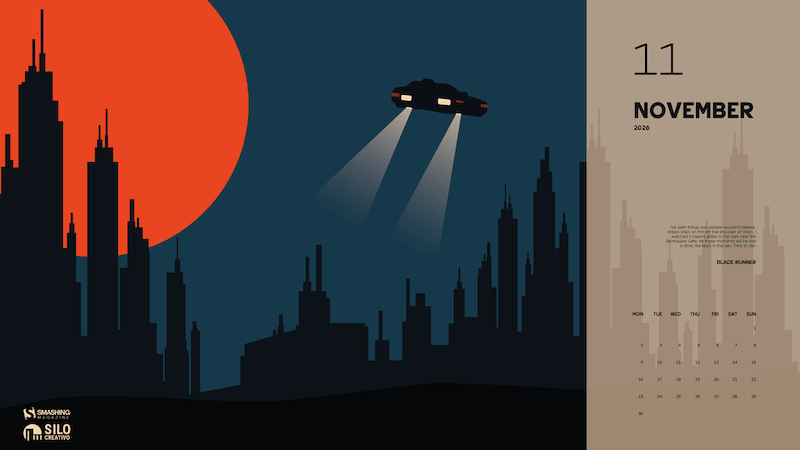
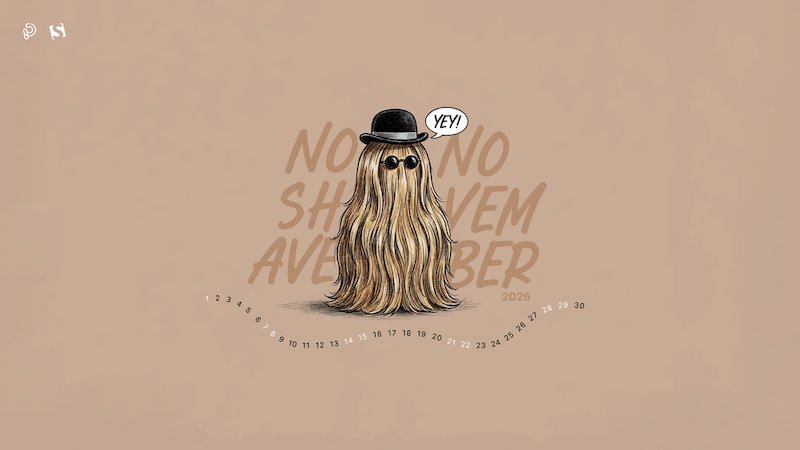
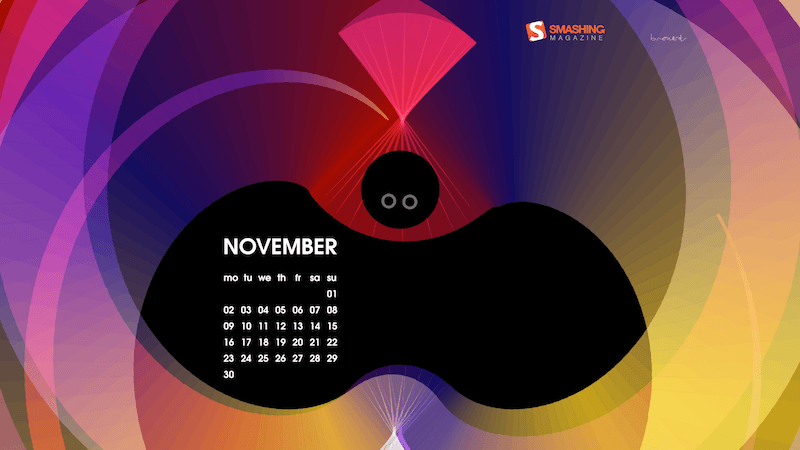
A Spark Of Color In November’s Gray (2026 Wallpapers Edition) November can feel rather gray in many parts of the world, so what better way to brighten the month than with some colorful inspiration? Our new collection of desktop wallpapers has you covered. Following our monthly tradition, which has been going on for more than 15 years already, the wallpapers in this post were designed by artists and designers from across the globe. All of them come in a variety of screen resolutions and can be downloaded for free. A huge thank-you to everyone who shared their creations with us — this post wouldn’t be possible without your wonderful support! If you would also like to get featured in one of our upcoming wallpapers posts, please don’t hesitate to join in. We are always looking for creative talent and can’t wait to see what you come up with! Happy November! You can click on every image to see a larger preview. We respect and carefully consider the ideas and motivation behind each and every artist’s work. This is why we give all artists the full freedom to explore their creativity and express emotions and experience through their works. This is also why the themes of the wallpapers weren’t anyhow influenced by us but rather designed from scratch by the artists themselves. From Spooky To Scruffy “Halloween may be officially over, but the real monster mash is just getting started on your face. This month, we swap the plastic vampire fangs for the ultimate terror: thirty days of completely uninhibited facial hair growth. Think of it as extended character cosplay. By week three, you won’t just be skipping your morning shave, you’ll be auditioning to play Cousin Itt in the next Addams Family reboot. Embrace the itch, dodge the hairbrushes, and let your chin go full ghoul. Who needs a costume when your jawline is the haunted forest?” — Designed by Predrag Kovacev from Serbia. preview with calendar: 320x480, 640x480, 800x480, 800x600, 1024x768, 1024x1024, 1152x864, 1280x720, 1280x800, 1280x960, 1280x1024, 1400x1050, 1440x900, 1600x1200, 1680x1050, 1680x1200, 1920x1080, 1920x1200, 1920x1440, 2560x1440 without calendar: 320x480, 640x480, 800x480, 800x600, 1024x768, 1024x1024, 1152x864, 1280x720, 1280x800, 1280x960, 1280x1024, 1400x1050, 1440x900, 1600x1200, 1680x1050, 1680x1200, 1920x1080, 1920x1200, 1920x1440, 2560x1440 One More Bat “While I was playing with parametric curves, I noticed a gap inside my drawing: it looked like a bat shadow. Bats are protected animals, not only during Halloween.” — Designed by Philippe Brouard from France. preview with calendar: 1024x768, 1366x768, 1600x1200, 1920x1080, 1920x1200, 1920x1440, 2560x1440, 2560x1600, 2880x1800, 3840x2160 without calendar: 1024x768, 1366x768, 1600x1200, 1920x1080, 1920x1200, 1920x1440, 2560x1440, 2560x1600, 2880x1800, 3840x2160 Lost In Time “All those moments will be lost in time, like tears in the rain. November is here, a transitional month leading into December, winter, and everything that entails. November reminds me of home, the warmth of being indoors and enjoying unique, unrepeatable moments, which brings to mind a fitting line from Blade Runner.” — Designed by Veronica Valenzuela from Spain. preview with calendar: 640x480, 800x480, 1024x768, 1280x720, 1280x800, 1440x900, 1600x1200, 1920x1080, 1920x1440, 2560x1440 without calendar: 640x480, 800x480, 1024x768, 1280x720, 1280x800, 1440x900, 1600x1200, 1920x1080, 1920x1440, 2560x1440 AI In 2027 “Let’s get ready for our shiny new AI 2027 Conference (online), with friendly, approachable experts showing how to set up AI-ready design systems, run AI-driven research, and design for trust in AI. Dec 1, 2026. Tickets are only €50. See you there?” — Designed by the Smashing Magazine Team. preview with calendar: 640x480, 800x480, 800x600, 1024x768, 1024x1024, 1152x864, 1280x720, 1280x800, 1280x960, 1280x1024, 1366x768, 1400x1050, 1440x900, 1600x1200, 1680x1050, 1680x1200, 1920x1080, 1920x1200, 1920x1440, 2560x1440, 3840x2160 without calendar: 640x480, 800x480, 800x600, 1024x768, 1024x1024, 1152x864, 1280x720, 1280x800, 1280x960, 1280x1024, 1366x768, 1400x1050, 1440x900, 1600x1200, 1680x1050, 1680x1200, 1920x1080, 1920x1200, 1920x1440, 2560x1440, 3840x2160 Be Proud Of Yourself “Be proud of yourself for how far you’ve come. You’ve handled things that once felt impossible.” — Designed by Hitesh Puri from India, Delhi. preview with calendar: 1024x1024, 1280x800, 1280x960, 1280x1024, 1400x1050, 1440x900, 1600x1200, 1680x1050, 1680x1200, 1920x1080, 1920x1200, 1920x1440, 2560x1440 without calendar: 1024x1024, 1280x800, 1280x960, 1280x1024, 1400x1050, 1440x900, 1600x1200, 1680x1050, 1680x1200, 1920x1080, 1920x1200, 1920x1440, 2560x1440 Candlelight November “In Lithuania, the first days of November belong to remembrance: families light candles on the graves of their loved ones and cemeteries across the country glow softly in the evening mist. I wanted a calm, warm wallpaper that turns your desktop into a small candle-lit corner, a quiet pause before the busy end of the year.” — Designed by Justas Arbatauskis from Lithuania. preview with calendar: 320x480, 640x480, 800x480, 800x600, 1024x768, 1024x1024, 1152x864, 1280x720, 1280x800, 1280x960, 1280x1024, 1366x768, 1400x1050, 1440x900, 1600x1200, 1680x1050, 1680x1200, 1920x1080, 1920x1200, 1920x1440, 2560x1440 without calendar: 320x480, 640x480, 800x480, 800x600, 1024x768, 1024x1024, 1152x864, 1280x720, 1280x800, 1280x960, 1280x1024, 1366x768, 1400x1050, 1440x900, 1600x1200, 1680x1050, 1680x1200, 1920x1080, 1920x1200, 1920x1440, 2560x1440 Colorful Autumn “Autumn can be dreary, especially in November, when rain starts pouring every day. We wanted to summon better days, so that’s how this colourful November calendar was created. Open your umbrella and let’s roll!” — Designed by PopArt Studio from Serbia. preview without calendar: 320x480, 640x480, 800x480, 800x600, 1024x768, 1024x1024, 1152x864, 1280x720, 1280x800, 1280x960, 1280x1024, 1366x768, 1400x1050, 1440x900, 1600x1200, 1680x1050, 1680x1200, 1920x1080, 1920x1200, 1920x1440, 2560x1440 Falling Into November “Celebrate the heart of fall with cozy colors, crisp leaves, and the gentle warmth that only November brings.” — Designed by Libra Fire from Serbia. preview without calendar: 320x480, 640x480, 800x480, 800x600, 1024x768, 1024x1024, 1152x864, 1280x720, 1280x800, 1280x960, 1280x1024, 1400x1050, 1440x900, 1600x1200, 1680x1050, 1920x1080, 1920x1200, 1920x1440, 2560x1440 Winter Is Here Designed by Ricardo Gimenes from Spain. preview without calendar: 640x480, 800x480, 800x600, 1024x768, 1024x1024, 1152x864, 1280x720, 1280x800, 1280x960, 1280x1024, 1366x768, 1400x1050, 1440x900, 1600x1200, 1680x1050, 1680x1200, 1920x1080, 1920x1200, 1920x1440, 2560x1440, 3840x2160 Anbani “Anbani means alphabet in Georgian. The letters that grow on that tree are the Georgian alphabet. It’s very unique!” — Designed by Vlad Gerasimov from Georgia. preview without calendar: 800x480, 800x600, 1024x600, 1024x768, 1152x864, 1280x720, 1280x800, 1280x960, 1280x1024, 1366x768, 1400x1050, 1440x900, 1440x960, 1600x900, 1600x1200, 1680x1050, 1680x1200, 1920x1080, 1920x1200, 1920x1440, 2560x1440, 2560x1600, 2880x1800, 3072x1920, 3840x2160, 5120x2880 Outer Space “We were inspired by nature around us and the universe above us, so we created an out-of-this-world calendar. Now, let us all stop for a second and contemplate on preserving our forests, let us send birds of passage off to warmer places, and let us think to ourselves — if not on Earth, could we find a home somewhere else in outer space?” — Designed by PopArt Studio from Serbia. preview without calendar: 320x480, 640x480, 800x480, 800x600, 1024x768, 1024x1024, 1152x864, 1280x720, 1280x800, 1280x960, 1280x1024, 1366x768, 1400x1050, 1440x900, 1600x1200, 1680x1050, 1680x1200, 1920x1080, 1920x1200, 1920x1440, 2560x1440 Time To Give Thanks Designed by Glynnis Owen from Australia. preview without calendar: 320x480, 640x480, 800x600, 1024x768, 1152x864, 1280x720, 1280x960, 1600x1200, 1920x1080, 1920x1440, 2560x1440 A Gentleman’s November Designed by Cedric Bloem from Belgium. preview without calendar: 320x480, 640x480, 800x480, 800x600, 1024x768, 1024x1024, 1152x864, 1280x720, 1280x800, 1280x960, 1280x1024, 1400x1050, 1440x900, 1600x1200, 1680x1050, 1680x1200, 1920x1080, 1920x1200, 1920x1440, 2560x1440 Bug Designed by Ricardo Gimenes from Spain. preview without calendar: 640x480, 800x480, 800x600, 1024x768, 1024x1024, 1152x864, 1280x720, 1280x800, 1280x960, 1280x1024, 1366x768, 1400x1050, 1440x900, 1600x1200, 1680x1050, 1680x1200, 1920x1080, 1920x1200, 1920x1440, 2560x1440, 3840x2160 International Civil Aviation Day “On December 7, we mark International Civil Aviation Day, celebrating those who prove day by day that the sky really is the limit. As the engine of global connectivity, civil aviation is now, more than ever, a symbol of social and economic progress and a vehicle of international understanding. This monthly calendar is our sign of gratitude to those who dedicate their lives to enabling everyone to reach their dreams.” — Designed by PopArt Studio from Serbia. preview without calendar: 320x480, 640x480, 800x480, 800x600, 1024x768, 1024x1024, 1152x864, 1280x720, 1280x800, 1280x960, 1280x1024, 1400x1050, 1440x900, 1600x1200, 1680x1050, 1680x1200, 1920x1080, 1920x1200, 1920x1440, 2560x1440 The Kind Soul “Kindness drives humanity. Be kind. Be humble. Be humane. Be the best of yourself!” — Designed by Color Mean Creative Studio from Dubai. preview without calendar: 320x480, 640x480, 800x480, 800x600, 1024x768, 1024x1024, 1152x864, 1280x720, 1280x800, 1280x960, 1280x1024, 1366x768, 1400x1050, 1440x900, 1600x1200, 1680x1050, 1680x1200, 1920x1080, 1920x1200, 1920x1440, 2560x1440 November Nights On Mountains “Those chill November nights when you see mountain tops covered with the first snow sparkling in the moonlight.” — Designed by Jovana Djokic from Serbia. preview without calendar: 320x480, 640x480, 800x480, 800x600, 1024x768, 1024x1024, 1152x864, 1280x720, 1280x800, 1280x1024, 1366x768, 1400x1050, 1440x900, 1600x1200, 1680x1050, 1680x1200, 1920x1080, 1920x1200, 1920x1440, 2560x1440 Red Leaves Designed by Evacomics from Singapore. preview without calendar: 320x480, 1024x768, 1280x800, 1280x1024, 1440x900, 1920x1080, 2560x1440 Me And The Key Three Designed by Bart Bonte from Belgium. preview without calendar: 640x480, 800x480, 800x600, 1024x768, 1024x1024, 1152x864, 1280x720, 1280x800, 1280x960, 1280x1024, 1400x1050, 1440x900, 1600x1200, 1680x1050, 1680x1200, 1920x1080, 1920x1200, 1920x1440, 2560x1440 Moonlight Bats “I designed some Halloween characters and then this idea came to my mind — a bat family hanging around in the moonlight. A cute and scary mood is just perfect for autumn.” — Designed by Carmen Eisendle from Germany. preview without calendar: 640x480, 800x600, 1024x768, 1280x800, 1280x960, 1440x900, 1600x1200, 1680x1050, 1680x1260, 1920x1200, 1920x1440, 2560x1440, 2560x1600 Mushroom Season “It is autumn! It is raining and thus
 it is mushroom season! It is the perfect moment to go to the forest and get the best mushrooms to do the best recipe.” — Designed by Verónica Valenzuela from Spain. preview without calendar: 800x480, 1024x768, 1152x864, 1280x800, 1280x960, 1440x900, 1680x1200, 1920x1080, 2560x1440 Go To Japan “November is the perfect month to go to Japan. Autumn is beautiful with its brown colors. Let’s enjoy it!” — Designed by Veronica Valenzuela from Spain. preview without calendar: 640x480, 800x480, 1024x768, 1280x720, 1280x800, 1440x900, 1600x1200, 1920x1080, 1920x1440, 2560x1440 Tempestuous November “By the end of autumn, ferocious Poseidon will part from tinted clouds and timid breeze. After this uneven clash, the sky once more becomes pellucid just in time for imminent luminous snow.” — Designed by Ana Masnikosa from Belgrade, Serbia. preview without calendar: 320x480, 640x480, 800x480, 800x600, 1024x768, 1024x1024, 1152x864, 1280x720, 1280x800, 1280x960, 1280x1024, 1400x1050, 1440x900, 1600x1200, 1680x1050, 1680x1200, 1920x1080, 1920x1200, 1920x1440, 2560x1440 Crown Me Designed by Ricardo Gimenes from Spain. preview without calendar: 640x480, 800x480, 800x600, 1024x768, 1024x1024, 1152x864, 1280x720, 1280x800, 1280x960, 1280x1024, 1366x768, 1400x1050, 1440x900, 1600x1200, 1680x1050, 1680x1200, 1920x1080, 1920x1200, 1920x1440, 2560x1440, 3840x2160 Deer Fall, I Love You Designed by Maria Porter from the United States. preview without calendar: 320x480, 800x600, 1280x800, 1280x1024, 1440x900, 1680x1050, 2560x1440 Don’t Let Gray Win “Let’s take extra care of colors during the autumn months. November might be gray and rainy. Outside. Don’t let it inside. Take a good book, prepare a hot ginger tea, and cover your knees with a bright woolen plaid.” - Designed by Tartanify from France. preview without calendar: 1280x720, 1440x900, 1440x1024, 2560x1440, 2880x1800, 2880x2048 Little Mademoiselle “Black-and-white drawing of a little girl.” Designed by Jelena Tơekulajeva from Estonia. preview without calendar: 320x480, 1024x1024, 1280x800, 1440x900, 1680x1050 Welcome Home Dear Winter “The smell of winter is lingering in the air. The time to be home! Winter reminds us of good food, of the warmth, the touch of a friendly hand, and a talk beside the fire. Keep calm and let us welcome winter.” — Designed by Acodez IT Solutions from India. preview without calendar: 640x480, 800x480, 800x600, 1024x768, 1024x1024, 1152x864, 1280x720, 1280x960, 1280x1024, 1366x768, 1400x1050, 1440x900, 1600x1200, 1680x1050, 1680x1200, 1920x1080, 1920x1200, 1920x1440, 2560x1440 First Icicles Of The Coming Winter Designed by Aleksandra Sivoronova from Latvia. preview without calendar: 1280x800, 1440x900, 1680x1050, 1920x1080, 2560x1440 Autumn Choir Designed by Hatchers from Ukraine / China. preview without calendar: 1024x768, 1152x864, 1280x720, 1280x800, 1280x960, 1400x1050, 1440x900, 1600x1200, 1680x1050, 1680x1200, 1920x1080, 1920x1200, 1920x1440, 2560x1440 Get Featured Next Month Feeling inspired? We’ll publish the December wallpapers on November 30, so if you’d like to be part of the collection, please don’t hesitate to submit your design. We are already looking forward to it! https://smashingmagazine.com/2026/10/desktop-wallpaper-calendars-november-2026/ #november #gray #designed #halloween #lost #bat #addamsfamily #cousinitt #rss #feeds #linksharing #qwibbit
#november #gray #designed #halloween #lost
WebCraft
WebCraft 1d

The Frankenstein Table A super scary way to go about tables using other layout techniques, like CSS Grid. The Frankenstein Table originally handwritten and published with love on CSS-Tricks. You should really get the newsletter as well. https://css-tricks.com/the-frankenstein-table/ #frankensteintable #cssgrid #rss #feeds #linksharing #qwibbit
#frankensteintable #cssgrid #rss #feeds #linksharing
WebCraft
WebCraft 3d

What’s !important #19: CSS Refraction Effects, Scroll State Queries, @custom-media, and More We’re back! Don't worry, this isn’t a trick (despite what our name suggests!). However, due to the hiatus, we're also a little behind. That’s why this issue of What’s !important is absolutely stacked. All killer, no filler. Here's what you missed. What’s !important #19: CSS Refraction Effects, Scroll State Queries, @custom-media, and More originally handwritten and published with love on CSS-Tricks. You should really get the newsletter as well. https://css-tricks.com/whats-important-19/ #rss #feeds #linksharing #qwibbit
#19 #rss #feeds #linksharing #qwibbit
WebCraft
WebCraft 4d

CSS-Tricks has a new owner! Yes, I've got the keys to the castle, so to speak. And, even after 12 years of working on the site, I'll admit I'm a little overwhelmed and nervous about that. CSS-Tricks has a new owner! originally handwritten and published with love on CSS-Tricks. You should really get the newsletter as well. https://css-tricks.com/css-tricks-has-a-new-owner/ #newowner #rss #feeds #linksharing #qwibbit
#newowner #rss #feeds #linksharing #qwibbit
WebCraft
WebCraft 7d

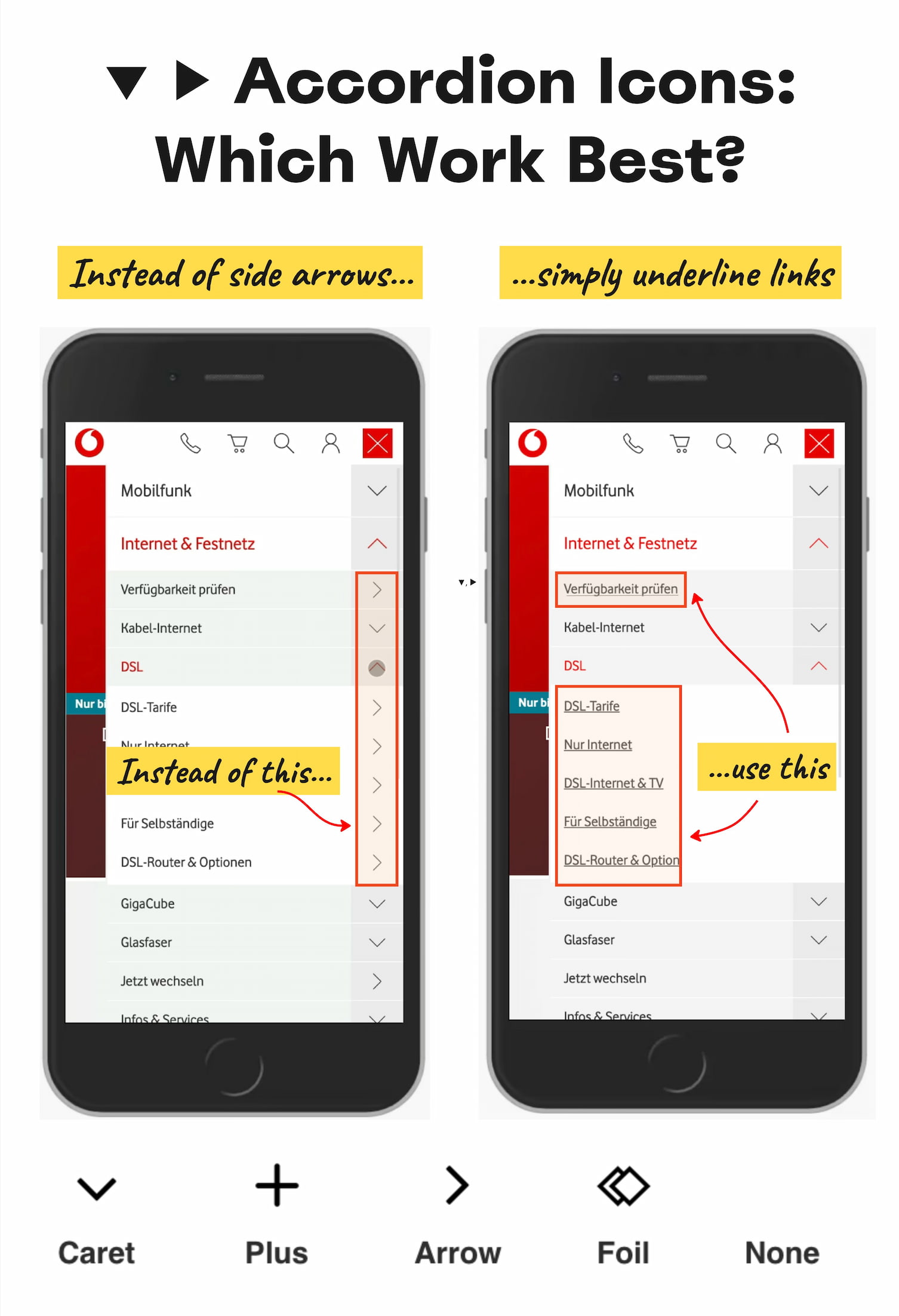
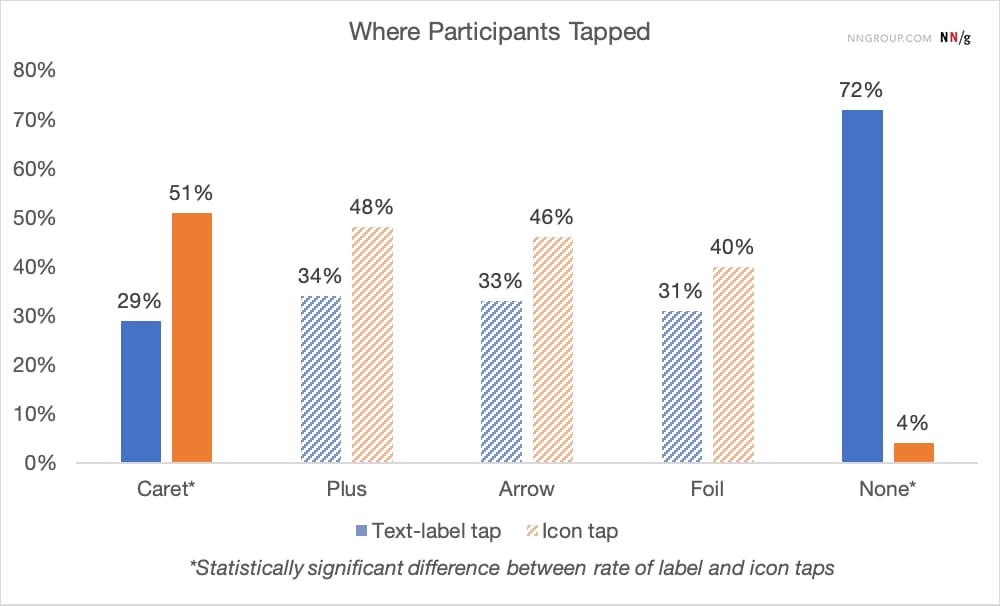
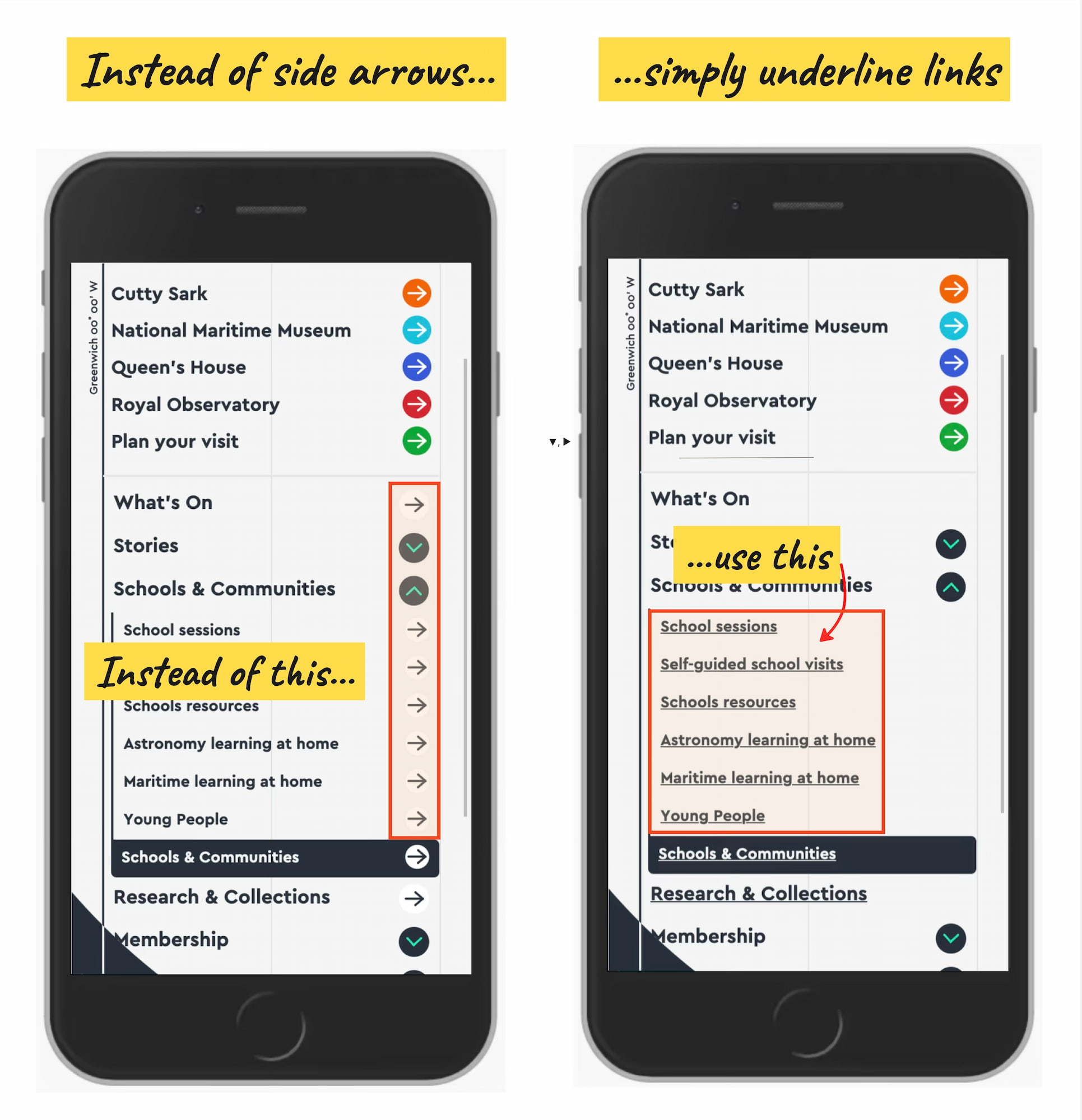
Accordion Icons: Which Work Best? So what icon is the most reliable to show expansion and collapsing for accordions? Is there really any noticeable difference between carets, chevrons, arrows, and triangles? Well, research shows that there is some difference indeed. But what’s more interesting is that split menus are harmful, why it's better to not have icons and text labels link to different actions, and why the caret is the safest icon choice. Let’s dive in! No Icon = Opening The Page The findings aren’t very surprising: without any icon in use, users expect that tapping on the menu item would take them directly to a new page. Users often struggle with custom icons as they don't clearly signal that they'll open an accordion. And people tend to tap fairly equally on the icon and on the label for most icons. Many designs (like the one below) tend to slightly overcomplicate things by adding arrows and carets pointing everywhere, depending on the state of the accordion. But typically we don't need to use an arrow to indicate a link to the category. The rule of thumb is very simple: if it’s a link, the easiest and most effective way is to simply underline it — without any arrow, caret, or other icon. Perhaps it’s not particularly exciting, but it works flawlessly every single time. Confusing Behavior With Arrows ▶ and Split Buttons Using a right-facing arrow icon ▶ isn’t associated with an expectation of going directly to a new page. And having the same icon pointing down â–Œ doesn’t necessarily imply that an accordion is going to open on tap/click. It’s a good idea to avoid split buttons for accordions — where the text label links directly to a page, but the icon opens the accordion. Instead, it’s much more reliable to allow users to tap on a main category and expose the menu; and to access the category page, we add a link to it inside the menu. Plus +/− and Arrows ↓/↑ Are Understood, But Can Be Misunderstood For accordions, we typically use +/− or arrows ↓/↑ to signal expanded and collapsed states, and typically it works well. However, both have many different interpretations. Plus + can mean anything from saving for later to adding to cart to zooming in, and can be particularly confusing for multi-level navigation, with many levels open at the same time. Arrows ↓/↑ can mean scrolling or sliding or finding the next match, but also a jump to a particular portion of a page. Both plus and arrows are well-understood and work, but depending on the design, can be confusing — mostly because they are overloaded. Wrapping Up The safe choice is to use the caret/triangle pointing down â–Œ by default, and change it to a caret pointing up or a caret pointing sideways ▶ on interaction. If you need an alternative, then +/- typically work well, too. But we certainly don’t need any further icons or arrows to indicate where the links go. The same goes for split menus, which often produce more mistakes than help. Instead, we have one button or dropdown that does exactly one thing — shows all options and allows users to drill down. And if you need a direct link, we link the title directly to the page and underline it. More often than not, simpler is better. Editor’s Note We hope you’ll find these wonderful projects useful — put together by wonderful creators. A friendly shout-out to everyone sharing their work with folks to use and learn from! That’s one of the reasons why we truly love the web and people building and designing it. 💚 At Smashing, we love the web. That’s why we publish articles and books, run workshops and events around everything web. We love seeing what we all can do to make the web more accessible and usable. We also love organizing and attending online events — with friendly discounts for large groups (5+ attendees) and schools and students. Interested? Just send us an email and we’ll sort it out! Multiple live sessions (2.5h each), 09:00 – 11:30 AM PT (18:00 – 20:30 CET) With workshop video recordings & slides, Free video preview (2.5h) Jump to all workshops → https://smashingmagazine.com/2026/10/accordion-icons-which-work-best/ #icon #arrows #accordion #page #split #splitbuttons #well #rss #feeds #linksharing #qwibbit

#icon #arrows #accordion #page #split
WebCraft
WebCraft 10d

Embracing Playful Imperfection With The CSS `random()` Function In design, we love spending hours obsessing over consistency, grids, and alignment. But when I heard that the native CSS random() function landed in Safari and is rolling out in Chrome 156, I started wondering: where does randomness actually make sense on the web? Is it something we want in our design system? To find out, I did what I always do in doubt: I built a bunch of playful CodePen demos exploring organic typography, bouncing letters, splayed cards, and a punk fanzine. As someone who loves building design systems and tinkering with CSS architecture, a big part of my day job revolves around control. We set up spacing scales, lock down typography, set up color tokens, and make sure everything aligns on a grid. Consistency is usually our bread and butter as design engineers and a proud badge of skill when creating design systems. If a card suddenly jumps 20 pixels to the left on a refresh, it’s not creative expression; it’s a bug that the project manager will log. So when I first heard that the native random() function from the CSS Values and Units Level 5 spec was shipped in Safari, and is currently rolling out in Chrome 156 (with positive signals from Mozilla on Firefox as well), my first reaction was: that’s pretty cool! And my second reaction was: wait... where would I actually use this without making a mess? How can I convince designers that random might be a good idea for a design system? Because let’s be honest: why on earth would we want randomness in our stylesheets when we’ve spent the last decade trying to make the web more predictable? Even when using flexbox or fluid typography, we’re still trying to make things as aligned and uniform as possible. The Charm Of Things Not Being 100% Straight If you step away from the browser for a second and look at physical things around you, nothing is ever truly uniform. Take an old letterpress print: the ink bleeds slightly into the paper grain, some letters have a microscopic tilt, and the baseline isn’t always that straight. Or think about a deck of Polaroid photos dropped on a coffee table; those photos aren’t perfect, probably not straight either. Or what about lights flickering in a street at night? That little bit of analog messiness is what makes things feel alive, organic, and human. On the web, we’ve gotten so good at pixel perfection that sometimes our interfaces end up feeling a bit sterile. We notice this even more now with rapidly created designs by an unguided LLM; we usually end up with the same sort of design we had 10 years ago. Everything is squared off, aligned, neat. It works, but frankly, it does get a bit boring. Randomness in CSS doesn’t have to mean throwing your design system out the window. It’s about little imperfections and playfulness. Maybe let’s even call it fun. To see what this actually looks like in practice, I spent a few hours tinkering in CodePen. The demos might feel a bit isolated, but I’m sure that many designers could make the best of this controlled chaos. But before we look at those demos, let’s take a look at the syntax. How The CSS random() Function Works The random() function is specified in CSS Values and Units Module Level 5. It generates a pseudo-random value inside your CSS without needing JavaScript or a build-time Sass loop. The formal specification looks like this: random( ?, , [, by ]? ) In practice, and across current browser implementations, you can just write comma-separated arguments: /* Random angle between -3deg and 3deg */ rotate: random(-3deg, 3deg); /* Random width between 20px and 80px in steps of 10px */ inline-size: random(20px, 80px, 10px); /* Random animation duration */ animation-duration: random(1.5s, 3s, 0.2s); Matching Units It won’t be a shocker for most people, but I thought I should at least mention that your minimum and maximum bounds must share the exact same unit type. The CSS parser needs to know what dimension it’s dealing with. You can use lengths, angles, time, percentages, or plain unitless numbers: /* Good: both are angles */ rotate: random(-4deg, 4deg); /* Good: both are unitless numbers */ opacity: random(0.3, 1); /* Nope! You cannot mix units */ inline-size: random(2rem, 100px); /* Invalid */ If you ever need to combine units, you’ll have to reach for calc() inside the arguments so each side resolves properly. Stepping And Rounding The optional third argument is the step size. If you don’t add it, the browser picks from a continuous range. But if you provide a step, it rounds the random value to discrete increments: /* Only produces 0px, 15px, 30px, 45px, or 60px */ top: random(0px, 60px, 15px); This can be helpful in cases where you want things to jump around a bit, but you still want them to land on your pre-defined grid. Caching Keys: Keeping Things In Sync Normally, every time random() is evaluated on a property, it creates an independent random value. But there could be an example where you create a box that sets inline-size and block-size at random, but at the same time you need them to match so the element stays a perfect square. That’s where the caching key comes in: .card-thumbnail { /* Both properties share the key --square-size */ inline-size: random(--square-size, 60px, 120px); block-size: random(--square-size, 60px, 120px); } Because both declarations reference --square-size on that element, the browser engine shares the same computed value between them. To see this in action, I created a little example. In the top row, the tiles have uncached dimensions, which distorts each tile into an unpredictable, mismatched rectangle. In the bottom row, both inline-size and block-size share --square-size, guaranteeing that each tile remains a pristine 1:1 square. Refresh the CodePen a couple of times and notice the bottom cards keeping the same randomness: See the Pen Uncached vs cached random() [forked] by @utilitybend. /* Uncached: width and height resolve independently, creating random rectangles */ .tile-uncached { inline-size: random(4.2rem, 8.5rem); block-size: random(4.2rem, 8.5rem); rotate: random(-3.5deg, 3.5deg); } /* Cached: shared key guarantees a clean 1:1 square */ .tile-cached { inline-size: random(--square-size, 4.2rem, 8.5rem); block-size: random(--square-size, 4.2rem, 8.5rem); rotate: random(--tilt, -3.5deg, 3.5deg); } Browser Support And Progressive Enhancement Where can you test this today? WebKit / Safari: Safari was the first to land support. Chrome / Edge: Shipped and rolling out right now with Chrome 156. Firefox: Positive signals on the standards track, so hopefully won’t be too far behind. Because we’re still in the rollout phase, you’ll want to wrap your experiments in @supports: /* Baseline for all browsers */ .badge { rotate: 0deg; } /* Enhanced for browsers with random() */ @supports (rotate: random(-2deg, 2deg)) { .badge { rotate: random(-2.5deg, 2.5deg); } } The Future random-item Function There’s also another function in the spec called random-item(). While random() handles numerical ranges, random-item() lets you pick from a list of predefined tokens or keywords: /* Picking a random color from your palette */ background-color: random-item(--seed, oklch(75% 0.18 150), oklch(65% 0.22 350), oklch(85% 0.16 85)); This can be handy to randomise from a set of design tokens. This one does not have any browser support at the moment, but it certainly is something to look forward to. And now for the practical part. Demo 1: Let’s just randomize letters When I started playing with the feature, I was also doing some typography tricks with animations. So that’s where my first thought went: Typography! What if we just add a tiny bit of imperfection to a word? Think of vintage book covers. The letters aren’t misaligned by miles, but they have small imperfections. See the Pen Imperfection random() [forked] by @utilitybend. Here is the CSS powering the letters: @layer demo { .char { display: inline-block; /* A tiny tilt */ rotate: random(-2.8deg, 2.8deg); /* A micro nudge on X and Y */ translate: random(-1.5px, 1.5px) random(-2.8px, 2.8px); /* Very subtle ink variance */ opacity: random(0.8, 1, 0.02); transition-property: rotate, translate, opacity; transition-duration: 0.3s; transition-timing-function: cubic-bezier(0.34, 1.56, 0.64, 1); } /* Snap straight on hover */ .word:hover .char { rotate: 0deg; translate: 0 0; opacity: 1; } } I also added a little hover effect. While you’re reading, the word feels playful. But the second you hover over it, every character snaps back. Please Don’t Break The Screen Reader One quick accessibility warning here: If you break a word into separate elements so you can style each letter, screen readers will often read it out as individual characters: “i - m - p - e - r - f - e - c - t - i - o - n”, or pause awkwardly between each one. That’s a terrible user experience. Always hide the visual spans from assistive tech and provide the full word:

i m p e r f e c t i o n

Screen reader users get the clean text, and sighted users get the fun visual quirks. Demo 2: Animating The Letters: Pure Procedural Bounce Once I had those letters sitting there with their little tilts, I couldn’t resist: what if we animated it? I started tinkering with a bounce keyframe. I was just goofing around, but the end result gave me a little smile. If you animate every letter with the exact same timing, you get that clean sine wave we’ve all seen before. But if every letter gets its own jump height, its own duration, and its own landing squash, suddenly the word looks like a bunch of little characters jumping around on a trampoline. See the Pen Bouncy imperfection with CSS random() [forked] by @utilitybend. Here is how the bounce parameters are wired up: @layer demo { .char { display: inline-block; transform-origin: center bottom; /* Procedural bounce variables */ --jump: random(-35px, -55px, 2px); --tilt: random(-8deg, 8deg, 0.5deg); --dur: random(1s, 1.2s, 0.1s); --delay: random(-3s, 0s, 0.1s); --rebound-squash: random(1.08, 1.18, 0.02); animation: letter-bounce var(--dur) linear var(--delay) infinite; } @keyframes letter-bounce { /* apex */ 0% { translate: 0 var(--jump); rotate: var(--tilt); scale: 1 1; animation-timing-function: cubic-bezier(0.65, 0.05, 0.85, 0.35); } /* touchdown */ 44% { translate: 0 0; rotate: calc(var(--tilt) * 0.2); scale: 0.96 1.05; animation-timing-function: ease-out; } /* squash */ 52% { translate: 0 0; rotate: 0deg; scale: var(--rebound-squash) calc(2 - var(--rebound-squash)); animation-timing-function: cubic-bezier(0.2, 0.8, 0.2, 1); } /* back up */ 62% { translate: 0 calc(var(--jump) * 0.2); rotate: calc(var(--tilt) * -0.4); scale: 0.98 1.03; animation-timing-function: cubic-bezier(0.15, 0.85, 0.35, 1); } 100% { translate: 0 var(--jump); rotate: var(--tilt); scale: 1 1; } } } Notice the negative animation delay (--delay: random(-3s, 0s)). If you set a positive delay, the letters sit frozen on page load, waiting for their timers to expire before jumping. By using a negative delay, the browser pretends the animation has already been running for a few seconds. The moment the page loads, every letter is already bouncing at its own rhythm. Demo 3: Tilting Cards And Dynamic Shadows We’ve built cards. Lots of cards. So many cards... Portfolio grids, blog summaries, feature lists. And most of the time, they sit in three or four neat, boring columns. For dashboards, that’s exactly what you want. But if you’re building a lifestyle portfolio, a children’s website, or a collection of vacation photos, we can be a bit more playful. In the following example, I did just that: See the Pen Random card tilt [forked] by @utilitybend. Here’s how I put that together: @layer demo { .card { /* A gentle random tilt and vertical shift */ --tilt: random(-3.5deg, 3.5deg); --shift-y: random(-6px, 6px); rotate: var(--tilt); translate: 0 var(--shift-y); /* Shadow follows the tilt angle! */ box-shadow: calc(var(--tilt) * 1.5) calc(10px + abs(var(--tilt) * 1px)) 28px oklch(20% 0.02 260 / 0.07); transition: rotate 0.4s cubic-bezier(0.2, 0.8, 0.2, 1), translate 0.4s cubic-bezier(0.2, 0.8, 0.2, 1), box-shadow 0.4s ease; /* Straighten up on hover or keyboard focus */ &:hover, &:has(.button:focus-visible) { rotate: 0deg; translate: 0 -10px; z-index: 10; box-shadow: 0 20px 44px oklch(20% 0.02 260 / 0.12), 0 2px 6px oklch(20% 0.02 260 / 0.04); } } } In the example, playing around with the shadow was a fun experiment. I will probably try more effects with that in the future. Demo 4: The Splayed Deck With sibling-index and scroll Here is where modern CSS features start getting really interesting. In the previous demo with tilting cards, we used pure randomness. But what if you have a stack of cards that needs to fan out across the screen as you scroll? In this example, I decided to use math for the structure and randomness for the human imperfection. See the Pen Scroll drivin animations with random() tilted cards [forked] by @utilitybend. Here is the setup: @layer demo { .deck-card { position: absolute; /* Mathematical fan base via sibling-index() (centered around middle card) */ --elevation: sibling-index(); --base-rot: calc((sibling-index() - (sibling-count() + 1) / 2) * 12deg); --base-x: calc((sibling-index() - (sibling-count() + 1) / 2) * 60px); --jitter-rot: random(-3.5deg, 3.5deg); --jitter-y: random(-12px, 12px); --jitter-x: random(-8px, 8px); transform-origin: center 130%; /* SDA */ animation: splay-fan linear both; animation-timeline: scroll(root); animation-range: 0% 80%; transition: scale 0.3s cubic-bezier(0.2, 0.8, 0.2, 1); &:hover { scale: 1.05; /* Hovered item on top */ z-index: calc(sibling-count() + 1); } } @keyframes splay-fan { from { rotate: 0deg; translate: 0 0; box-shadow: 0 1px 3px oklch(20% 0.02 260 / 0.1), 0 2px 8px oklch(20% 0.02 260 / 0.07); } to { rotate: calc(var(--base-rot) + var(--jitter-rot)); translate: calc(var(--base-x) + var(--jitter-x)) var(--jitter-y); /* Splayed: 1. Sharp inter-card contact edge shadow 2. Elevated atmospheric shadow scaled realistically by sibling-index() */ box-shadow: 0 calc(1px + var(--elevation) * 0.6px) 4px oklch(20% 0.02 260 / 0.1), calc(var(--base-x) * 0.15) calc(10px + var(--elevation) * 5px) calc(18px + var(--elevation) * 7px) oklch(20% 0.02 260 / 0.13); } } } Look at how cleanly this works: sibling-index() calculates the mathematical fan so cards spread out evenly around the center card, and scales --elevation so cards higher in the stack cast wider shadows. calc((sibling-index() - (sibling-count() + 1) / 2) * 12deg); makes sure the amount of cards doesn’t matter; they each will rotate the same 12deg amount. random() adds the slight wobble you'd get if a person dealt the cards by hand. animation-timeline: scroll(root) ties the entire fan and shadow transition to the scrollbar. Demo 5: Random Velocity If you’ve ever looked at brutalist or high-end fashion websites, you’ve probably seen horizontal marquee text drifting across the screen as you scroll down the page. Usually, you see developers creating classes like .drift-slow, .drift-fast, .drift-reverse, or using a hefty JavaScript scroll listener to compute transforms. With random() and a tiny bit of math, we can get procedural drift speeds in just a few lines: See the Pen Random() velocity scroll animation [forked] by @utilitybend. Here is the CSS: @layer demo { .drift-line { white-space: nowrap; /* Alternate direction between rows using math parity */ --direction: calc(pow(-1, sibling-index())); /* Velocity distance */ --travel: random(15%, 44%); /* Tied to page scroll */ animation: tectonic-glide linear both; animation-timeline: scroll(root); animation-range: entry 0% cover 100%; } @keyframes tectonic-glide { from { translate: calc(var(--direction) * -1 * var(--travel)) 0; } to { translate: calc(var(--direction) * var(--travel)) 0; } } } calc(pow(-1, sibling-index())) give https://smashingmagazine.com/2026/10/embracing-playful-imperfection-css-random-function/ #css #function #playful #cssvalues #things #chrome #safari #straight #randomness #even #rss #feeds #linksharing #qwibbit
#css #function #playful #cssvalues #things
WebCraft
WebCraft 14d

Is Your Organization Messing Up AI Adoption? The way I see most organizations roll out AI feels more like a farce than a strategy. If it were turned into a movie, reviewers would say it was unbelievable. Nobody could be that stupid. Yet here we are. And what makes it all the more frustrating is that we have been here before. Back in 2014, I wrote a book for Smashing Magazine called Digital Adaptation, looking at the mistakes being made in how organizations were approaching digital transformation and what they should be doing instead. The similarities between then and now are striking. So in this post, I want to look back at Digital Adaptation and see how the lessons in that book apply to the AI era and what we can learn from the past to help us navigate the challenges of AI today. The biggest mistake, both then and now, is approaching each as a technological challenge. It’s About People, Not Technology Sure, both digital transformation and AI are technological advances, and yes, some level of technological implementation is required. But that is the tip of a very large iceberg. Back in the midst of the digital transformation era, IT departments were rolling out CMSs, CRM systems, intranets, and so on. Meanwhile, on the customer-facing side, organizations were rolling out websites, apps, and personalization. But they were putting almost no emphasis on how people were going to use these systems. Internal systems were hard to use, and customers either didn’t care what was being built or wanted something else entirely. The same is happening with AI. Senior management are buying into the hype, and IT teams are rolling out Copilot Studio licenses company-wide and considering the job done. Sure, there is a bit of organization-wide generic training, but that’s about it. Just like before, staff are left wondering what to do with these new systems and feeling under pressure to use them and deliver results. Organizations need to recognize that AI is a cultural shift as much as a technology, and that shift has enormous implications for their staff. After all, this time around, it is even worse, because this time, staff fear for their jobs. They have read the same headlines that you have, and no amount of promises from senior management is going to make them feel any better. Why Would Staff Want To Adopt AI? I mean, think about it from a staff member’s point of view. AI offers them very little personally, even setting aside the fact that management may be intending to use it to replace them. The main reason senior management are excited about AI is that it provides additional productivity. People can do more in less time. But that does not benefit staff. They are still required to work 9 to 5, but now they are expected to do more in the same time. They don’t get any time back, and they don’t get paid more, so why would they embrace AI? So before asking staff to embrace AI, organizations need to ask themselves how they intend to motivate them to do so. One strategy is to help staff identify the parts of their job they hate and how AI can help them do those tasks more quickly and less painfully. People tend to be a lot more receptive to change when it is presented as an opportunity to improve their working lives. But, that should just be the beginning. Organizations may need to consider providing incentives for staff to adopt AI in terms of career progression, compensation, or shorter working hours. Staff Need Time And Support To Adopt AI Also, adopting AI is not a simple task. It involves challenging every working practice they have built up over (in some cases) decades. All of that procedural knowledge has to be rebuilt. That is a lot to ask of anybody in even the best of circumstances, and most employees do not find themselves in the best of circumstances. Most are overworked and struggling to stay on top of their to-do lists. They don’t have time to sit down, learn a new tool, and figure out how it fits into their workflow. That doesn’t just take time. It also takes a lot of consideration and experimentation. It is not enough to just send a member of staff on a training course and expect them to be able to use AI to its full potential. At a minimum, staff need training specific to their roles, such as the AI training I provide to UX teams. But organizations should be going even further. They need to develop sophisticated training programs that help staff from different departments understand how to use AI in their specific roles. They need ongoing support and the time to experiment with AI to find the best ways to use it. But formal training will only take you so far. In my experience, the most effective support comes from colleagues, which is why I would start with the enthusiasts rather than the resisters. Every organization has a handful of people who are already experimenting with AI, often without anybody asking them to. Bring those people together, give them the time and space to share what is working for them, and let their enthusiasm spread to everyone else. I saw this work during the digital transformation era too. In Digital Adaptation, I described an internal conference where staff showed their colleagues what they had built, and it did more for adoption than any memo from the top ever could. People are far more likely to try something when they see a colleague in a similar role using it successfully than when they are told to by senior management. Rather than trying to win over the most resistant staff first, organizations should find the people already experimenting with AI, give them time to share what they have learned, and let social proof do the heavy lifting. Unfortunately, experimentation comes with a big downside
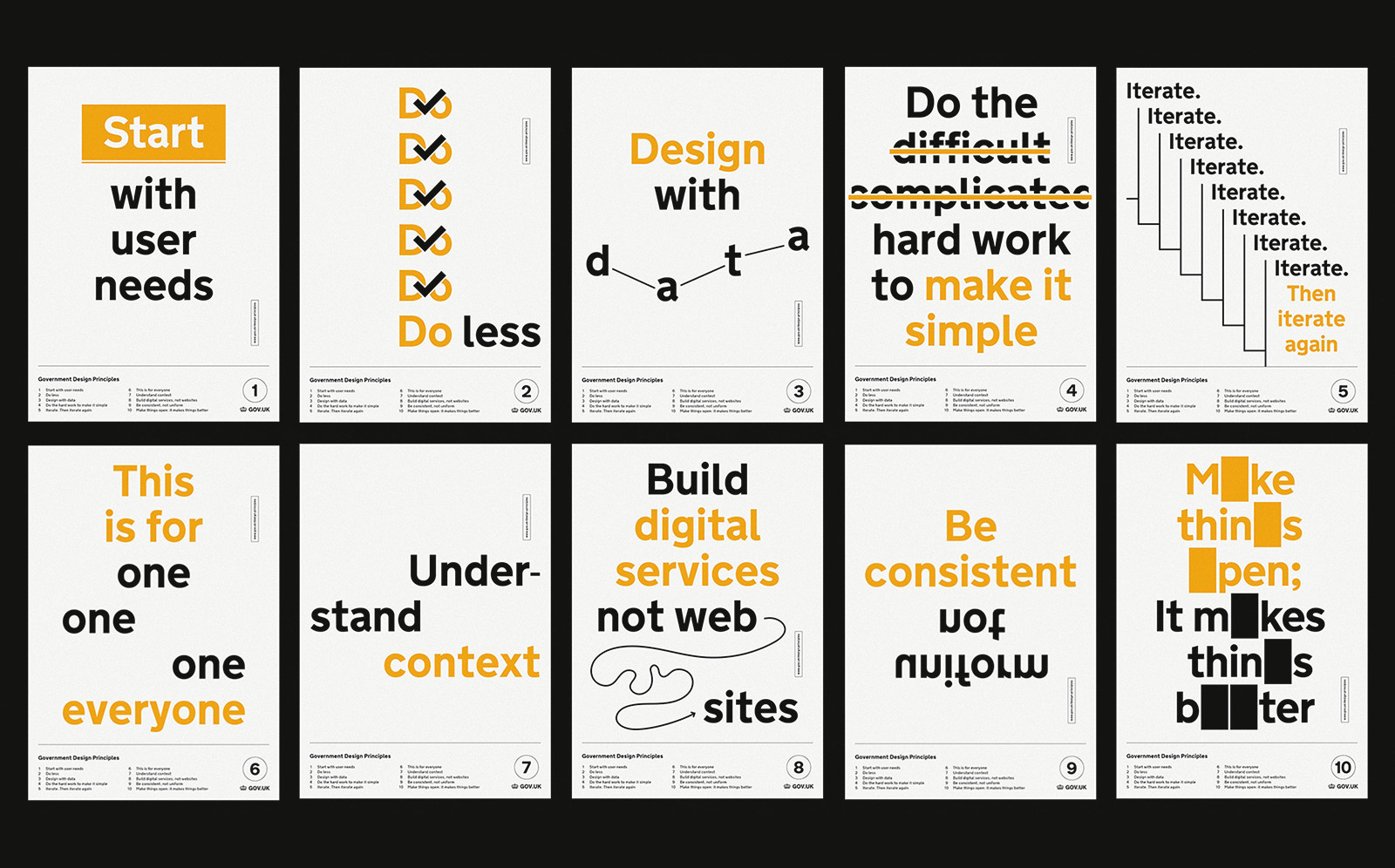
 mistakes will be made. It Needs To Be Safe To Fail Many organizations have, to be frank, a culture of fear where mistakes are seen as a sign of incompetence. However, by its very nature, learning a new tool like AI will involve making mistakes, and this can be a massive barrier to adoption. I saw this during the era of digital transformation. Senior management would demand digital transformation and were confused when it didn’t happen. What they didn’t realize was that they were sending mixed messages to staff. Sure, they were asking for digital transformation, but they were still demanding that the same key performance indicators (KPIs) be met, and they still pointed out any mistakes in their annual reviews. There was no space to fail, as the pressure to deliver was relentless. This time around, it seems to be even worse. I hear horror stories of staff being reprimanded for using too many tokens just weeks after being told to adopt AI. Or staff being lectured so much about what they should or should not do with AI that they are afraid to try anything. It is safer to just do what they have always done. If management want staff to adopt AI, then they need to make staff feel safe to experiment. They need to adjust KPIs, change how staff are reviewed, and relax some of the governance while staff are learning. Handle Governance With Care Look, I get it. AI cannot be rolled out without some governance in place, but again, this is an area that organizations have typically handled poorly. In the midst of digital transformation, governance would either be non-existent, or it would be so strict that it would stifle innovation, and unfortunately, I see the same pattern emerging with AI adoption. Staff need some governance to help them know where they stand. It helps them understand what is expected of them and what they can and cannot do. But too often organizations have been so strict that it is easier not to do anything at all. Pages of instructions about what people should and should not share with AI create that sense of fear that I mentioned earlier. Organizations need a short set of principles that would fit on a handful of posters, similar to gov.uk’s design principles. Beyond that, they need to demonstrate a degree of trust in their staff to use common sense. Of course, mistakes will get made, but that is the cost of change, and so organizations need to accept that and do what they can to mitigate that in how they roll out the technology. Adaptive Technological Rollout That said, organizations will need to be careful in how they roll out AI from an IT perspective. Once again, it is easy to lock everything down and stifle the adoption of AI. Again, this is something I highlighted back in 2014 with digital transformation. Overstretched IT teams would pick a set of technologies and roll them out organization-wide, often with little or no consultation with the individuals who would be using them. Anything outside of that set of technologies had to go through a complex approval process, normally involving a steering committee. The result was a glacial pace of change that was one of the major contributing factors to the failure rate of digital transformation projects. Today we are seeing the same thing. IT teams are opting into a tool like Copilot and calling it a day, but that often falls massively short. Take, for example, a UX team I am working with at the moment. Management is pushing hard for AI adoption, and the team is excited about the potential of creating an AI-powered research repository and even AI personas. It sounds like a wonderful case study in AI adoption, with enthusiastic management, an excited team, and innovative ideas. Unfortunately, the reality is that nothing is happening because Copilot cannot deliver on the team’s vision, and so they are currently bogged down in bureaucracy as they try to persuade the AI steering group that they need to use a different toolset. Understandably, the team’s enthusiasm is waning. Why bother? And that team is one of the more patient ones. In many organizations, staff are not waiting for the steering group at all. Just as we saw shadow IT during the digital transformation era, with people signing up for Dropbox and Google Docs because the official tools could not do what they needed, we are now seeing shadow AI. When the in-house AI tool will not let people do their jobs, they open a personal ChatGPT or Claude account on their phone or home laptop and get on with it. That is far more dangerous than the problem the restrictions were meant to prevent. Company data ends up in tools the organization has no control over, with no oversight and no record of what has been shared. In trying to lock everything down, organizations end up pushing the risk somewhere they cannot see it. The instinctive reaction is to clamp down with stricter policies, blocked websites, and warnings about disciplinary action. But that rarely works, and it drives the behavior further underground. Shadow AI is a symptom, and a useful one, because it shows exactly where the official tools are falling short. Instead of trying to stamp out shadow AI, organizations should learn from it. Talk to staff about what they are using personal accounts for and what they feel they cannot do with the AI they have been given, then use that to shape what gets rolled out next. Look, I understand the cost of a messy, out-of-control tech stack. It is not ideal. However, in the early days of adoption, we may have to live with a bit of chaos while people explore the edges of what is possible and work out common use cases. Organizations need to allow staff to explore different uses of AI and even different AI apps to find what suits their specific needs in their specific roles. They can always start locking things down later as the real organizational needs become clearer. A Dangerous Time I admit all of this feels dangerous to some organizations. They want to control the AI adoption process centrally and make sure nothing goes wrong. I understand that. But change comes with a degree of risk, and the risk of moving too slowly is greater than the risk of moving too fast. However, a bigger danger still is when organizations see this as a technological challenge and overlook the human side of things. AI adoption is not simply about rolling out new technology. Just like digital transformation, it is about people, culture, and change management. The sooner organizations realize the scope of what they are dealing with, the better. https://smashingmagazine.com/2026/10/is-your-organization-messing-up-ai-adoption/ #staff #back #smashingmagazine #senior #ai #rss #feeds #linksharing #qwibbit

#staff #back #smashingmagazine #senior #ai
WebCraft
WebCraft 15d

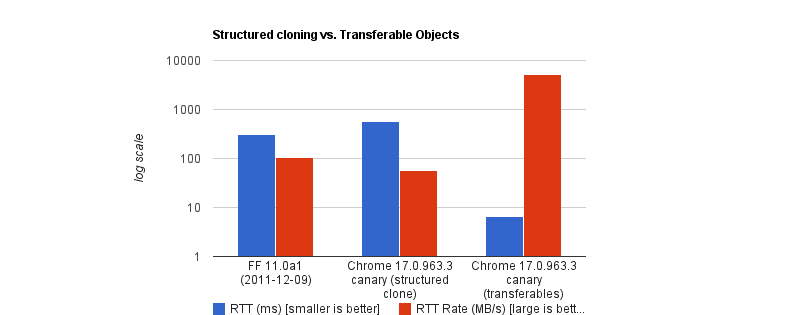
When It Makes Sense To “Block” The Main Thread We’ve all heard of the sacred rule in modern web development, the rule never to be broken. The rule of “Never block the main thread.” You almost can’t miss it as a web developer; it’s in almost every performance guide, and to be fair, it is good advice. We all know the browser’s main thread is single-threaded, meaning it can only do one thing at a time. Plus, as we know, the main thread isn’t ours alone; we share it with the browser’s rendering engine, input handlers, and other critical tasks. As a result, the less time we hold onto the main thread, the more responsive an app feels. That leads us to share tasks with background workers as we’ve convinced ourselves there should be a hard line between the UI and any computation, and that line shouldn’t be crossed. And that is what a “recommended” architecture looks like. But I dare say that sometimes**, moving the data to a worker is slower than just letting the main thread do the work. I found this out a few months ago while building a Chrome extension with screenshotting features called Fastary. I kept finding a latency of about 2 to 3 seconds in all my testing, even after using an Offscreen Document (a background process in Chrome extensions) to handle the canvas operations. A screenshot task should feel instant without lag, after all. It is quite ironic that by reflex, we move work away from the main thread to avoid freezing the UI, but sometimes the act of moving that work (e.g., serializing, copying, and deserializing) can also freeze the UI. And sometimes the recommended approach of letting the background do the work can be slower than just doing the work on the main thread. Let’s talk about that. The Architecture Of Browser Context Isolation To put things in perspective, let’s understand why we isolate browser contexts and how they communicate with each other, with emphasis on the communication part. A browser is more than a single environment. Different environments are running at the same time, each having its own memory space, what it can access, and rules: The main thread is what we are most familiar with; this is where JavaScript logic runs, where the DOM lives, where styles get rendered, and where users interact. The Web Workers are separate threads that can also execute JavaScript without DOM access. We mostly use this for heavy data tasks. The Service Workers are network-related proxies in charge of intercepting network requests and can even run when the page is closed. And then there are Chrome extension contexts, where we have background service workers, content scripts, and Offscreen Documents (the relevant ones for this article). Each one of these is isolated from the others. A web worker or background script lives in a different memory space from the main thread. They cannot just reach and read each other’s variables or logic, and this is known as the “shared-nothing” architecture. How do these isolated environments communicate? They explicitly message each other back and forth using APIs, like postMessage(). The Structured Clone Algorithm postMessage() tells the browser to take a piece of data and deliver it to the context that requested it. But to do this, the browser relies on the Structured Clone Algorithm (SCA). You’re probably familiar with JSON.stringify(). SCA is similar, but much stronger and smarter. In its simplest form, SCA is a deep, recursive copy operation, i.e., cloning. It walks through the entire data structure it is given, clones every single value, serializes it into a transportable format, ships those bytes to the target contexts, and then reconstructs the original object on the receiving side. SCA is fast, or maybe fast-ish... For a small regular config object like {theme: "dark"}, it is imperceptible; you don’t even notice it. The story changes, however, when dealing with heavy data because the SCA is a synchronous blocking O(n) operation, i.e., the cost increases linearly with the size of your data. Let’s put that into perspective. A user clicks a button, and internally, an 8MB image payload is sent to a background worker for processing. When you call postMessage(), the main thread must immediately stop what it is doing to run this serialization and copying process. So, if the time it takes to pack, ship, unpack the data, and go back to the start is longer than the time to just process the data on the main thread, why not do that instead? What About Transferable Objects? I’m sure some of you are already thinking, “Why not just use Transferable objects?” And that is a valid point. Let’s talk about that. Developers who really pursue ultra-high-performance web apps usually use Transferable objects (e.g., ArrayBuffer, ImageBitmap, or MessagePort) to bypass the Structured Clone Algorithm. This is because when you transfer an object, you’re not making a copy (like SCM). Instead, the browser switches ownership of the data from one context to another. The browser performs a hand-off whereby the sending context loses access to the data instantly, and the receiving context takes full control. It is actually insanely fast. According to Chrome Developers’ benchmark, transferring a massive 32MB ArrayBuffer can take under 7ms, compared to about 300ms when cloning with SCM. That’s a 43x speed boost. But like all good things, there are downsides. To name a few: You lose it once you send it. If the UI still needs that data (like to show an image preview), you can’t access it anymore. Not all data is transferable. A plain JS object is not. A Blob is not. Even a Base64 string is not. API limitations. In the context of browser extensions, Chrome’s internal messaging (chrome.runtime.sendMessage) traditionally forces everything through JSON serialization. So, as far as my screenshot extension went, Transferable objects were not an option. Why We Isolate Contexts Anyway Why do we even bother isolating contexts at all? Why not just leave it all to the main thread? Offloading long-running CPU tasks to a background thread is absolutely the right thing to do. The browser needs to paint a new frame every 16.6ms to keep things fluid; that means any task that takes >50ms is generally considered “long”. Offloading to the background is absolutely the right thing to do. The issue, however, is that we’ve turned this “never block the main thread” into an absolute rule, without asking is this task expensive to process or expensive to move? I have come to realize now that the rule is less “never block the main thread” than “never block the main thread for too long.” When The Right Architecture Is The Wrong Architecture My goal with the Fastary extension was to make it feel like a native app, running as smoothly and instantly as you would expect a native app to. As you already know, I took the recommended approach to use the Offscreen Document to handle DOM work in the background. But to my surprise, that took a different turn. The Offscreen Document API is a clear winner. You create a hidden, undisplayed document that runs entirely in the background. It has a DOM and supports Canvas. For example, if I want to crop a screenshot, stitch multiple screenshots together, perform heavy image manipulation, or add a watermark, Offscreen Document was made for that. Turns out that was not the best approach. This was my architecture: The background Service Worker captures a screenshot with chrome.tabs.captureVisibleTab(), which returns a Base64-encoded data URL string. The background Service Worker uses chrome.runtime.sendMessage() to ship this image payload to the Offscreen Document. The Offscreen Document receives the image, loads it into an element, then draws it onto a canvas before it applies the user’s crop coordinates, encodes the result, and sends the processed image back to the background worker. But when I tested it, the screenshot didn’t feel instant. As I said earlier, there was a consistent 2–3 second lag. I figured out that when captureVisibleTab() takes a screenshot, it returns a Base64 URL string, and on a standard 1080p screen, that string could be approximately 1MB or more, depending on how detailed the image is. It gets even more interesting on modern Retina displays (e.g., MacBooks) as they tend to automatically double the image’s size by default. Keep in mind that since the image payload could be doubled and extension messaging relies on JSON serialization (as of this writing), we potentially deal with massive synchronous communication that costs an entire round trip. The image string data is JSON-serialized at least twice: once when going into the Offscreen Document and once coming back out with the processed results to the background worker. The actual image processing (cropping) done inside the Offscreen Document was fast, no doubt, but I can’t say the same about the transfer overhead. The Retina High-DPI Problem As if the latency itself wasn’t enough, I noticed a rather subtle bug — which, now that I think of it, was more of my ignorance. After a screenshot was taken, the crop result was completely off in a way that either weirdly scaled the image or resulted in incorrect coordinates. It turns out that when a user selects a region to crop, the content script gets the box coordinates using getBoundingClientRect(), which is measured in CSS pixels; this is what the DOM uses. But when the screenshot is captured natively in Chrome, the browser doesn’t crop it automatically; it instead uses the physical hardware pixels to get the full screen capture. And the browser uses devicePixelRatio (DPR) to know how many physical pixels should represent one CSS pixel. Basically, if a user on a Retinal display (DPR = 2) highlights an area of 400x300 CSS pixels, the actual captured image area is 800x600 physical pixels. Note: One CSS pixel is equal to 1 physical pixel (DPR of 1) on a standard monitor. On a Mac Retina display or a modern 4K monitor, however, the DPR is usually 2 or 3. For an accurate crop, I needed to apply these two different measurement systems with the right DPR, i.e., scale the crop coordinates by the DPR. But remember, Offscreen Documents have no physical display. Processing any image would have a default DPR equal to 1. To fix this, I would have to capture the exact devicePixelRatio from the active tab, serialize it, pass it alongside the image payload, and manually do the scaling math inside the Offscreen Document. The complexity starts to compound. What if I broke the golden rule and did the work on the main thread instead? Working On The Main Thread Some developers will argue that UI tasks are the only things that should run on the main thread, but I don’t fully agree with that. Personally, I believe that user explicitly-invoked actions that need immediate results can sometimes get a solid pass to run on the main thread, provided the work is incredibly fast (e.g., 1s). That’s what I did: scrap out the Offscreen Document and reengineer the logic. Instead of: Background → [serialize] → Offscreen Document → [serialize] → Background → Content Script 
I decided to run the whole image processing in the active tab: The background Service Worker captures the screen and gets the Base64 string (same as before). The background sends the payload directly to the content script in the active tab using chrome.scripting.executeScript(). The content script (running on the main thread) receives the payload, draws it to a canvas, performs the crop using the correct DPR value, and copies the result to the clipboard. // Background Script const screenshotUrl = await chrome.tabs.captureVisibleTab(undefined, { format: "png" }); // Inject the processing function into the active tab as a content script await chrome.scripting.executeScript({ target: { tabId: activeTab.id }, func: processAndCopyImage, args: [{ base64Image: screenshotUrl, cropData: userSelection }] }); This approach completely clears out multiple context hops and round trips that JSON serialization requires. The only cross-context transfer involves sending the data URL from the background to the content script. The Retina DPI issue essentially solved itself, as the content script runs directly inside the real, active browser tab because it knows the monitor’s real devicePixelRatio. But there’s an elephant in the room that you may have noticed. Sure, the image is now processed on the main thread, and the background manipulates the canvas in the active tab. I could technically be blocking the main thread. That’s where I amended the “no blocking the main thread” rule to “no blocking the main thread for too long.” In this specific case, at least, blocking the main thread for a task the user requests for approximately one second is justifiable. It works conversely as well: maybe don’t isolate processes if the data transfer cost is greater than the processing cost. Conclusion: When To Isolate And When Not To I’ve boiled it down to a mental model that depends on whether the task is: 1. Compute-Heavy Tasks (CPU-Bound) These are tasks where the primary cost is computation and not the size of the data itself. These are tasks where most of the time is spent on doing calculations or heavy transformations, e.g., image compression, audio profiling, physics simulation, etc. The transfer cost for these tasks is minuscule compared to the actual work. 2. Data-Heavy Tasks (Data-Bound) These tasks are the exact opposite. These tasks are only expensive because of the size. The processing time is almost insignificant, but the data is expensive to transport, e.g., image cropping, filtering an array, shallow copy, etc. In my specific case, offloading the task to the background falls mostly into negative-sum efficiency. If we are talking about moving megabytes of data to perform a 50ms operation, there is no benefit to offloading it to the background. Perhaps we can think of it like this: Total Time = Serialization Cost + Transit + Background Processing Time + Deserialization Cost Looking at this, if the “background processing time” is the most dominant task in your operation, then isolation is the clear winner. But if serialization, plus deserialization, plus transit exceeds that cost, then there’s no need to isolate things. And if you can’t figure out if the task is CPU-heavy or data-heavy, it certainly doesn’t hurt to measure it, for example, using performance.mark() and performance.measure() around postMessage calls to profile the transfer cost. https://smashingmagazine.com/2026/07/when-makes-sense-block-main-thread/

WebCraft
WebCraft 15d

Weaponizing And Defending The React Flight Protocol: Deserialization Sinks In RSCs React Server Components don’t send HTML to your browser. They don’t send JSON either. When a server component renders, what actually travels over the wire is a custom streaming protocol called Flight. It’s a line-delimited format with its own type system, its own reference resolution, and its own rules for reconstructing executable behavior on the client. Most React developers have never opened the Network tab and actually looked at a Flight payload. It looks like a mix of JSON fragments, dollar-sign-prefixed references, and module pointers that the React runtime silently reassembles into a live component tree. The framework handles it, so nobody questions it. I’m not sure most teams have thought carefully about what that trust actually implies. I started pulling apart the Flight protocol after CVE-2025-55182 dropped in December 2025. The security community called it React2Shell, and for good reason. It was a CVSS 10.0, unauthenticated remote code execution vulnerability sitting in the Flight deserialization layer. One crafted HTTP request to a Server Function endpoint, and an attacker had shell access. No credentials needed. The federal Cybersecurity & Infrastructure Agency (CISA) added it to the Known Exploited Vulnerabilities catalog. Sysdig tied in-the-wild exploitation to North Korean state-sponsored actors deploying file-less implants through the Ethereum blockchain. That’s the kind of CVE that gets your attention. After spending time in the source (mostly getOutlinedModel and getChunk, which is where the resolution logic that matters actually lives), I realized React2Shell wasn’t a one-off parsing bug. It was a symptom. Flight reconstructs executable references, lazy-loaded components, server RPC endpoints, and async state from a stream of text. That’s a deserialization system. The attack surface extends well beyond a single missing hasOwnProperty check. This article covers how Flight works on the wire, where the deserialization sinks are, what attackers have already weaponized, and what’s still exposed. This leads to a ranked, practical set of defenses for your own Server Components: schema validation on every Server Action, the server-only package, cross-site request forgery (CSRF) hardening beyond framework defaults, and an assessment of what the Taint API and Web Application Firewalls (WAFs) provide. Table of Contents Flight On The Wire Why Flight Is A Deserialization Sink The Mechanics Of React2Shell The Fix Defenses, Ranked By Impact What Came After React2Shell What’s Still Exposed This Has Happened Before Where This Goes Next Flight On The Wire Open your browser’s Network tab on any Next.js App Router page and look for requests returning Content-Type: text/x-component. That’s Flight. It’s not a single JSON blob. It’s a streaming, line-delimited format where each line is a self-contained “row” that the client-side React runtime processes as it arrives over the connection. Here’s what a simple Flight payload looks like in practice: 1:I["./src/components/ClientComponent.js",["chunks/main.js"],"default"] 2:J["$","article",null,{"children":"$1"}] 0:D{"name":"RootLayout","env":"Server"} Row 1 is an import directive. It tells the client to load ClientComponent.js from the bundler’s chunk map. Row 2 is a JSON tree that constructs an

HTML element, and the "$1" inside children is a reference back to chunk 1 (the imported component). Row 0 defines the server execution context, marking this as a RootLayout running in the Server environment. Even in this tiny example, you can see the mix of structural data, module references, and cross-chunk pointers that makes Flight different from plain JSON. The Row Format Every row follows the same syntax: :\n. The row ID is a numeric identifier that other rows can reference. The tag is a single character (or short string) that tells the parser what kind of data follows. The payload is the actual content. Here are the row tags I found while reading through the source: Tag Name What it does J JSON Tree Serialized virtual DOM nodes, component props, and HTML elements. M Module Metadata for a specific Client Component module or chunk. I Import Tells the client to load a module from the bundler’s chunk map. HL Hint/Preload Instructs the browser to preload resources such as stylesheets or fonts. D Data Server-rendered element context and environment info. E Error Serialized server-side exceptions and error boundaries. So far, this might look like a benign structured data format with some custom tags, but the real complexity and attack surface live in the prefix system. The $ Prefix System This is where I started paying closer attention. When the client-side parser encounters a string value starting with $, it doesn’t treat it as literal text. It intercepts the string, checks the prefix, and routes it through a type-specific resolution path. The parseModelString function in ReactFlightClient.js is where this happens. It’s essentially a big switch statement on the character after $. Prefix Type What the parser does with it $ Model Reference Resolves to another chunk in the stream (e.g., $2 points to row 2). $: Property Access Traverses into a resolved chunk’s properties (e.g., $1:user:name). $S Symbol Creates a native JavaScript Symbol. $F Server Reference Represents a callable Server Action (an RPC endpoint on the server). $L Lazy Component Defers component loading until it’s needed in the render tree $@ Promise/Raw Chunk Returns the internal Chunk wrapper object itself (often acting as a Thenable/Promise), not its resolved value. $B Blob/Binary Triggers the blob deserialization handler for binary data. Every other prefix resolves a chunk and gives you the parsed result. $@ hands you the raw internal Chunk object instead, the wrapper React uses to track resolution state, pending callbacks, and internal metadata (which is why it’s used for Promises and why exploits use it to get a mutable handle). Exposing framework plumbing through the protocol looks like a design mistake to me, though I’d be interested to hear the rationale if there is one. And $: (property access) is the other critical prefix. It lets the protocol specify a path like $1:user:name, which tells the parser to resolve chunk 1, then access .user, then access .name on the result. That’s arbitrary property traversal driven by data in the stream. If you’ve spent any time auditing JavaScript for prototype pollution, that pattern should feel familiar. This Is Not Just A Data Format Flight is not JSON with extra steps. JSON gives you data. Flight gives you behavior. It reconstructs module references that trigger client-side code loading, creates server action endpoints the client can invoke as RPC calls, sets up Promise chains that the React runtime will await, and builds lazy-loaded component boundaries that execute on demand. Whether React developers think of it that way or not, the mechanics look very similar to deserialization systems that have historically caused problems. The stream doesn’t just describe what the UI looks like. It instructs the client runtime on what code to load, what functions to call, and what to trust. If you want to read the implementation yourself, fair warning: the chunk resolution path is miserable to follow. State transitions bounce between helper functions, and the naming obscures what the code is actually doing. I gave up on static reading and just set breakpoints. The key files are react-client/src/ReactFlightClient.js for the client-side parser (look for parseModelString, getChunk, reviveModel, and getOutlinedModel) and react-server/src/ReactFlightServer.js for the serialization side. The reply handler for Server Actions lives in react-server/src/ReactFlightReplyServer.js. Why Flight Is A Deserialization Sink The deserialization pattern is familiar: Java’s ObjectInputStream gave us ysoserial, Python’s pickle executes code on load(), PHP’s unserialize chains __wakeup and __destruct methods, and .NET’s BinaryFormatter was deprecated entirely. The pattern: deserialize attacker-controlled input → invoke behavior during reconstruction → lose control of execution. So JavaScript should be immune to this, right? JSON.parse() only produces plain data objects. No constructors fire. No magic methods run. You get back exactly what the JSON string describes, nothing more. That’s true for raw JSON.parse(). But it stops being true the moment a framework wraps custom deserialization logic around it. And that’s exactly what Flight does. Prototype Pollution JavaScript uses prototype-based inheritance. Every object has a __proto__ link to its prototype, and property lookups walk up this chain. If an attacker injects __proto__ or constructor.prototype as a key during reconstruction, they modify the shared base prototypes that all objects inherit from. Downstream code reads attacker-controlled values without knowing. Flight’s $: prefix performs property traversal on deserialized objects. The getOutlinedModel function walks colon-separated paths like $1:user:name by iterating through each segment and accessing it on the parent object. If those path segments include __proto__ or constructor, the traversal walks straight up the prototype chain. That’s not a theoretical risk. It’s exactly how React2Shell worked. Duck Typing and Thenables The V8 engine (and the JavaScript spec) treats any object with a .then property as a Thenable. When you await something, the runtime checks for .then and calls it if it exists. No class check. No internal slot verification. If .then is callable, it gets invoked. Flight resolves chunks asynchronously. If an attacker constructs an object with a manipulated .then property and gets it into the chunk resolution pipeline, the runtime calls the attacker’s function during normal await behavior. The language semantics do the work. I initially focused on $F because forging Server Action references seemed like the obvious attack surface. After tracing the resolution path, $: property traversal looked much more interesting. I also spent a few hours examining chunk status transitions (pending, blocked, resolved, errored) to see if you could force a chunk into an unexpected state, though that approach didn’t yield any results. The Core Problem These two risks converge in Flight because the protocol doesn’t just deserialize data. It deserializes behavior. The $ prefix system dictates which execution path the parser takes: $F creates a callable server endpoint, $L sets up lazy code loading, $B triggers a blob handler, $@ exposes internal framework state. The parser’s control flow is driven entirely by what’s in the stream. If an attacker can influence the stream’s content, they control which functions the parser calls, which objects it constructs, and which internal state it exposes. The Mechanics Of React2Shell This is the CVE that proved the theory. CVE-2025-55182, nicknamed React2Shell, is a CVSS 10.0 unauthenticated remote code execution vulnerability in the Flight deserialization layer. One HTTP request, no login required, full shell access. I want to walk through the entire gadget chain because understanding it reveals how much power the Flight protocol hands to an attacker who can control the stream. The Root Cause The vulnerability sits in getOutlinedModel, a function responsible for resolving deep property paths from the $: reference system. The instance used in the exploit chain lives in the server-side reply handling code (ReactFlightReplyServer.js). When the parser encounters a reference like $1:user:name, it splits on the colons and walks the path segment by segment. Here’s the vulnerable loop: for (key = 1; key < reference.length; key++) parentObject = parentObject[reference[key]]; Two lines. No hasOwnProperty check. No validation that the property exists on the object itself rather than somewhere up the prototype chain. Just parentObject[reference[key]] and move on. So an attacker supplies $1:__proto__:constructor:constructor, and the loop traverses from a plain JSON object up through Object.prototype to the Object constructor to the Function constructor. Function in JavaScript behaves like eval(). Function("arbitrary code")() executes. No allowlist on property names. No check for __proto__. I searched reviveModel and the chunk initialization path for any filtering. Nothing. The Gadget Chain Getting from “I can reach the Function constructor” to “I have RCE” requires chaining several Flight protocol features together. The Resecurity write-up covers the full chain in detail; here’s the high-level sequence: Step 1: Prototype walk to Function. The $: path __proto__:constructor:constructor walks from any plain object to Object.prototype, then to the Object constructor, then to Function — JavaScript’s built-in eval() equivalent. Step 2: Raw chunk self-reference. $@0 returns the raw internal Chunk wrapper instead of its resolved value, giving the attacker a mutable handle on React’s internal state machine. Step 3: Thenable hijack. The attacker sets the chunk’s .then to Chunk.prototype.then, so React’s resolution pipeline treats the manipulated chunk as a legitimate Promise-like object and awaits it. Step 4: Context confusion. During the second deserialization pass, the payload overwrites _response._formData.get to point to the hijacked Function constructor and places the attacker’s shell command into _response._prefix. Step 5: Trigger via blob handler. $B0 invokes the blob handler, which internally calls response._formData.get(response._prefix + blobId) — now equivalent to Function("attacker_shell_command")(). That’s arbitrary code execution with whatever privileges the Node.js process has. Each step uses a legitimate Flight protocol feature in a way the designers didn’t anticipate. There’s no single “broken” feature. The vulnerability emerges from how these features compose when an attacker controls the input. Impact The numbers on this one are stark: CVSS 10.0. The maximum possible score. Unauthenticated and pre-auth. No credentials needed — and the deserialization happens before any application-level auth checks run, so even endpoints behind login walls are exposed. Single HTTP request. One POST to a Server Function endpoint. Affected React 19.0.0, 19.1.0, 19.1.1, and 19.2.0, across react-server-dom-webpack, react-server-dom-parcel, and react-server-dom-turbopack. CISA added it to the Known Exploited Vulnerabilities catalog within days. What Happened In The Wild Exploitation was immediate. Sysdig published research linking EtherRAT deployments to North Korean state-sponsored actors who weaponized the vulnerability within hours of disclosure. EtherRAT is a file-less implant that uses the Ethereum blockchain for command-and-control communication — a technique researchers call “EtherHiding” — making takedown nearly impossible because you can’t seize a blockchain. Separately, Palo Alto’s Unit 42 documented a backdoor called KSwapDoor that masquerades as [kswapd1] on infected Linux systems, blending into process lists alongside the legitimate kswapd0 kernel swap daemon; their analysis confirms KSwapDoor uses RC4 encryption to protect its internal strings and configuration data, while C2 communications run over AES-256-CFB with Diffie-Hellman key exchange across a P2P mesh network. The speed and sophistication of these campaigns — state-sponsored actors deploying novel implants through a single unauthenticated HTTP request — underscores why a CVSS 10.0 in a deserialization layer demands immediate patching, not triage. The Fix The React team’s patch is clean and targeted. The core change caches the genuine hasOwnProperty method at module load time: var hasOwnProperty = Object.prototype.hasOwnProperty; Then every property check in the deserialization path uses .call() to invoke the cached reference: hasOwnProperty.call(value, i); Even if an attacker shadows hasOwnProperty on a malicious object, the check uses the original prototype method. The prototype chain traversal that powered the gadget chain is blocked. This fix shipped in React 19.0.1, 19.1.2, and 19.2.1. The fix is correct. But reading through the patches, I noticed the React team hardened ownership checks whi https://smashingmagazine.com/2026/07/weaponizing-defending-react-flight-protocol/

WebCraft
WebCraft 15d

Thinking Outside The Box: Digital Design In The AI Era This article is a sponsored by MacPaw The phrase “artificial intelligence” has many excited, especially those in tech. But for those of us in creative fields like digital art and design, AI can be more concerning than it is exciting. AI-generated art, videos, and images have flooded the internet, raising questions about whether more companies will turn to tools like OpenAI’s Dall-E, Midjourney, Leonardo.ai, and more, rather than employing human artists. What’s more, the fact that these AI models are trained on real artists’ work without their consent leaves many feeling as if they have no choice but to accept AI into their work and lives. In a digital world increasingly dominated by faceless AI chatbots, agents, and features, it can be easy to get overwhelmed by all the technology. AI will certainly play a huge role in reshaping many industries, including design. We can’t deny this. But at the same time, humanization, empathy, and having a person at the wheel have never been more important. Rather than viewing AI as something that replaces human creativity, we at MacPaw saw an opportunity to explore how we could make AI feel more personal and accessible — all the while keeping humans at the center of the experience. That led us to rethink how AI assistants are created. The Concept Of A New AI Assistant Traditional AI assistants like Claude and ChatGPT typically take the form of a conversational textbox or webpage on screen, as this is how users have interacted with their devices. It’s comfortable and familiar. While extremely useful for a variety of tasks, interacting with these AI assistants can feel transactional and technical. Using the same textbox format across all AI assistants does provide consistency. But we wanted to create a new, more personal and differentiated experience for users. But what format would be best? Even if we change how an AI tool looks, it still needs to be useful and intuitive to use. As humans, it’s easier to understand and connect with things that resemble us. This is why we often find ourselves drawn to things like animals and characters: they have traits that we recognize within ourselves. Understanding this, we saw an opportunity to combine these values: utility and personality. The Importance Of Character In Design Enter Eney: a new proactive AI assistant. MacPaw didn’t want Eney to simply be another AI tool for users, but rather one that proactively assists within a user’s workflow. The vision was to help users connect with Eney more easily than with other AI tools, so we decided to create a character users could interact with. We wanted Eney to be expressive, friendly, and to emote as humans do. But we needed to strike an important balance: making Eney cheerful without it being overly goofy or childish. This is where human animation and intervention played a critical role. While challenging, it was crucial because an overloaded character UI could turn users off and make navigating Eney difficult. To avoid this, the design team chose to create a select set of emotions and gestures for Eney to express, ensuring that its expressions conveyed useful information. For example, when working on a task, Eney’s figure resembles a loading icon. To do this, we worked to reduce Eney’s on-screen movement to make sure it wasn’t distracting or excessive. After exploring a few different shapes and styles for Eney, we settled on a circular figure, as it felt the most approachable. It was simple and helped create the feeling of a calm, floating digital companion, rather than another rigid interface element on a user’s desktop. Eney’s minimal face design also plays an important role in connecting with the user. Its eyes are the main emotional connector — a key feature in showing emotions without being cartoonish. The color choice for Eney was also important. Many AI assistants and companies use blue in their products, as it’s typically associated with intelligence. Blue is a great color, but we wanted Eney to stand out. We still wanted the color to be warm and inviting while slightly more visually stimulating, which led us to choose the color pink. Among dozens of other AI products that choose a more blue aesthetic, Eney was designed to catch a user’s eye and stand out in their mind (and on their screen). All in all, we wanted to create a character that was present but not attention-seeking; a warm and supportive digital helper that enhances a user’s workflow rather than distracts from it. Eney’s character gives personality to otherwise invisible processes. Artists In The AI Era While those who aren’t design professionals may assume there wasn’t much significance behind Eney’s character creation, this couldn’t be further from the truth. Like many other products, all these elements — style, design, emotion, size, name, and more — were intentionally chosen, not by machines but by humans. Even though AI has streamlined many design processes, namely enabling faster design, there are still many things it can’t do well. Even when designing Eney, while technology supported the process, human designers controlled every step and decision. As designers, it’s more important than ever to have good judgment, artistic direction, integrity, and emotional sensitivity when working in the field. Technology like AI can help us work faster, but it can’t replace the values that inspire and shape our work. What’s more, while anyone can easily generate something by typing a prompt into an AI image tool, there’s a true beauty and talent when intentionally crafting something through manual design. As designers, we shouldn’t stray away from the latest tools. Rather, we should learn them and see how they could potentially help us within our creative workflows. Personally, I like to use AI tools such as Perplexity and ChatGPT for research purposes in the early stages. However, we need to remember that they’re just that: tools. At the end of the day, technology like AI cannot, and should not, replace human artistry. It should help us express our visions, not replace us entirely. If there’s one thing to take away from this piece, it’s that curiosity helps build taste over time, and taste becomes more valuable, not less, in the AI era. https://smashingmagazine.com/2026/07/digital-design-ai-era/

Welcome to WebCraft spacestr profile!

About Me

Web design tips and small clever coding ideas. Unofficial automated fan feed. Content belongs to its respective owners; not affiliated with source publishers.

Interests

  • No interests listed.

Videos

Music

My store is coming soon!

Friends