spacestr

🔔 This profile hasn't been claimed yet. If this is your Nostr profile, you can claim it.

Edit
RetroComputing
Member since: 2026-10-15
RetroComputing
RetroComputing 1h

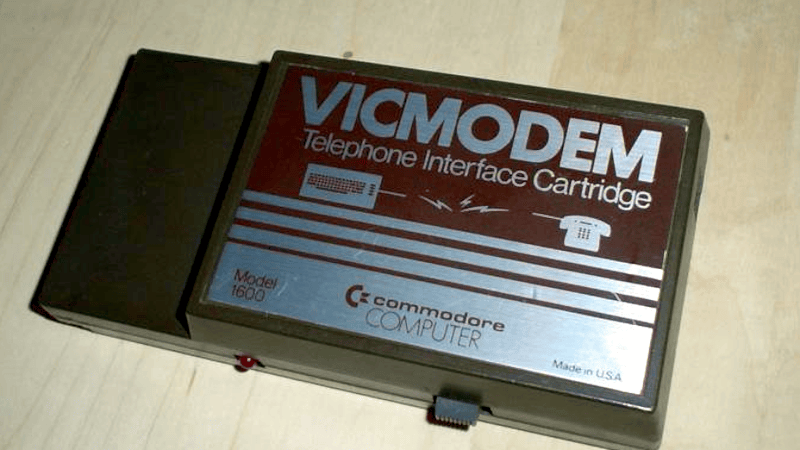
A 1982 Modem for $100 [Dave Farquhar] takes a walk down memory lane about the Commodore 1600 VICModem, perhaps the first phone modem to sell for less than $100. Commodore, of course, was famous for making cheaper computers like the VIC20, the Commodore 64, and lower-cost peripherals like disk drives. But how did they hit the $100 price point with the modem when competing 300 baud modems sold for at least twice that, and a 1200 baud unit would set you back at least $600? First, Commodore didn’t handle the design themselves. Instead, they outsourced to Anchor Automation, a well-known modem manufacturer. It used a Motorola MC14412 modem on a chip, along with six other chips. The chip could, in theory, do 600 baud, but the modem was rated for 300. But it did make some interesting design choices. Old-school modems were not allowed to connect to the phone lines directly, so you dialed the phone number and then shoved the handset into some padded cups known as an acoustic coupler that placed a microphone next to the phone speaker and a speaker next to the phone microphone. Modern modems didn’t have this problem (thanks, in part, to Tom Carter), and the VICModem also connected directly. But to save money, it couldn’t dial the phone for you. The idea was you’d dial the phone like you would with an old acoustic modem and then pull the handset cord and plug it into the modem yourself. There was a problem. In those days, old phones didn’t always have a plug on the handset. Ironically, according to [Dave], the company bought phones to bundle with the modem in Canada only to find out the phones they bought had hard-wired handsets and were not usable. Not only that, if the phones had been the right kind, they would have been illegal in Canada at that time since the phone rules prohibited modular jacks for the handset. To fix the problem, they also bundled the VIC-1605, which was essentially a Y cable for the phone. You plugged it into the wall, and then plugged the phone into an RJ-11 and the modem into an RJ-9. There were other cost savings, too. There was a switch that determined if you were originating a call or receiving one, for example. A great example of how to design something as cheaply as possible, other than the faux pas with the phone connectors. These days, it is hard to find a modem, but even if you do remember them fondly, it is surprising how old they really are and how little you needed to make a low-rate acoustic modem. https://hackaday.com/2026/10/30/a-1982-modem-for-100/ #modem #commodore #davefarquhar #anchorautomation #old #tomcarter #first #rss #feeds #linksharing #qwibbit
#modem #commodore #davefarquhar #anchorautomation #old
RetroComputing
RetroComputing 1d

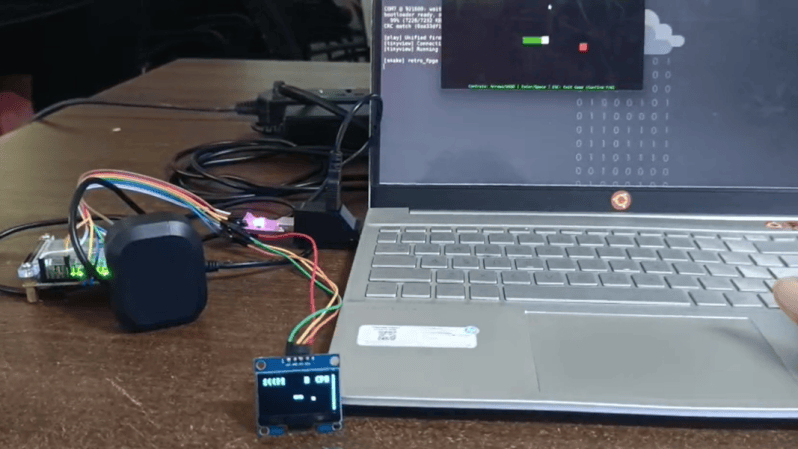
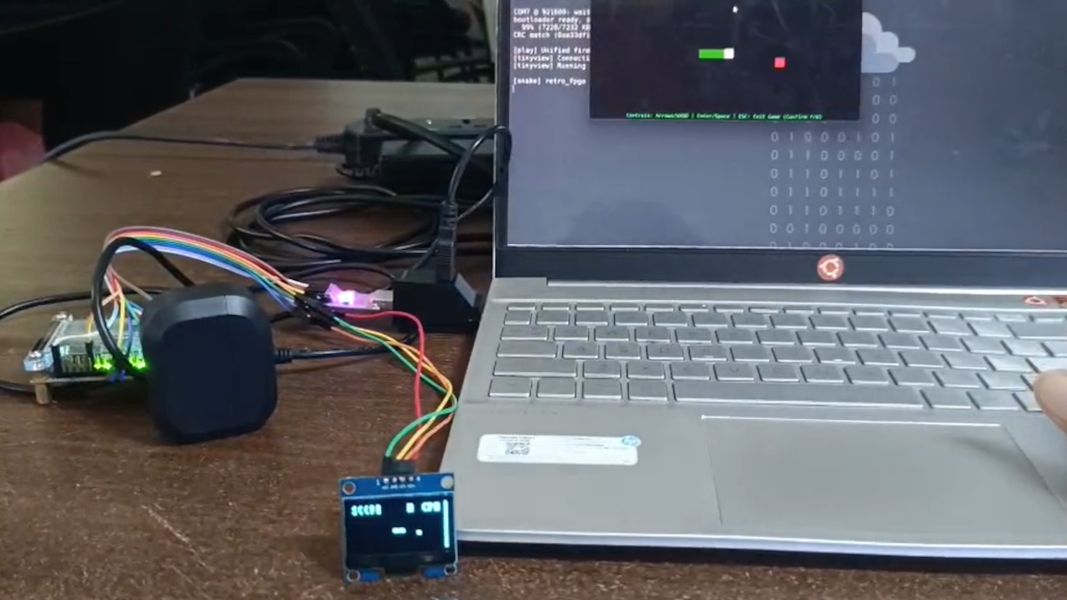
2026 Retrocomputing Challenge: Custom RISC-V Processor For Retro System Although once little more than an academic endeavor, the RISC-V architecture is slowly supplanting applications that would have normally gone to ARM. Even a few microcontrollers have chips running this open-source instruction set now, and we expect it to grow in the future since it doesn’t require the licensing of an ARM or x86 chip. [M_Jagadeesh97] is getting ahead of the curve with this retro gaming system built on a custom-designed RISC-V system. Most of us, presumably including [M_Jagadeesh97], don’t have access to chip fabrication tools, but what we can get is any of various FPGAs. This RISC-V CPU is built on a Terasic DE0-Nano board with 32 MB of RAM available to it, and boots to a launcher with 32 games available. There are a few limitations with this low-power system which was largely solved by limiting the display to 64×32, which lets it maintain the same aspect ratio as the original DOOM as well as the same aspect ratio for many of the older games, while still maintaining 45 FPS. The project writeup goes deep into the design of a system like this, from the bare metal, the CPU design, the timing of the video signals, and how to implement a Wolfenstein-like raycaster. After adding a small display it looks to be fairly portable as well and is an excellent demonstration of how powerful inexpensive boards like this FPGA can be with the proper amount of effort. https://hackaday.com/2026/10/28/2026-retrocomputing-challenge-custom-risc-v-processor-for-retro-system/ #system #arm #cpu #rss #feeds #linksharing #qwibbit
#system #arm #cpu #rss #feeds
RetroComputing
RetroComputing 2d

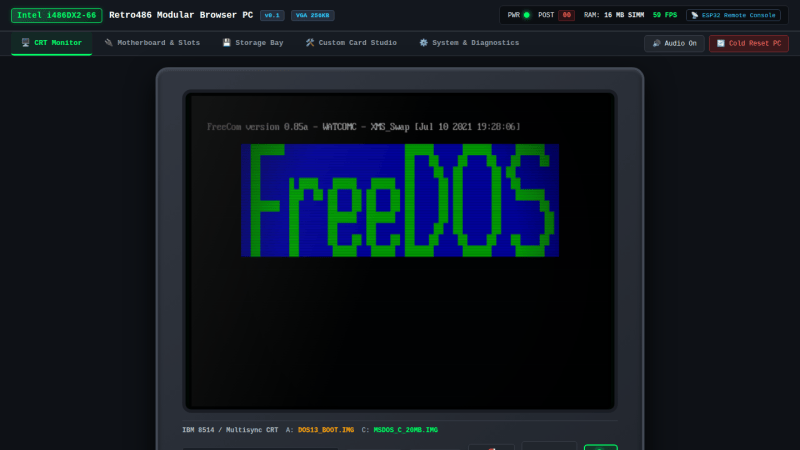
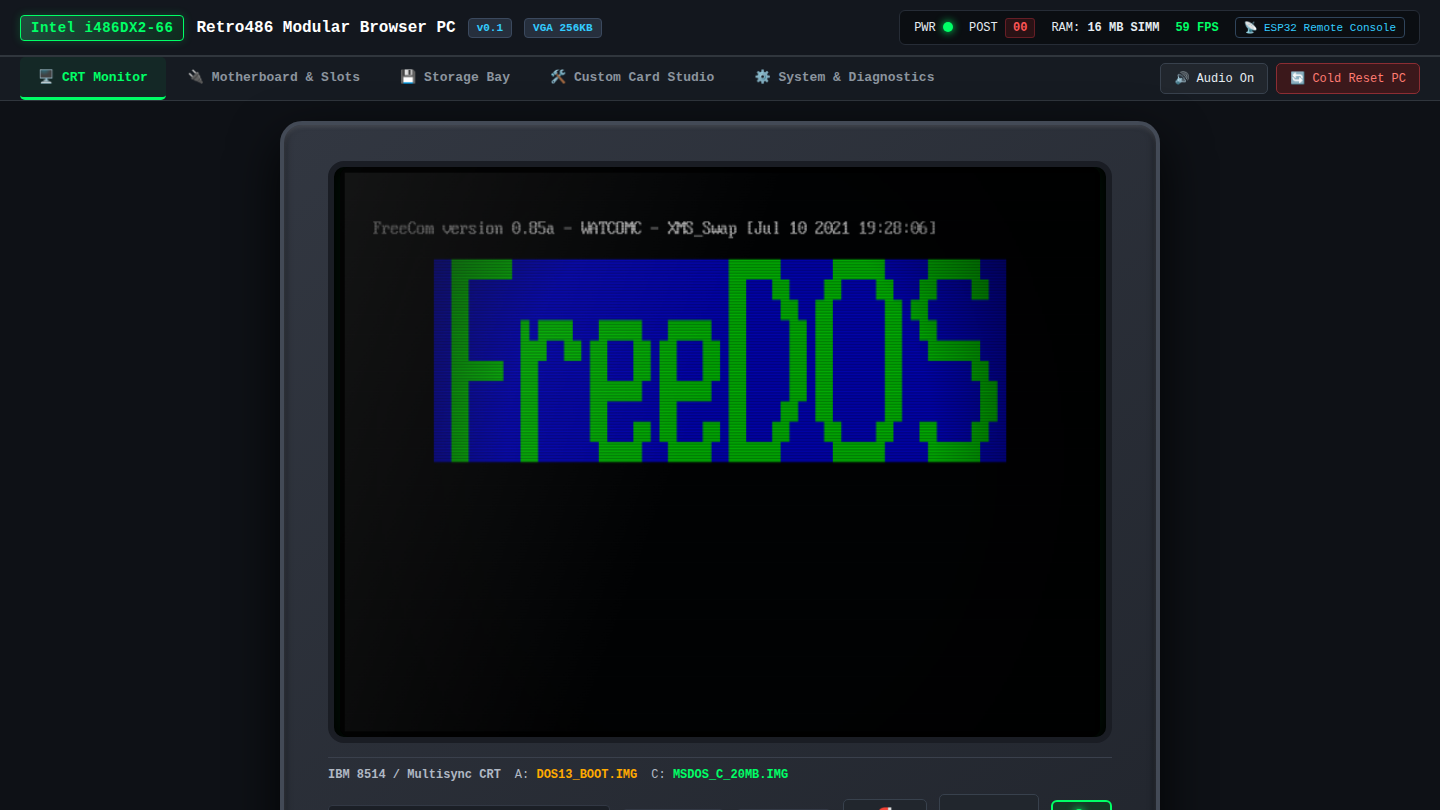
Emulate the 486 in Your Browser You might fondly remember the days of the Intel 486, but you probably don’t have one on your desk anymore. If you’d like to emulate that classic hardware, you can now do it in your browser, thanks to [Jan de Jager]. What [Jan] has built is a 100% browser-based emulator for an Intel 80486DX2-66 PC. Obviously, it’s not just a CPU that’s being emulated here—[Jan] has gone so far as to throw in the motherboard and ISA/VLB adapter card emulation necessary to make this a real and functioning computer that runs inside a solitary browser tab. It’s all written in ES6 JavaScript. It will happily run SeaBIOS, VGA BIOS, FreeDOS 1.3, and a whole bunch of classic games, like Wolfenstein 3D, Duke Nukem, and DOOM. There’s even a control panel where you can configure the PC how you like, from storage to expansion cards and all the rest. Once upon a time an emulator was an application you had to download and run, hoping all the while that your new machine had enough grunt to emulate the classic hardware of your desires. These days, we have endless piles of CPU cycles to throw at everything and you can do it all within a browser. Or even on a tiny microcontroller, if you feel like it! https://hackaday.com/2026/10/28/emulate-the-486-in-your-browser/ #browser #jan #intel #dukenukem #cpu #jager #isa #vlb #bios #vga #rss #feeds #linksharing #qwibbit
#browser #jan #intel #dukenukem #cpu
RetroComputing
RetroComputing 3d

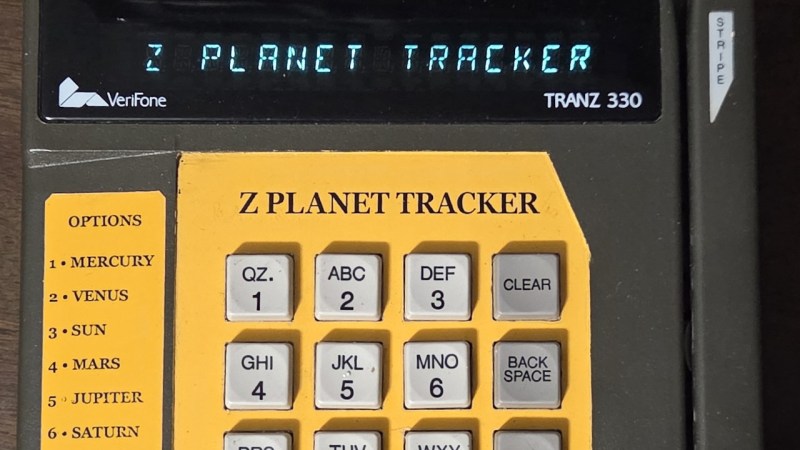
2026 Retrocomputing Challenge: Explore Space with a Credit Card Reader The humble credit card reader — most of us have used hundreds, perhaps even thousands of them over the years. But even for folks like us, it’s not the sort of device we give a lot of thought to. It’s just a keypad, a display, and a magnetic stripe reader. How interesting could it possibly be? That may be true in some cases, but at least for the 1990s-era TRANZ 330, there’s a bit more to the story than that. As [CharlesD] explains, these particular readers are essentially complete Z80 computers just waiting to do something more exciting than processing PINs. In the case of this particular unit, the addition of a GPS module and some new code has turned it into an interactive guide to the solar system. Thanks to the UV erasable ROMs used in the TRANZ 330, loading new code on the device is easy enough. With a bit of educated poking around, [CharlesD] was able to map out what did what. Working from the basics of getting the display and keypad working, he moved onto the serial interface, which in turn let him communicate with a modern GPS module and era-appropriate thermal printer. From there it was just a matter of getting the math implemented to compute the azimuth and elevation of a given planet, and he had an offline map of the solar system for use with his telescope. This is one of those projects which is awesome enough on its own merits, but it’s particularly exciting to see just how easy it is to repurpose one of these card readers, especially since [CharlesD] was kind enough to share his source code. If you end up picking one of these up and getting something running on it, be sure to let us know. https://hackaday.com/2026/10/27/2026-retrocomputing-challenge-explore-space-with-a-credit-card-reader/ #creditcard #cardreader #charlesd #tranz #gps #rss #feeds #linksharing #qwibbit
#creditcard #cardreader #charlesd #tranz #gps
RetroComputing
RetroComputing 3d

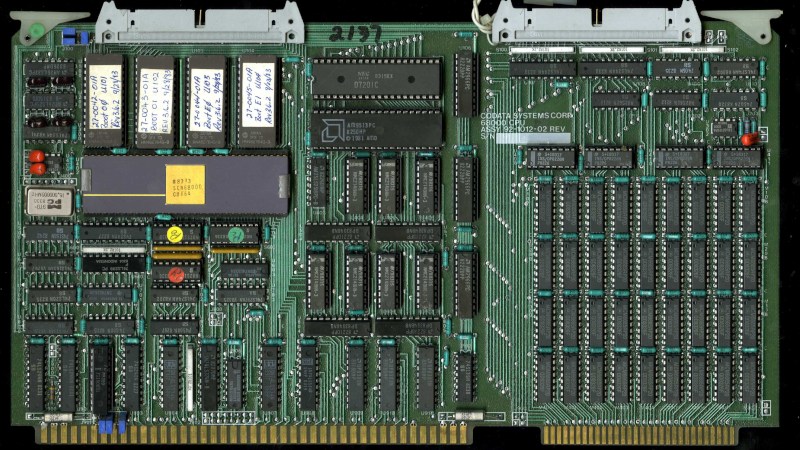
How a Single University Project Started Everything If we care to cast an eye over the history of ubiquitous personal computing as we know it today, we might immediately point at the original IBM PC. After all, for most of us our machines share backward compatibility in some form through multiple generations back to that original box from 1981. But if we look at the things we use today and take for granted, from laser printers to graphics cards to the routers which power most of the Internet, they’re not from IBM at all. At the recent Vintage Computing Festival Berlin, [Michael Engel] delivered a talk naming a surprising progenitor for much of that technology, none other than Sun Microsystems. It all starts with [Andy Bechtolsheim], famously Sun’s co-founder, when at the end of the 1970s he was a postgraduate at Stanford University. Working on the Stanford University Network — SUN — project he designed a computer to be used as a workstation on the network. The processor of choice then was Motorola’s 68000, but it lacked the MMU that would be required to run UNIX. His design had an MMU implemented externally to the 68000, with a bank of SRAM serving as the page table. This design would form the CPU board of the first Sun workstation. The story might end there, were it not that many other companies had the same requirement, and Sun could supply them a CPU board. Silicon Graphics, the distant ancestral progenitor of your GPU, was one of them, so the first SGI workstation also had the same CPU as the first Sun. It appeared in the early Imagen laser printers too, as well as commercial AppleTalk to Ethernet bridges. Perhaps the biggest surprise is that because the original Stanford board had also been used as a router, the software for that became part of Cisco’s first product. The video is below the break, and it’s a fascinating watch. https://hackaday.com/2026/10/27/how-a-single-university-project-started-everything/ #stanforduniversity #sun #cpu #sunmicrosystems #ibm #michaelengel #festivalberlin #computingfestival #vintagecomputing #andybechtolsheim #rss #feeds #linksharing #qwibbit

#stanforduniversity #sun #cpu #sunmicrosystems #ibm
RetroComputing
RetroComputing 3d

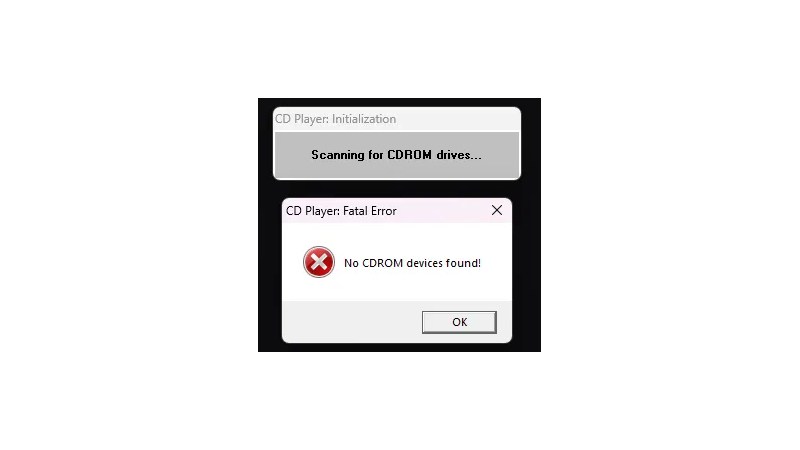
The Oldest Windows App To Still Run On WIndows 11 In the open source world we are used to software being compiled from source for our particular distro, so while in a few cases an ancient release may still be in use, it’s just going to run on the latest distro version. But in the Windows world it’s rare for software to come with the source, so you’re left with a binary that will only run if your Windows version has the right APIs for it. Since the more recent versions of Windows dropped 16-bit support a while back, that means there must be a hard date set on the earliest Windows GUI application that can still run today. [Enlyth] decided to investigate. Given that the earliest API supported in WIndows 11 is the 32-bit version, the hunt led straight to either the first Windows NT release and ancestor of Windows 11, or the Win32s extension for WIndows 3.1. Thus a 1993 Win32S version of Freecell runs happily, but that want’s the end of the trail. Somewhere in the pre-release builds of Windows NT 3.1 would be the requisite binary, but there’s a snag. Early Windows NT 3.1 APIs were incompatible with later ones. This led through a lot of crashing binaries to a November 1992 version of the CD player app, that ran because it called a DLL which happens to still be present. The need for another DLL to emulate a CD drive speaks volumes about the progress of the PC world, back then they were the last word in storage but who’s got one now? That’s the earliest official binary to run, but the story’s not quite over. Windows 11 may not have a VDM to run 16-bit apps, but there’s a WINE VDM for that. Behold, Reversi from Windows 1.01 in November 1985, in Windows 11. Your ancient software may yet be saved. https://hackaday.com/2026/10/26/the-oldest-windows-app-to-still-run-on-windows-11/ #windows #stillrun #app #november #dll #vdm #apis #rss #feeds #linksharing #qwibbit
#windows #stillrun #app #november #dll
RetroComputing
RetroComputing 3d

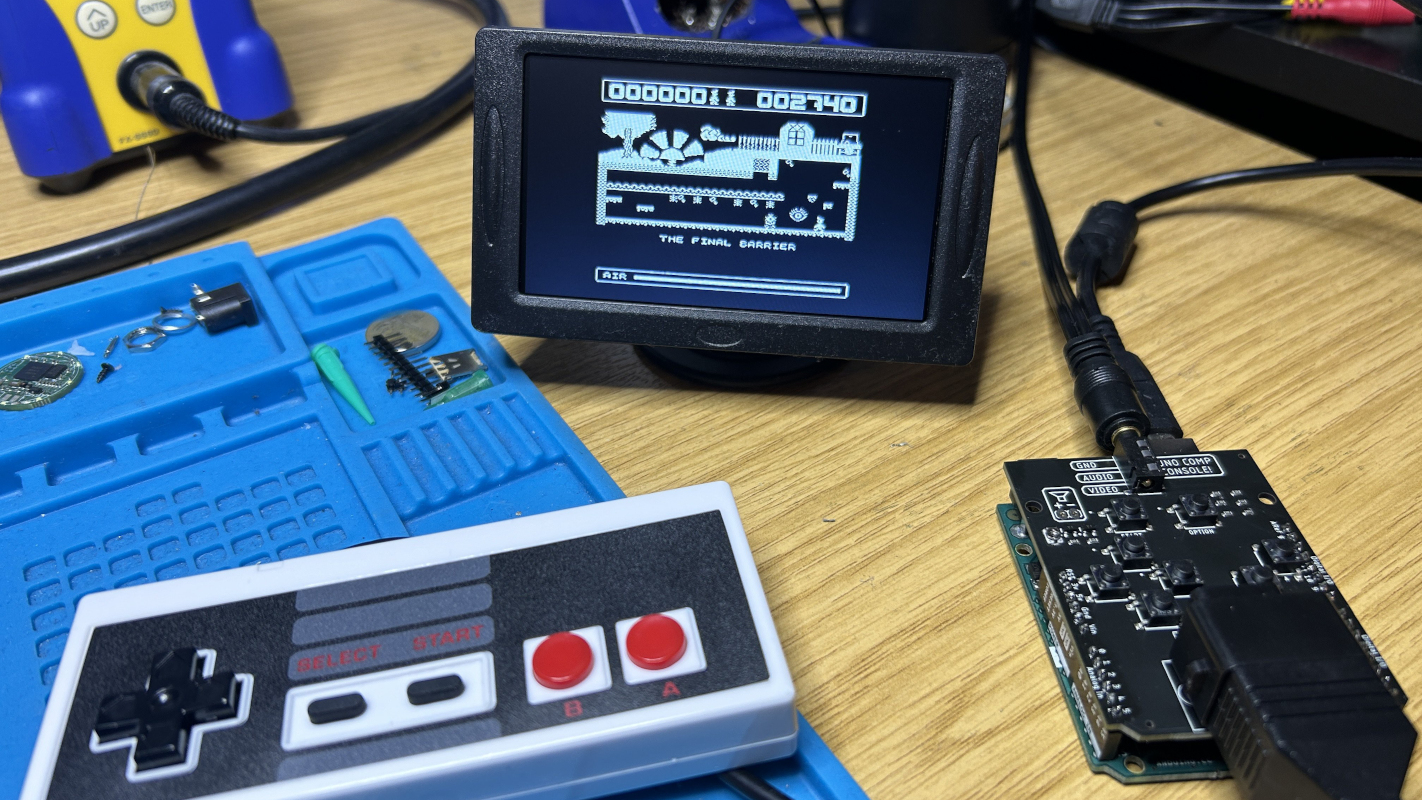
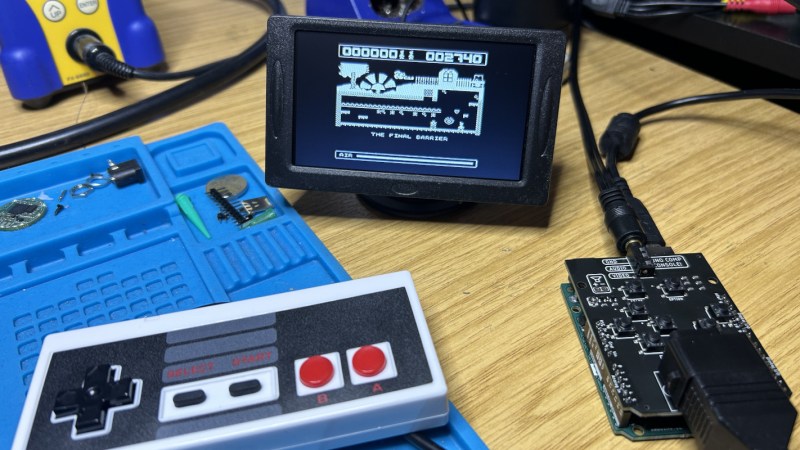
Arduino Engine Runs Many Games A few years ago, [Smashcat] ported a ZX Spectrum game called Manic Miner to the Arduino Uno. The Arduino has less memory than the original Spectrum did, so doing all this on an 8-bit microcontroller was no easy lift. Since then, parts of this original port have been adapted to produce a game engine, allowing [Smashcat] to port several other games to the Arduino Uno as well. The engine is able to host a 2D map with the ability to scroll, at a resolution of 256×256, as well as up to nine sprites at the same time. The graphics are locked to 50 FPS, but only with a real Arduino Uno that has a crystal oscillator. Some replica boards do not have a timekeeping chip accurate enough to replicate the video signal, which is done without a framebuffer. That signal, as well as two PWM audio channels, are still generated directly as well, with only a few resistors needed to hook everything up to a monitor and a controller, including the option of using an NES controller. With all of that running on the Arduino and it hooked up to the daughterboard that provides the controller interface as well as the resistors for the video signal to function and a driver for a speaker, the system now runs the original Manic Miner as well as three other games: Scramble, Space Invaders, and Pac Man. The engine and the rest of the code are available on a GitHub page as well, and there’s even a WebAssembly version available to run various pieces of the software without the specific hardware. The original ZX Spectrum was an interesting machine too that still inspires builds like this, despite it being well over 40 years old now. https://hackaday.com/2026/10/26/arduino-engine-runs-many-games/ #arduinouno #manicminer #games #smashcat #spaceinvaders #pacman #rss #feeds #linksharing #qwibbit
#arduinouno #manicminer #games #smashcat #spaceinvaders
RetroComputing
RetroComputing 6d

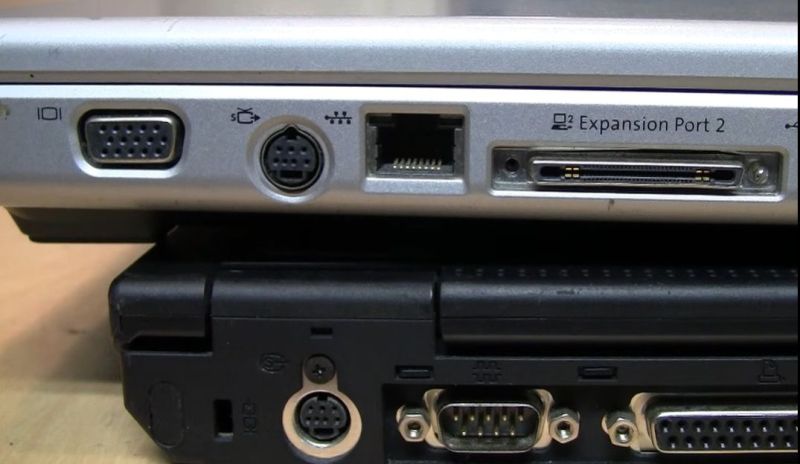
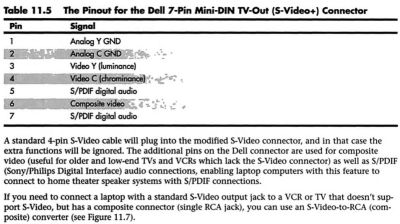
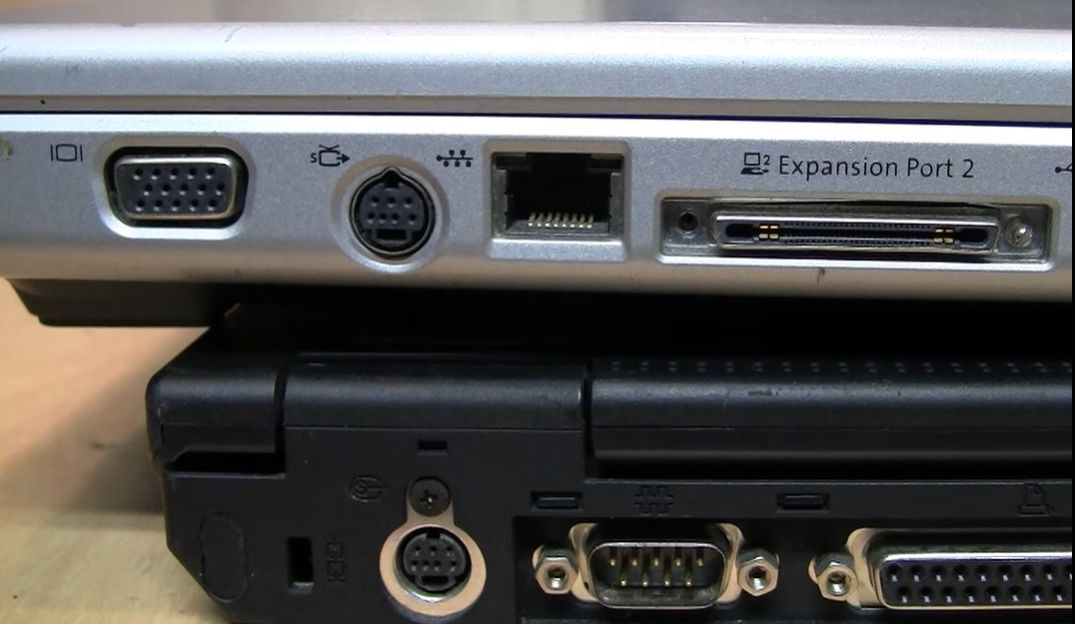
That Weird 7-Pin S-Video Port on Old Laptops Even though laptops from around the early 2000s came with just about every conceivable port on them, they still would often feature a somewhat unusual combined video output port. While at its core this was just a 4-pin analog S-video output, the three additional pins on the mini-DIN connector provided some more features. Of course, as [VWestlife] found out during his archaeological research, not every manufacturer used the same pinout here. The naming for this specific port differs, with the name ‘S-video+’ appearing regularly, yet many descriptions glossing over the additional pins and only mentioning that it can be used with a 4-pin S-video connector. As it turns out, most manufacturers used roughly the same pinout, matching the shown Dell one. This adds composite output, along with two S/PDIF digital audio pins that could be routed out with an adapter into their full-sized ports. Of course, the Apple PowerBook G4 had to be that exception again, with it omitting the audio pins and putting the composite signal on pin 5. This left the last two pins completely unused, but serving to completely confuse anyone who thought that they could get more out of the port with an adapter for those uncouth PC systems. As to the remark at the end about how the transition to ‘just USB ports’ has made everything better, we’d challenge the average person to look at a random USB-C port and tell based on its appearance which standards it actually supports. https://hackaday.com/2026/10/24/that-weird-7-pin-s-video-port-on-old-laptops/ #port #laptops #rss #feeds #linksharing #qwibbit
#port #laptops #rss #feeds #linksharing
RetroComputing
RetroComputing 6d

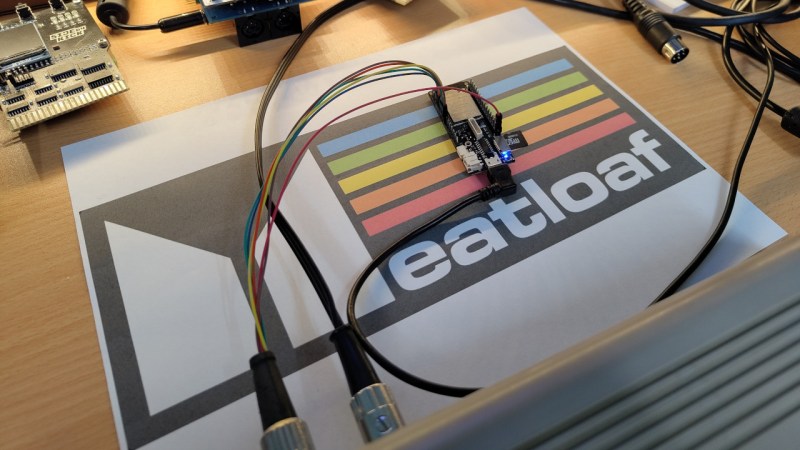
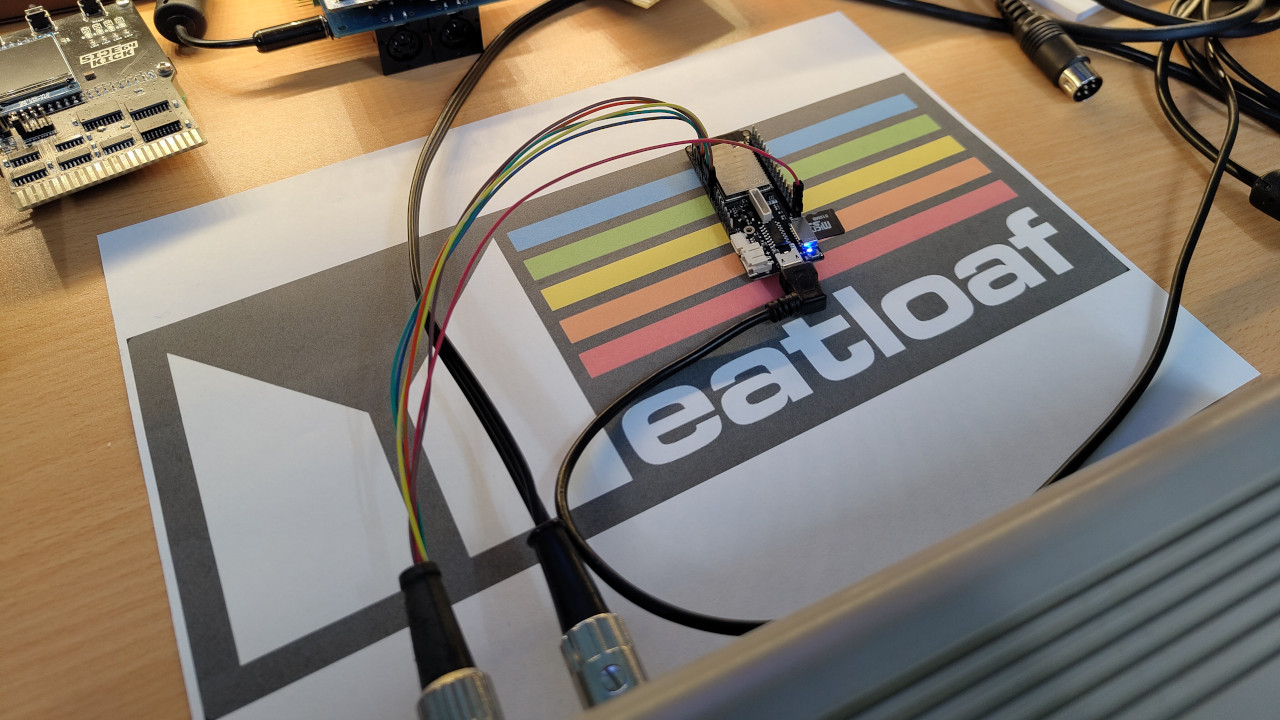
2026 Retrocomputing Challenge: I Would Do Anything For Serial Data These days we take high-speed networking for granted, but it can be difficult to get vintage computers talking to modern machines. To help solve this problem [jaime] came up with Meatloaf which can provide files to a Commodore regardless of their location or medium of storage. Meatloaf is an ESP32 device at its core, which plugs in to any of several Commodore computers through their IEC serial port. Many similar systems exist to bridge the gap between the modern world and the now-retro one, but this one connects to a dedicated service which points towards files no matter where they’re stored. There is some local storage, but it can also retrieve files from any active URL, and Meatloaf retrieves the files and then sends them to the Commodore over that serial link. Part of what makes this unique is that the user doesn’t need to configure Meatloaf in any particular way, everything is done from the Commodore as long as the URL is known to the user. The system can even parse nested files like archive file types and send them along to the computer just like it would if they were on a period-correct floppy drive. There’s a GitHub project page as well for anyone looking to get into the weeds of this serial data interface. https://hackaday.com/2026/10/24/2026-retrocomputing-challenge-i-would-do-anything-for-serial-data/ #serialdata #commodore #meatloaf #rss #feeds #linksharing #qwibbit
#serialdata #commodore #meatloaf #rss #feeds
RetroComputing
RetroComputing 6d

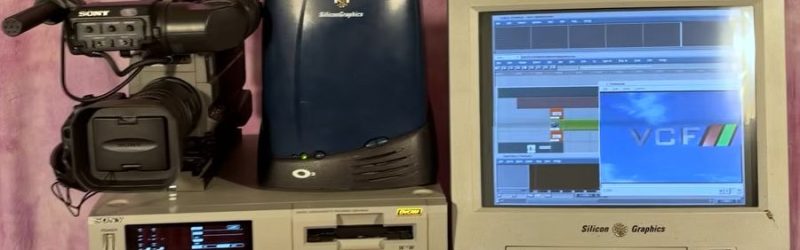
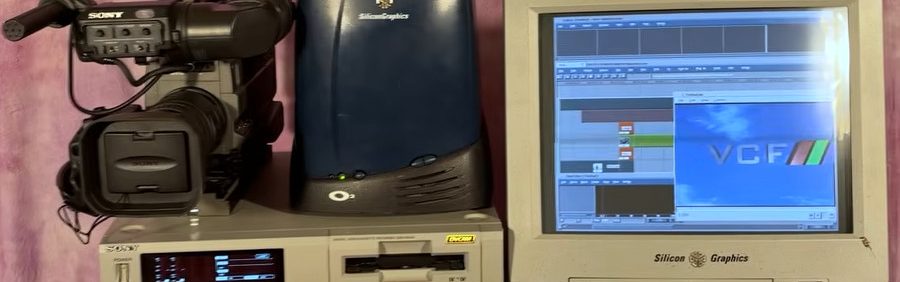
Watch VCF Southwest in Retrotastic SGI-Edited Footage There’s just something about backing way, way off the cutting edge to rediscover the simpler joys of yesteryear. We’ve got a contest about to wrap up along those lines, and there are festivals celebrating all things retro in the world of computers and electronics the world over. Vintage Computer Festival (VCF) Southwest happened back in the summer, but [Wave Design] just posted a gloriously retro retrospective, complete with the full 1990s video-editing workflow, completed on an SGI O2. The footage was recorded on a 1990s vintage DV camera, and read using a somewhat-newer Sony tapedeck that we sadly have to admit also counts as retro in these late days. That gets piped into a vintage SGI O2 workstation that would have had us drooling back in the day, whose only concession to modernity is the inclusion of an NVMe SSD through a collection of adapters we can only call a hack. This may be burying the lede deep, but it turns out there is now an NVMe driver for IRIX 6.5. Using a modern SSD saves [Wave] from dealing with the literal stack of external drives video editing called for back in the day, so we can’t hardly blame him. After the hardware walk-through, [Wave]’s video gets into the software, which is surprisingly modern. The footage he creates is decidedly not. It looks exactly like it was broadcast in 1996, perhaps following an episode of ReBoot — which conveniently enough, also used SGI workstations in its production, though with a decidedly rarer type of digital video tape. https://hackaday.com/2026/10/24/watch-vcf-southwest-in-retrotastic-sgi-edited-footage/ #vcf #footage #wave #sgi #wavedesign #computerfestival #vintage #ssd #nvmessd #using #rss #feeds #linksharing #qwibbit
#vcf #footage #wave #sgi #wavedesign

Welcome to RetroComputing spacestr profile!

About Me

Vintage computers, preservation, and old hardware magic. Unofficial automated fan feed. Content belongs to its respective owners; not affiliated with source publishers.

Interests

  • No interests listed.

Videos

Music

My store is coming soon!

Friends