spacestr

🔔 This profile hasn't been claimed yet. If this is your Nostr profile, you can claim it.

Edit
satslist
Member since: 2026-06-29
satslist
satslist 1d

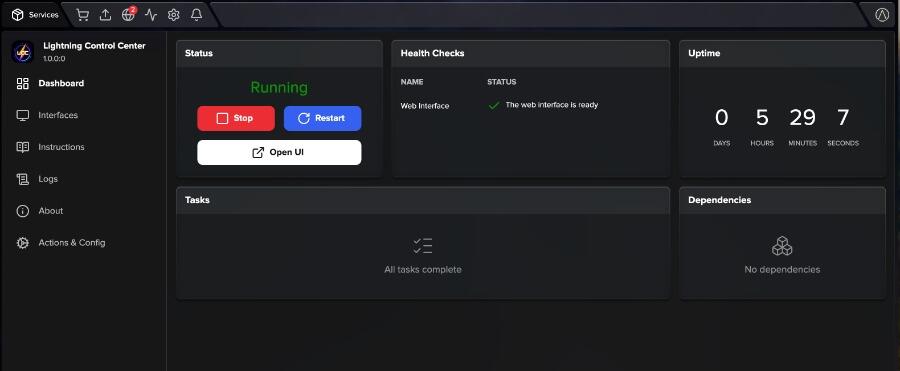
Start9 uddates .. LCC is 100% healthy , submitted and should be available shortly on your Start9 app store .. here's the setup instruction https://m.stacker.news/159051 Lightning Control Center Lightning Control Center (LCC) is a dashboard for running your LND node. It shows your channels, routing income, fees and wallet in one place, and it helps you rebalance channels and set fees with user controlled fully automated functions . Documentation README: an overview of the features and editions. User Manual: a full guide to every page, plus a beginner-friendly explanation of how Lightning routing works. StartOS package issues: report problems specific to this StartOS package. What you get on StartOS Web interface: open it from the Interfaces tab. It is password protected. Automatic LND connection: LCC connects to your StartOS LND service over REST using LND's certificate and macaroon. There is nothing to configure. Generated login password: StartOS creates a strong random password when you install. See it with Actions → Show Login Password. Persistent data: your settings, journal and history are stored in the service's data volume and are kept through updates. Automation starts off: auto-rebalance, automatic fee changes and auto-reconnect do nothing until you switch them on. Not available on StartOS yet: The Mining page and Bitcoin Core statistics, which need a Bitcoin Core connection. Loop Out swaps, which need the Loop daemon. Getting set up Make sure LND is installed, running and fully synced. Go to Actions → Show Login Password and copy the password. Open the web interface from the Interfaces tab and sign in. Explore the Dashboard, Channels, Routing and Wallet pages to see your node's state. Optional: in Settings, turn on the automation you want: Auto-reconnect: reconnects to channel peers that drop offline. Recommended for routing nodes. Auto-rebalance and Auto Fee: set them up per channel on the Channels page. Optional: to unlock Personal or Pro features, enter

satslist
satslist 5d

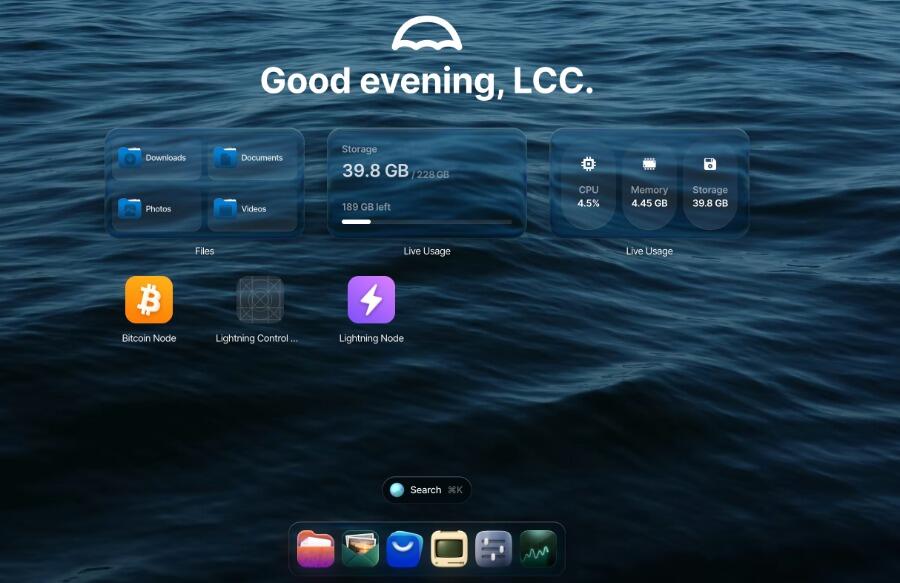
A couple of major updates for today and one major announcement 1. added to Analytics : each row shows which channel's outbound fee policy is actually charging on that route (base msat / PPM). The outbound leg always sets the fee for a route, not the inbound one — this column answers "which of my channels is charging here" at a glance. 2. Per-channel fee automation that adjusts a channel's live fee policy based on its current local balance, so you don't have to babysit fees manually. Set a min/max base fee and min/max PPM per channel, plus a check interval in hours High local balance (channel full of your sats, not draining) fee drifts toward the minimum, to attract more routing through it Low local balance (channel already heavily drained) — fee drifts toward the maximum, to slow the drain and earn more per sat that does go out Runs as its own background job, independent of Auto Rebalance safe to run both on the same channel at once Only calls updatechanpolicy when the calculated fee actually changed won't spam the network graph with no-op updates Reads and preserves the channel's real time_lock_delta automatically — never guesses or resets it Toggle per channel from the Channels page (💰 Auto Fee button); enter -1 at the min base fee prompt to disable All changes are logged to the Node Journal Last but not least LCC Is start9 ready and submitted to the App store , also LCC is now available for install on your Umbrel node in the community App store (pending listing )

satslist
satslist 5d

2 major upgrades to LCC 1. in analytics , Top Routing Pairs — each row now shows which channel's outbound fee policy is actually charging on that route (base msat / PPM). The outbound leg always sets the fee for a route, not the inbound one — this column answers "which of my channels is charging here" at a glance. 2. Auto Fee by Liquidity Per-channel automation that adjusts a channel's live fee policy based on its current local balance, so you don't have to babysit fees manually. Set a min/max base fee and min/max PPM per channel, plus a check interval in hours High local balance (channel full of your sats, not draining) — fee drifts toward the minimum, to attract more routing through it Low local balance (channel already heavily drained) fee drifts toward the maximum, to slow the drain and earn more per sat that does go out Runs as its own background job, independent of Auto Rebalance safe to run both on the same channel at once Only calls updatechanpolicy when the calculated fee actually changed won't spam the network graph with no-op updates Reads and preserves the channel's real time_lock_delta automatically — never guesses or resets it Toggle per channel from the Channels page (💰 Auto Fee button); enter -1 at the min base fee prompt to disable All changes are logged to the Node Journal

satslist
satslist 9d

always good to see this .. WOS is the best

satslist
satslist 9d

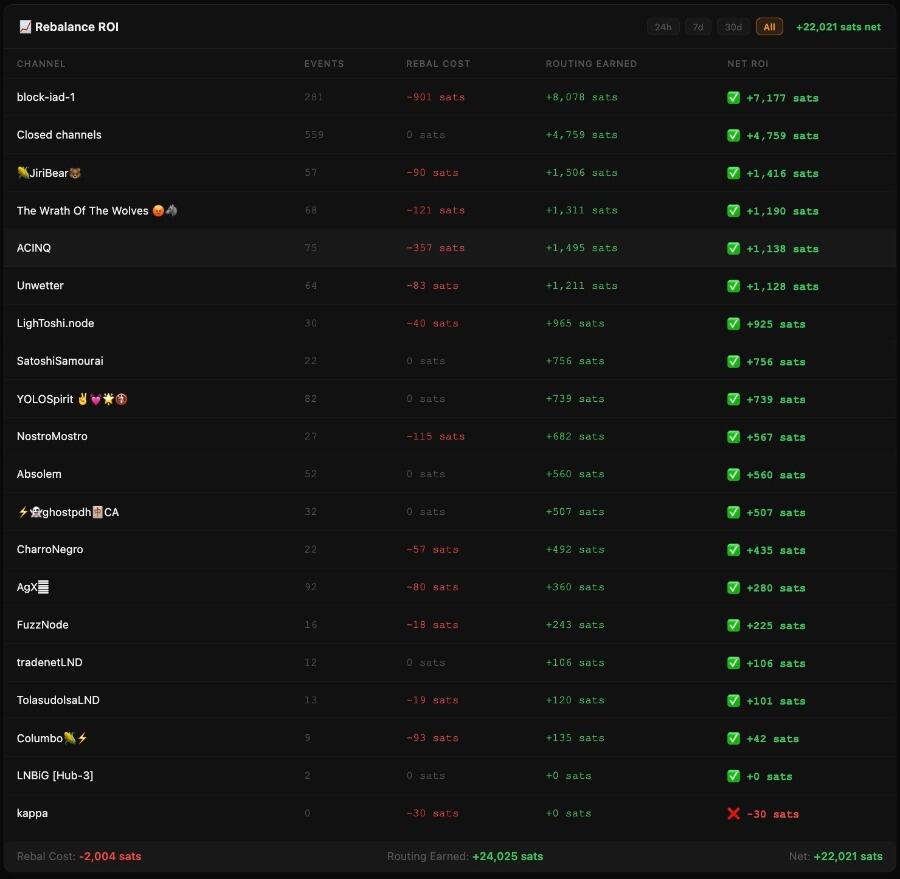
how do you know if you're lightning node channels are profitable after rebalancing fees ? LCC will show you exactly that ..how ? The ROI tracker compares two numbers per channel: Rebalance Cost (total sats spent on auto-rebalances for that channel ) Routing Earned (total routing fees earned through that channel) The difference is your Net ROI. Positive = profitable channel Negative = losing money. Time Filters Use the filter buttons to view ROI over different periods: 24h, 7d, 30d, All time What to Look For - Channels with high routing earned and low rebalance cost = your best performers Channels with rebalance cost but zero routing = stop rebalancing those Channels with zero rebalance cost and positive routing = free money, leave them alone ROI tracker is an essential tool for day to day operation of a lighining node

satslist
satslist 9d

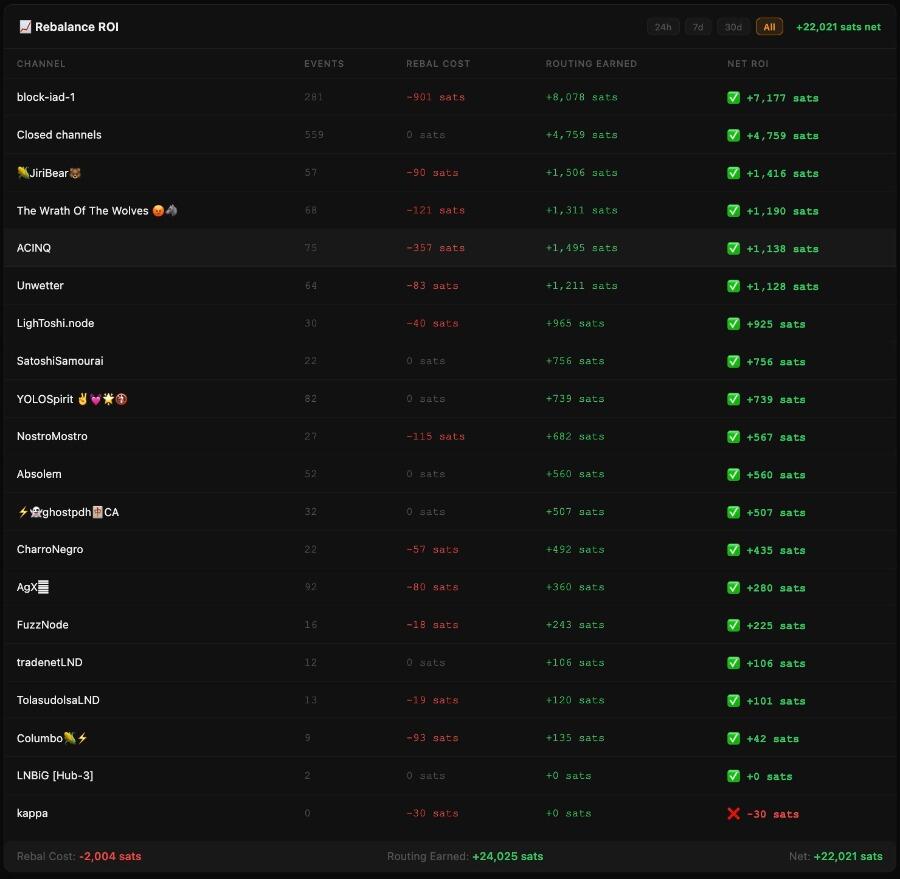
how do you know if you're lightning node channels are profitable after rebalancing fees ? LCC will show you exactly that ..how ? The ROI tracker compares two numbers per channel: Rebalance Cost (total sats spent on auto-rebalances for that channel ) Routing Earned (total routing fees earned through that channel) The difference is your Net ROI. Positive = profitable channel Negative = losing money. Time Filters Use the filter buttons to view ROI over different periods: 24h, 7d, 30d, All time What to Look For - Channels with high routing earned and low rebalance cost = your best performers Channels with rebalance cost but zero routing = stop rebalancing those Channels with zero rebalance cost and positive routing = free money, leave them alone ROI tracker is an essential tool for day to day operation of a lighining node

satslist
satslist 10d

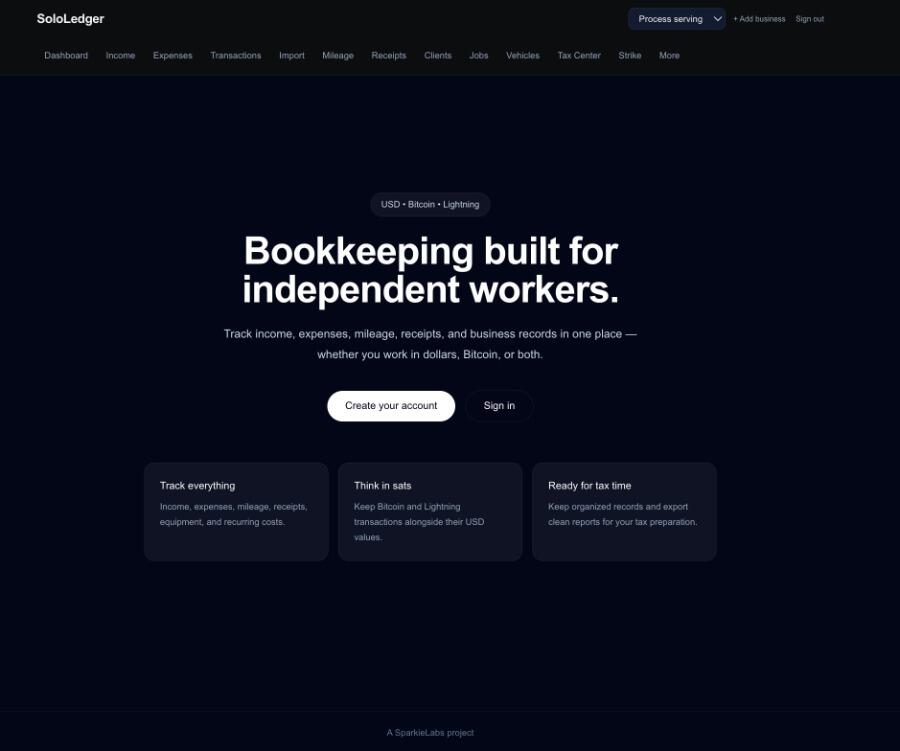
SoloLedger is live. 10 days giveaway, Enter here : https://x.com/satslist/status/2100020319314493693 the ledger built for bitcoiners and non bitcoiners who run solo businesses: ✔️ Income & expense tracking ✔️ Mileage logging ✔️ Receipt scanning ✔️ Tax Center with quarterly estimates (works in all states) ✔️ Strike Lightning import ✔️ fully integrated with SparkieLabs LCC (lightning Control center) ⚡We're giving away 10 PRO accounts 1 month each, one winner EVERY DAY for 10 days. To enter: 1️⃣ Follow @satslist on X 2️⃣ Reply: how would YOU use SoloLedger? 3️⃣ Repost 🔁 to double your entry Winner drawn daily at 8pm ET. Day 1 starts September 16th 2026 👇 https://sololedger.sparkielabs.com Not feeling lucky? Early Adopter Pro is just $3.99/mo — locked for LIFE (ends Oct 31, Bitcoin Whitepaper Day 🧡). Get paid by card in your own favorite currency via Stripe, or save 10% paying with Lightning. Your money, your choice Offer ends Oct 31 (Bitcoin Whitepaper Day 🧡) https://x.com/satslist/status/2100020319314493693?ref_src=twsrc%5Etfw%7Ctwcamp%5Etweetembed%7Ctwterm%5E2100020319314493693%7Ctwgr%5Eed25af648d621b23b24bdd253c0a2e5bc92d052c%7Ctwcon%5Es1_c10&ref_url=https%3A%2F%2Fstacker.news%2Fitems%2F1573257

satslist
satslist 12d

running a sololedger giveaway on x if anyone is interested head over to the @sparkiekabs on x https://x.com/satslist/status/2100020319314493693 SoloLedger is live the ledger built for bitcoiners and non bitcoiners who run solo businesses: ✔️ Income & expense tracking ✔️ Mileage logging ✔️ Receipt scanning ✔️ Tax Center with quarterly estimates (works in all states) ✔️ Strike Lightning import ✔️ fully integrated with SparkieLabs LCC (lightning Control center) ⚡We're giving away 10 PRO accounts 1 month each, one winner EVERY DAY for 10 days. To enter: 1️⃣ Follow 2️⃣ Reply: how would YOU use SoloLedger? 3️⃣ Repost 🔁 to double your entry Winner drawn daily at 8pm ET. Day 1 starts today ...September 16th 2026 👇 https://sololedger.sparkielabs.com Not feeling lucky? Early Adopter Pro is just $3.99/mo — locked for LIFE (ends Oct 31, Bitcoin Whitepaper Day 🧡). Get paid by card in your own favorite currency via Stripe, or save 10% paying with Lightning. Your money, your choice Offer ends Oct 31 (Bitcoin Whitepaper Day 🧡)

satslist
satslist 16d

100% tracking rebalance ROI is next. I built it to minimize rebalances in general if i can dial in the exact times it would make the rebalances more efficient , next couple of days will give me a better idea .. the Journal already logs fees paid, just need to compare with routing income in the 2hr window after. If it's net negative the 3-strike auto-disable kills it. great feedback as usual 👍

satslist
satslist 16d

New Killer feature added to LCC .. now you can set a schedule on your automatic rebalances .. why ? there are routing patterns for each channel, at very specific times there are bursts of routing fees based on the time zones of each channel .. when the network settles transactions . I let Claude analyze these patterns over all transactions ever made using the CSV export feature , and it pinpointed several times that are different for each channels . With scheduled rebalances you can set a timer to rebalance each channel right before these activity bursts , the full process as explained in the LCC manual Routing Pattern Analysis Find your node's peak routing hours to optimize when auto-rebalancing runs. How to Analyze Your Routing Patterns Export your routing history CSV from the Routing page (All time), then ask Claude or any AI assistant: "Analyze this routing CSV and show me hourly and daily patterns - when does my node route the most?" What to Look For Peak hours with highest fees - these are your money hours Dead hours with low or zero activity Daily patterns - weekdays vs weekends How to Use This Data Set your per-channel auto-rebalance to run 1 hour BEFORE your peak hours. This ensures channels have liquidity when traffic spikes. Example: If your node peaks at 9-11 AM and 10-11 PM, set auto-rebalance to run at 8 AM and 9 PM. Tip: You need at least 2 weeks of routing data for reliable patterns. Re-analyze monthly as your channel mix changes. https://m.stacker.news/156463

Welcome to satslist spacestr profile!

About Me

⚡ Bitcoin Marketplace Buy & Sell with Bitcoin Native Lightning payments join our newsletter for updates https://satslist.shop

Interests

  • No interests listed.

Videos

Music

My store is coming soon!

Friends