spacestr

šŸ”” This profile hasn't been claimed yet. If this is your Nostr profile, you can claim it.

Edit
addshore (Unofficial)
Member since: 2026-10-16
addshore (Unofficial)
addshore (Unofficial) 6h

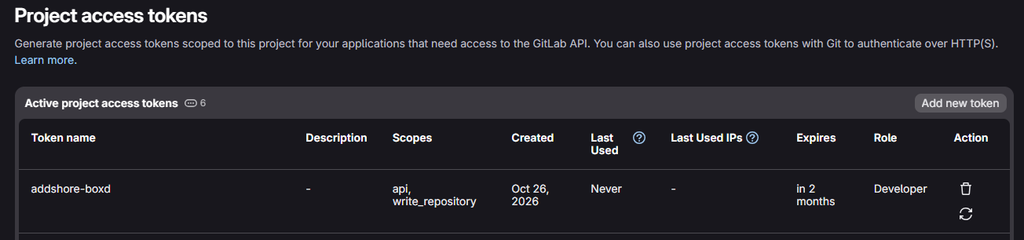
boxd.sh VM, ChatGPT Codex CLI remote & git I’ve been trying a slightly different setup for working with Codex, give it a VM, connect to it remotely, and let it get on with setting up a development environment and making changes. Mainly so that I could trial this sort of more remote development from less powerful devices than my main daily driver, maybe even my phone! I did a bunch of research, and the easiest service to get off the ground with seemed to be boxd.sh. One of the reasons for experimenting is disk space. The cloud environments that you can use with Codex / ChatGPT have had around 20 or 30 GB available, which can get rather tight for larger setups involving multiple projects, or even single repos that have lots of dependencies, and or need various docker images for various things.. most of my experiences with the cloud workspaces as part of chatGPT / codex have actually been rather disappointing! A few repositories, dependencies, container images and development databases later, and suddenly you are thinking about disk space rather than the thing you wanted to work on. The boxd machines come with 100 GB of disk by default. That seemed like a much more useful starting point, and I wanted to see how little effort it would take to get one working with Codex and Wikimedia GitLab for a small feature for a-wikimedia-cli. An account, some integrations, and a GitLab bot I had already made an account at app.boxd.sh, which currently comes with $30 of free credit (and an offer for more free credit on your first top up). I have actually be using the VM on and off for a few weeks now, and only spent 10USD. The simplicity of the interfaces for turning them on and off, and the startup time really help in not wasting resources. For a 2 CPU and 4GB machine, not bad. And equivalent digital ocean droplet would be 24 USD per month, but it wouldn’t come with quick such a simple interface(but i’m up for trying that soon too). I connected the basic integrations for Git, GitHub and Codex, which again really levels up the simplicity of the VM setup, if your only using it for private use. The idea is that the machine can pull repositories, push branches, and already have Codex CLI authenticated when I log in, without extra setup. Wikimedia GitLab needed a little extra setup. I created a project access token and added it to boxd as a secret called WM_GITLAB_ADDSHORE_BOXD, scoped to gitlab.wikimedia.org. Such an option would naturally be available for basically all possible integrations, likely allowing for more fine grained control when it comes to scopes and access to other services and the outside world. The token has an expiry and the Developer role, with api and write_repository scopes. It is scoped to this project, rather than giving the VM my normal GitLab account. Interestingly, GitLab actually represents it as a project-scoped bot user, so you can track the activity, and see the separated out actions. Creating the machine Heading to the machines page points you towards the CLI to create a machine. I called mine awm-1, said yes when asked whether I wanted to connect, and was straight into a shell. ~ boxd machine new Name your machine: awm-1 name: awm-1 id: 20ced7dc-1c33-42cf-a361-44dc84a4ee01 url: awm-1.boxd.sh source: standalone boot: 3ms Connect: ssh ssh awm-1.boxd cli boxd machine connect awm-1 browser https://awm-1.boxd.sh Connect to awm-1 now? [Y/n] yes boxd@awm-1:~$ The reported boot time was 3ms, which is delightful. Checking Codex confirmed that the integration had done its job, codex was already there, and already authed. boxd@awm-1:~$ codex login status Logged in using ChatGPT Connecting Codex remotely Next, I started remote control on the VM: boxd@awm-1:~$ codex remote-control start Starting app-server daemon with remote control enabled... Installing daemon from CLI version 0.164.0 into /home/boxd/.codex/packages/app-server-daemon... This machine is available for remote control as awm-1. Daemon used app-server: path: /home/boxd/.codex/packages/app-server-daemon/current/bin/codex version: 0.164.0 Then, to pair it with the app: codex remote-control pair In the desktop app, Connections → Control other devices lets you add a device using the pairing code. After doing that, awm-1 appeared as connected. You can also do this from a mobile phone, and yes you have to do that as an additional pairing and new pairing code (everything isn’t magically connected). In a new chat, I could then select the remote machine and send it a prompt. You can also just use Codex CLI directly on the machine. In fact, I might try doing the whole thing from the console next time, and maybe that’ll stop me needing to switch between my personal and work OpenAI accounts in the desktop app over and over again… Let it set itself up My first prompt was simply: I want you to prepare a local development environment for https://gitlab.wikimedia.org/repos/releng/cli You should have a secret WM_GITLAB_ADDSHORE_BOXD which should allow you to read from that repo, and push branches in the future Get setup and let me know how it goes That gave Codex the repository and the name of the secret it should use, with the intention of being able to push branches later. Once the development environment was set up, I took a snapshot before giving it something more interesting to try. This is also a good point in time to note that you can snapshot the VMs, pause them, resize them and even fork them. So I am unlikely to need to do this whole setup again. A real change: Toolviews in a Wikimedia CLI For the actual development task, I picked something I wanted in a Wikimedia CLI: access to Toolviews, which has an API for tool traffic statistics (so that I could easily find the most used tools, and in turn see if I should add any CLI support within the tool). We had recently added pageview metrics using the Wikimedia analytics APIs, including terminal graphs. It seemed like some of that could be reused here. There was also a small command-layout question, as tools and toolforge were aliases, and adding this functionality might mean separating them. This was all decided ahead of time by me, not left for Codex to try and figure it out (that would likely be a waste). My prompt, typos and all, was: I want you to take a look at https://toolviews.toolforge.org/ and the API https://toolviews.toolforge.org/api/ that as far as I can tell is currently un authenticated I think it would be neat to include this as part of the CLI tooling! (remember to always send the a-wikimedia-cli UA) We recently implements pageview metrics etc based on the official wikimedia analytics APIS Some parts of that will be reusable, such as the graphs At a guess, the command should be under `mw tools viewsā€ or something? Which means I think we will be splitting the tools vs toolforge alias that currently exists..! Manage Toolforge tools, jobs, builds and deployments Usage: mw tools [command] Aliases: tools, toolforge So we end up with ā€œmw tools toolviewsā€ for example Can you go ahead and try to implement this The result, after a few mins, was a pushed branch and draft merge request !768. There is not yet an Agents.md file in this repo, so I did a little bit of hand holding in terms of commit message styling, and also making sure that it ran the appropriate tests and linting checks before submission. There was also a dead part of the API that it implemented, but always returned 0s, so I got it to remove it! And there was something useful to try in the terminal. For example, a graph of hits for the Toolviews tool itself: mw tools toolviews toolviews --output graph Or a table of the previous day’s tool views, now one of the examples in the command help: mw tools views --date "$(date -d yesterday +%F)" --output table | head -n 11 There are also JSON and CSV outputs too, as these all ā€œcome for freeā€ as part of the rest of the CLI setup that I have been ā€œrefiningā€ here for years. This was a useful first test of the setup: get a development environment ready, work on a feature, and get the result back into GitLab as a branch and merge request. And I’ll probably end up reviewing and merging the feature for the next release today! More to try There is quite a bit more to boxd than I used here. Network restrictions, automatic sleeping, snapshots, machine forks and checkpoints all look interesting for development environments. Being able to save a working setup before trying something is particularly appealing when the next step is handing an agent a fairly loose brief. I haven’t worked out an exact bill for this experiment, but I expect it to have cost pennies, as long as I remember to turn the VM off after writing this post. More importantly for me, I’ll keep trying this setup for this sort of one off easy implementation. And it’s really nice to not be tied too much into weird odd complex infrastructure (such as via devin.ai which I tried previously too). In a work context, I’m also looking forward to exploring USB proxying through to the VM for a Raspberry Pi sitting locally, proxying COM port for development on local ESPs etc. I haven’t tried that yet, but have been working on some easy open source tooling for it. And next time, perhaps I’ll just SSH in and use Codex in the console, rather than bringing it into the app :D That alone removes a few steps and complexity here! https://addshore.com/2026/10/boxd-sh-vm-chatgpt-codex-cli-remote-git/ #rss #feeds #linksharing #qwibbit


#rss #feeds #linksharing #qwibbit
addshore (Unofficial)
addshore (Unofficial) 4d

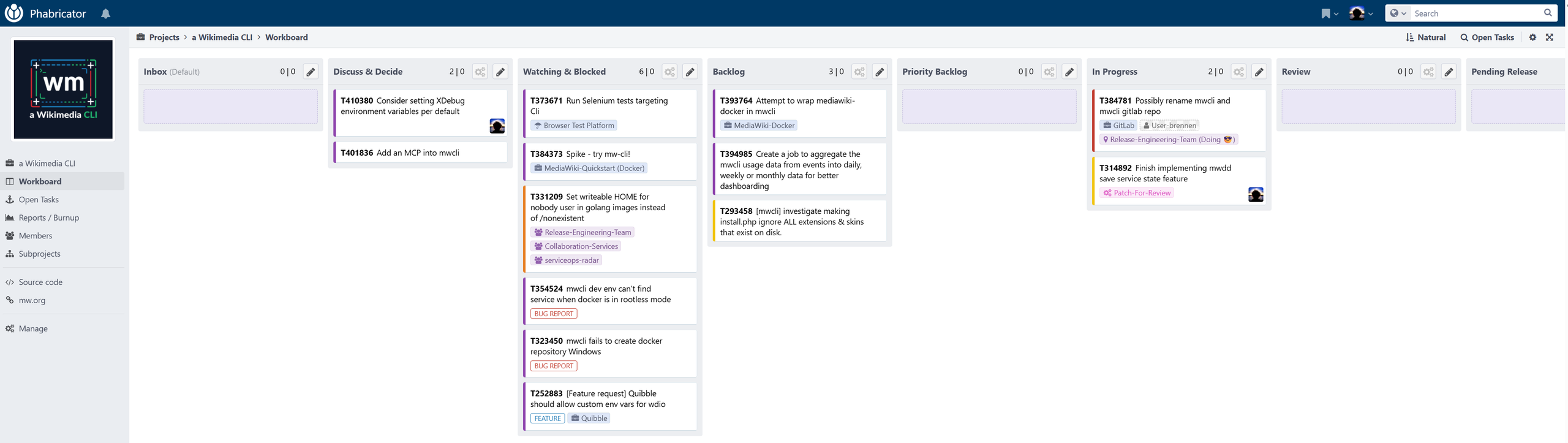
mwcli -> a-wikimedia-cli: The start of a rebranding Welcome to…. a Wikimedia CLI. My involvement with what eventually became mwcli goes back to the Wikimedia Hackathon in Vienna in 2017. I put together mediawiki-docker-dev, or MWDD, to make testing MediaWiki against different combinations of PHP versions, web servers and databases easier. It gradually became a development environment that people used day to day, with a collection of Bash scripts wrapping Docker Compose. I wrote up that early history in 2021. By May 2020, I was experimenting with a more intentional CLI around it. That prototype was written in PHP using Symfony Console, split the environment into independently controlled service groups, and reduced the number of containers needed at startup. It also made tools such as Composer, Fresh and Quibble easier to use alongside the development environment. The basic idea was still Docker Compose, with a friendlier way to manage all the moving parts. Meanwhile, the Wikimedia Foundation’s Release Engineering team was working on a Go-based MediaWiki CLI. I began porting the MWDD functionality into that project in 2020, with the work continuing through 2021. This brought the development environment into a tool that could be distributed as a single binary, with built-in help, automated tests and regular releases. By November 2021, I could finally point existing MWDD users towards its new home under mw docker. The wider Wikimedia scope was already starting to appear then. Alongside the development environment, mwcli had commands for GitLab, Gerrit, Codesearch and Toolhub. When I looked back at its usage in January 2025, the development environment still accounted for most recorded activity. But the ambition was to make the CLI useful across more MediaWiki and Wikimedia workflows, and I ended that post wondering whether a rename should accompany a rework, restructure and refocus. Which brings us to a Wikimedia CLI. The development environment remains a substantial part of the project, but there is now more to discover around Wikimedia data, Toolforge, Cloud VPS and working with wiki content. After several iterations of the tooling—and quite a few years of carrying names from earlier ones—it feels like a good time to start making that broader direction more visible. A naming discussion The naming had become rather muddled. The project was generally called mwcli, the executable was mw, the documentation lived on the Cli page of mediawiki.org, and the repository was called releng/cli. In March 2023, Sam Wilson asked the fairly reasonable question of what the project was actually called. Calling a command-line tool ā€œCLIā€ also gives people very little to distinguish it from all the other command-line tools they might be looking for. See the naming discussion on the talk page. There was also another mwcli already out there. Sam had a separate PHP-based command-line client for working with MediaWiki wikis, including uploading files and exporting pages. Two tools with the same name, operating in the same ecosystem, made a distinct identity particularly important. His project has since moved to Wikimedia GitLab and continues to use that name. The scope of this project was another reason to reconsider ā€œMediaWiki CLIā€. Back in April 2023, I suggested that ā€œWikimediaā€ would better describe where it was heading, pointing to the GitLab integration as something that wasn’t specifically about MediaWiki. With analytics, EventStreams, Toolforge and Cloud VPS functionality now available, that broader description makes even more sense. Naturally, agreeing that a name should change and actually changing it turned out to be rather different tasks. I said I would get to it before the end of 2023, we discussed names including kiwi and wicli in 2024, and I then aimed for the end of that year too. Naming things remains hard, apparently! a Wikimedia CLI gives the project a descriptive identity that fits its wider ambitions. It also leaves room for the many other useful command-line tools in the ecosystem. The practical transition can happen gradually, keeping existing commands and scripts working while the documentation and branding catch up. (More on that in future versions) 0.34.0 release The 0.34.0 release brings together the new branding (with more to come) and a fairly substantial collection of changes across the CLI. There is plenty for existing development-environment users, alongside more functionality for people working with Wikimedia services, data and wiki content. The full changelog has the details, but here are a few highlights. The Wikimedia data commands are probably the easiest place to start exploring. mw analytics can retrieve pageviews, edit counts, editor counts, most-viewed pages, media requests and more. Results can be returned as tables, JSON or CSV, or displayed as graphs directly in your terminal. For example: mw analytics pageviews 'Albert Einstein' --project en.wikipedia.org --output graph There is also mw api for making direct requests to Wikimedia REST APIs, and mw events for discovering and following public EventStreams feeds. These commands give the CLI something useful to do even when you have no intention of running MediaWiki locally. Toolforge’s CLI is now embedded under mw tools, making its jobs, builds, deployments, shells and Kubernetes commands available from your local machine. The Cloud VPS commands have also expanded, covering instance discovery, SSH sessions, remote command execution, instance creation and volume management. I’m preparing for more interactive and visual documentation, now with automated recordings of some of the more complex command interactions, such as deploying a k8s service in toolforge from your local machine. (see below) The wiki commands have received some attention too. You can upload files and new versions, move individual pages or batches of pages while preserving their histories, and download files in their original format or as PNG/JPEG images. For example, getting a small PNG version of the new logo from Commons is now: mw wiki file download 'File:Logo of a-wikimedia-cli.svg' --wiki commons.wikimedia.org --format png --width 250 --output logo.png I’m sure I’ll properly flesh out the wiki interactions in another future release… For development-environment users, mw dev is now the main entry point, with mw docker retained as an alias. Traefik is the default proxy, and Cloudflare Quick Tunnel and Holesail support make it possible to access an environment through an authenticated gateway. There is optional log browsing through OpenSearch Dashboards, improved suspend/resume behavior, parallel source cloning, and a new mediawiki update-code command for updating core, extensions and skins. This is going toward being able to use the CLI to entirely manage a remote development environment on a VM for MediaWiki and more. I expect one of the next services that will be added will be VsCode itself. There are also plenty of smaller improvements around installation output, Composer failures, Docker contexts and service images. MariaDB now defaults to 11.4 LTS, and replication retains its position across service restarts. Existing MariaDB data is upgraded automatically on startup; that upgrade is one-way, so take a database backup before updating an existing environment. In-fact, I basically cleared out the entire Phabricator board of issues in this release (I look forward to more being filled in). Finally, there are more workflow guides available through mw help guides, alongside recorded demonstrations. And these will all also be viewable and searchable on mediawiki.org. Where next? I’m going to try and start ā€œspeeding upā€ development, and releasing monthly (at least), continuing to expand coverage of ā€œcoreā€ Wikimedia services that are often used by devs, or tech savvy folks. What’s already in my view? Better secret support for CLI related passwords, keys and users details Automatic integration with VsCode if running remotely on a VM Expanded development environment dashboard support Wikimedia service shortcuts, so commands such as wm @en.wikipedia.org page get Foo could exist alongside wm @en.wikipedia.org analytics pageviews Foo But if there is something you might like, just let me know! https://addshore.com/2026/10/mwcli-a-wikimedia-cli-the-start-of-a-rebranding/ https://upload.wikimedia.org/wikipedia/commons/b/be/Logo_of_a-wikimedia-cli.svg?utm_source=addshore.com #wikimedia #cli #mwcli #mediawikicli #start #mwdd #back #gitlab #dockercompose #releaseengineering #rss #feeds #linksharing #qwibbit
#wikimedia #cli #mwcli #mediawikicli #start
addshore (Unofficial)
addshore (Unofficial) 13d

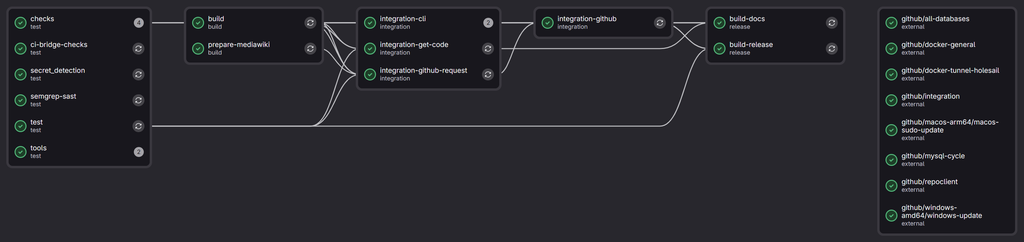
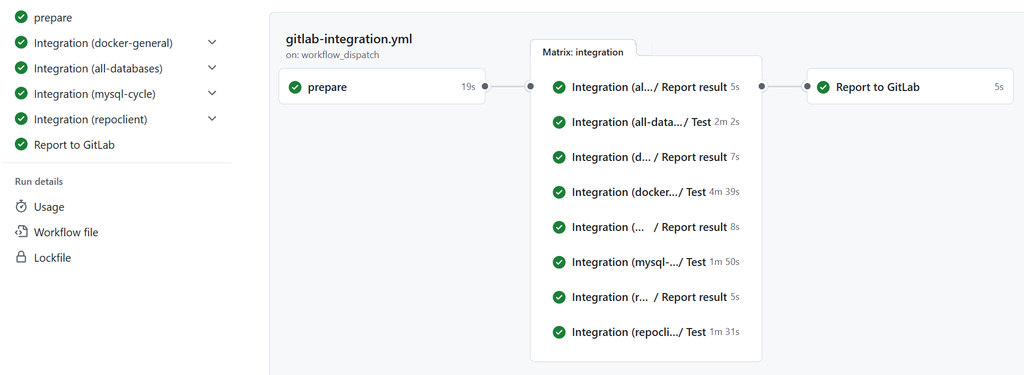
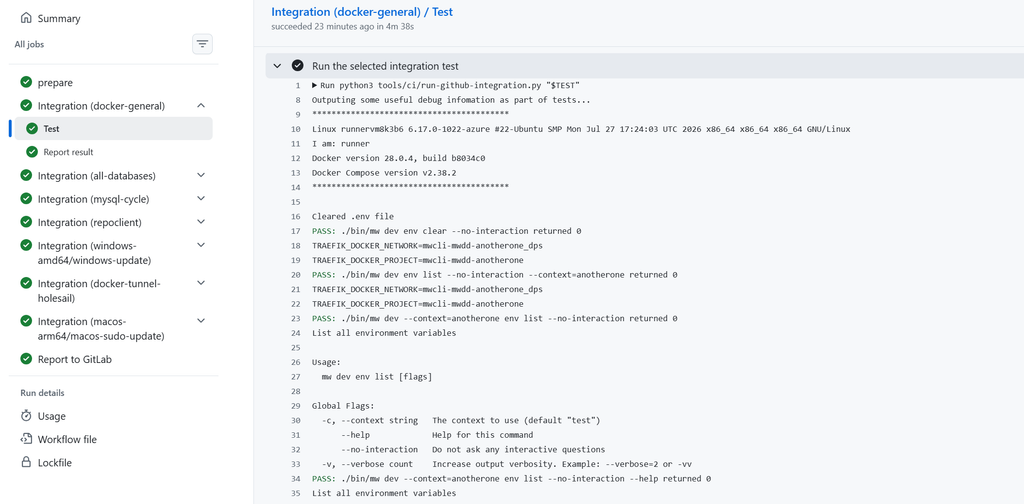
Calling GitHub CI from a Wikimedia GitLab repo I want to spend some more time developing a-wikimedia-cli (previosuly called mwcli), expanding what it can do, and adding integration tests for more of its functionality along the way. Having tests is useful, but having to wait for them every time you change something makes that slightly less appealing. Especially when your development system seems to be intense bursts of work and branches on the odd evening, or odd weekend, and not much development the rest of the time. Some of the more involved tests create MediaWiki environments, start databases, install things, turn them off, turn them back on again and check that the CLI has done what it was supposed to. These have been running using Docker-in-Docker (or dind for short) on Wikimedia Cloud VPS machines for some time now, alongside the other checks and builds managed by Wikimedia GitLab. However the are only 2 small workers in the pool for the Docker-in-Docker tests, which are limited to 4 simultaneous jobs due to CPU and RAM constraints. not to mention it’s a waste leaving them on most of the time… Meanwhile, the project also has a repository on GitHub which is mirrored to from GitLab, where GitHub Actions has machines quite capable of running these tests. I have thought about moving entirely over to GitHub to solve this problem before, and have spun up forks there with CI before to make sure integration style tests pass before promoting them into branches in GitLab. However I never made a complete move. I have also dabbled with doing cross repo CI before for this setup, however it often ended in a disappointing mess. However, maybe this time it will work *wink wink*… A GitLab runner inside a GitHub Action Looking back through the Git history, I had already started exploring this in October 2022, adding a GitHub workflow that could register a GitLab runner. By January 2023, I was trying to connect individual integration jobs to those runners using dynamically generated tags. GitLab would trigger GitHub, GitHub would start a runner, and the runner would pick up the appropriate GitLab job. I don’t remember much about getting this far, or exactly why I stopped. Looking at the configuration now, there were already quite a few moving parts. But it didn’t seem to make enough sense at the time. The first working approach this weekend followed much the same idea. A GitHub workflow starts a temporary GitLab Runner on its hosted machine. That runner connects to Wikimedia GitLab, processes one job, and disconnects afterwards. The integration tests still run as GitLab jobs, with their output appearing in GitLab, but the machine doing the work belongs to GitHub. This also meant that Cloud VPS runners and GitHub-hosted runners could share the work. Whichever runner picked up a job would execute it. There was a bit of plumbing around checking whether a worker was actually needed, avoiding duplicate dispatches, and cleaning up the temporary runner afterwards. But it worked, and the tests were considerably faster. Ultimately after getting this mostly working, and almost being happy, I decided to throw it all away, as the approach likely makes the GitHub runners appear as doing some odd stuff, which might raise some flags. Essentially it would be hundreds of jobs that just sit there, running a gitlab runner and then exiting, with not very much output on the GitHub side. Not to mention the fact that this time around I was using a webhook from GitLab to trigger the GitHub action, but that would trigger for ALL JOBS, even if nothing needed to run on GitHub. So within an hour or so I had actually spawned thousands of CI jobs on GitHub for the project… Going native The next iteration moved the integration tests into native GitHub Actions jobs. GitLab still runs the checks (linting etc), builds the CLI binary, and prepares a MediaWiki snapshot. Once those prerequisites pass, a request job dispatches the GitHub workflow. GitHub then downloads the inputs from that particular GitLab pipeline: The built mw binary. The prepared MediaWiki files. A Git bundle containing the source being tested. Jobs then run in parallel, covering general Docker functionality, the supported databases, the MySQL lifecycle, and a Wikibase repository/client setup. These use the GitHub machine’s Docker daemon directly. As each finishes, a separate reporting job posts its result back to GitLab, including a link to the GitHub logs. A small waiting job in GitLab keeps downstream jobs blocked until all four tests have passed. There are still Cloud VPS machines involved, but their role in this flow is dispatching work and waiting for results. The heavy Docker tests happen on GitHub. And there might be room to entirely get rid of the 2 VMs in the future, instead moving those processes to toolforge. How much faster? I went back through some actual pipeline timings to compare the different arrangements, as one of my other memories of experimenting in this topic before, was that GitHub actions was significantly faster. Integration testSeptember: VPS DinDSaturday: VPS DinDGitHub-hosted GitLab RunnerGitHub ActionsGeneral Docker12m21s5m57s4m25s3m41sAll databases8m03s14m14s2m10s1m39sMySQL lifecycle9m57s3m03s1m59s1m41sWikibase repo/client8m30s9m42s1m55s1m22s Sep VPS Sat VPS GitLab Runner Native Actions General Docker All databases MySQL lifecycle Wikibase repo/client 0481216 min Job durations; queues excluded. September: median of four runs. Other setups: individual examples. The September column uses median durations from four pipelines on 15 September. The other columns are individual example runs: Cloud VPS, GitHub-hosted GitLab Runner, and native GitHub Actions. These are historical comparisons, with different code, caches and runner load. Preparation and caching also improved during the work, so we can’t attribute all of the difference to moving away from Docker-in-Docker. The variability on Cloud VPS is fairly visible though… Queueing added another layer. Across the September examples, the original batches of Docker jobs took around 15–46 minutes from becoming runnable to finishing, including queue time and an initial failure in one batch, primarily down to the limitation of 4 simultaneous dind executions at once, as a single merge request or branch, or merge into main will instantly take those 4 slots, and based o the above times, they won’t be back for another 5-10 mins. With the native setup, one complete request took around 4 minutes 21 seconds, from starting the dispatch job to GitLab receiving a successful result. That makes adding more integration coverage feel considerably more practical. Is this allowed? Running a GitLab runner inside a GitHub Action felt like something worth checking against GitHub’s terms, and my first check is what lead to me not actually running the GitLab runner application itself. It is an unusual-looking arrangement, even when the work being done is ordinary CI, there are no PRs on GitHub? but lots of actions? The Actions terms restrict hosted-runner activity unrelated to the: production, testing, deployment, or publication of the software project associated with the repository They also address activity where the: burden is disproportionate to the benefits provided to users My reading is that testing, through the GitHub repository for this project fits the stated purpose. The terms don’t specifically prohibit other runner or require changes to arrive through GitHub pull requests. Using native jobs does make the purpose clearer though. Open the workflow and you can see the individual integration tests, their results, and their logs. Windows and macOS too Not something I was thinking about at the start of the day, but as I was trying to tackle a backlog of tasks and bugs, many of them relate to mac, windows and arm (not somewhere the integration tests currently run). We now also have access to Windows and macOS machines, which opens up testing that the Linux Cloud VPS runners weren’t covering, and this is already in place with some first tests for initial setup and updating on windows and mac. The integration plan lives in the GitLab configuration, listing which tests should run on which platforms. GitHub turns that into parallel jobs, checks out the exact source being tested, and runs the appropriate scripts. Adding another test can happen in the same GitLab merge request as the functionality it checks. This is much closer to what I wanted when starting: being able to expand mwcli’s functionality alongside integration coverage for the environments people actually use. How to? The CI documentation covers the setup, and the workflows and helper scripts live alongside the rest of the project, and im writing this as 7a5692187b4b6d05b65d668fb6007144c25d188a is currently the HEAD of main, so your best bet will start looking there. Next step, making GitHub a first class citizen to the project and being able to open PRs there, having GitLab CI trigger? Which in turn triggers GitHub? CI inception! only time will tell… For now, hopefully less waiting, more tests, and more stability… https://addshore.com/2026/10/calling-github-ci-from-a-wikimedia-gitlab-repo/ #wikimediagitlab #github #runner #callinggithub #cloudvps #repo #however #actionlooking #having #rss #feeds #linksharing #qwibbit
#wikimediagitlab #github #runner #callinggithub #cloudvps
addshore (Unofficial)
addshore (Unofficial) 16d

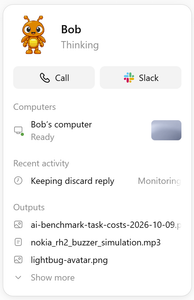
I’m here to ramble (about AI ā€˜n stuff): a look at the last few months The last post about AI that I wrote was about GitHub Copilot moving to AI credits, rather than their prior model of something akin to per prompt billing. That was in May, and to be honest, through June, July and August, not much seemed to change for me in the landscape for my productive working hours. (Various things changed and happened in my periphery that I might be able to explore in my personal time). However September and October really saw another wave of changes that actually lead to impact during my working hours. From the new wave of GPT 6 6.1 models, to the OpenAI dots, and our increasing internal usage of Notion AI for our new internal knowledge base and task tracking, I’m seeing myself rambling on to various LLMs day in day out, and leaving more and more for them to do in the background, vs following along closely with for all of the steps (being an avid GitHub Copilot user before this). The tides have turned, and I primarily use Codex these days as part of VsCode. With Copilot, the only model that I seem to be able to gel with well and make productive for my usage right now is GPT 5.6 Terra, auto always selects something that seems to take too much time, or perform poorly, meanwhile Codex seems to generally just get shit done, without needing so much human interaction. I imagine I’ll continue using GitHub Copilot for more hand holdy type tasks, and also for ā€œcode reviewā€ and some basic coding tasks within GitHub Copilot Cloud. Where the ā€œpowerā€ is really coming from in my working day now is having an AI accessible and curatable knowledge base and task tracking system, IDE integration, and consistent chat and context experiences across devices. Along with my first dot, called Bob… Bob (the Dot) An OpenAI dot is an always-on, autonomous AI agent inside ChatGPT powered by GPT-6 Astra. I have no doubt that some folks home hosted LLM setups come close to this sort of thing (only with arguably less effective and likely slower models), however for a working setup having this as an off the shelf product is mighty powerful. For me the Dot is part of the $100 USD subscription that I was already using as part of my day job, and these are rough human effort estimates for comparable work, over a broad set of categories since I created my Dot around 2 working weeks ago. Code review and regression tests: 4-10 hours. Reviewed substantial changes, investigated differences in behavior and added tests to help catch regressions before merging. Protocol/spec reconciliation: 3-6 hours. Compared documentation with multiple implementations, identified inconsistencies and worked through focused corrections. CI, dependency and repository maintenance: 2-5 hours. Investigated failing builds, updated dependencies, fixed linting and reduced unnecessary CI runs. SDK and release workflows: 2-4 hours. Improved generated-code publishing, checked that examples compiled and organized verified build artifacts. Documentation migration and task updates: 1-3 hours. Moved technical documents and attachments between tools (migrating to Notion), checked the results and kept related tasks and links organized. Cross-system investigations: 2-5 hours. Brought together evidence from code, logs, documentation and correspondence to answer questions that crossed several systems. Creative experiments: 30 mins-2 hours. Produced small visual and audio experiments, including an animated avatar and simulated device-buzzer playback. And for fun on a Sunday to see how much of my usage I could actually use I did some property research and train ticket research, both compiling a large amount of information int Google Sheets. (2-4 hours) The main thing that stood out around this mode of operation, was again taking it one level of abstraction further up the tree. I no longer (seemingly) have to spend too much time worrying about if I I’m channeling my thoughts into the correct chat / prompt window in the right application to get the thing done that I actually want to achieve. Some honest feedback about my heavy dot usage. Tools sometimes stalled, some writes needed retries, sources could be stale. The dot delivered research, files and reviewable changes; that doesn’t mean code was automatically deployed, tickets were completed, or every idea became a finished project. And I can still see how this can come forward in more leaps and bounds and connect slightly more back with IDE based development for situations where having a system run amuck in the cloud just isn’t that productive. My head hurts (I think) I really appreciate coming back to this blog after 3 months (I really had no idea it had been that long), and writing some words down that actually stand a chance of being consumed by another human, rather than just being chewed up by a machine, and spat back out after a little bit of processing. The feeling that everything we are currently working through and with is all just the same set of systems, interactions, communications and processes (all be it with less people involved) as we have experience for many years, decades and arguably centuries. Just it is all happening much faster, and individual people are more capable of directing more parts of the moving systems at the same time. That being said, the threat of some kind of burnout seems real. I came up with at least 2 new projects I could work on in the past 3 hours, and might be convinced that I have the time these days to just about manage to achieve them to an acceptable standard, but at what cost? (Maybe if I didn’t have a job…) There are a fair few good blog posts that have been written (I hope primarily by people) on the continued evolution of AI, particularly with a software engineering slant. See below… After AI takes everything has a few quotes I’ll comment on: ā€œOver the past year, every piece of my work that I could hand off, I handed off to AI, piece by piece.ā€ as part of a section called ā€œThe Bottleneck Has Moved to Usā€. I have certainly being doing this, as my workplace is AI positive, and I personally enjoy the learning experience (that keeps changing drastically every quarter), but to me the journey is part of the whole experience. ā€œthe technical complexity of a single page is bounded; when you break it, the blast radius is your own page, not other systems; even if a page becomes unmaintainable, the cost of rewriting it from scratch is low.ā€ as part of a section called ā€œThe Disappearing Moatā€ As someone that has watched this space change from simple auto completions, to the cross task chats we can have today, there was a point a few years ago there this moat became apparent. Systems are often, and likely will always, have some level of complexity to them, however they are ultimately made up of many simple components. The theory from a few years ago of ā€œuse AI like an internā€ still applies, however its becoming increasingly cheap to rewrite more complex components. ā€œThe person who picks the right problem gets ten times the output; the person who picks the wrong problem just does the wrong thing ten times as fast.ā€ In a nutshell this highlights the likely importance of people in the field of software engineering (in my opinion) to at least get some experience in the field of prompting in their technical space. But I also imagine looking at the wider field this thought path again just highlights the difference between varying levels of engineers, or the way that various different engineers think about the same problems. Of course, getting to any outcome faster is beneficial to all, as even if the outcome is wrong, and something else (such as a human in the loop) can identify that and loop back around to correcting (as has been happening for years already). AI Didn’t Make Programming Easier. It Just Made It Differently Difficult leads with ā€œThe future of software development will belong to those who can think clearly at scale, maintain durable mental models amid rapid changeā€ ā€œthe hard part moves from recall (ā€œHow do I write this?ā€) to judgment (ā€œDoes this actually make sense?ā€).ā€ ā€œthese findings support the view that architectural reasoning, impact analysis, and long-term system maintenance cannot be offloaded to AI.ā€ And some less structured reading… ā€œI built the feature almost entirely using my voice, chatting away to my laptop while I cooked dinner.ā€ – Simon Willison’s Weblog – 9 October 2026 I still don’t scream at my laptop as much as I ā€œwould likeā€, however I did recently spend about an hour researching what van I might want to buy, while driving, and without doing a single web search myself. ā€œAI Doesn’t Reduce Work—It Intensifies Itā€ – Simon Willison’s Weblog – 9 February 2026 Removing the more trivial thinking of remembering how to write the code, how to structure it, how to tie it together, and instead spending more time thinking about the bigger harder more complex questions. ā€œā€œYou can just do thingsā€ was what was on my mind all the time but it took quite a bit longer to realize that just because you can, you might not want to.ā€ – Armin Ronacher’s Thoughts and Writings – 18 January 2026 Something I have apparently been ignoring again for the past few months. ā€œvelocity without understanding is not sustainableā€ – How Generative and Agentic AI Shift Concern from Technical Debt to Cognitive Debt – 9 February 2026 To me this is the difference between vibe coding and… vibe engineering? (nah, just engineering right?) Until next time. and… AI didn’t write this https://addshore.com/2026/10/im-here-to-ramble-about-ai-n-stuff-a-look-at-the-last-few-months/

addshore (Unofficial)
addshore (Unofficial) 16d

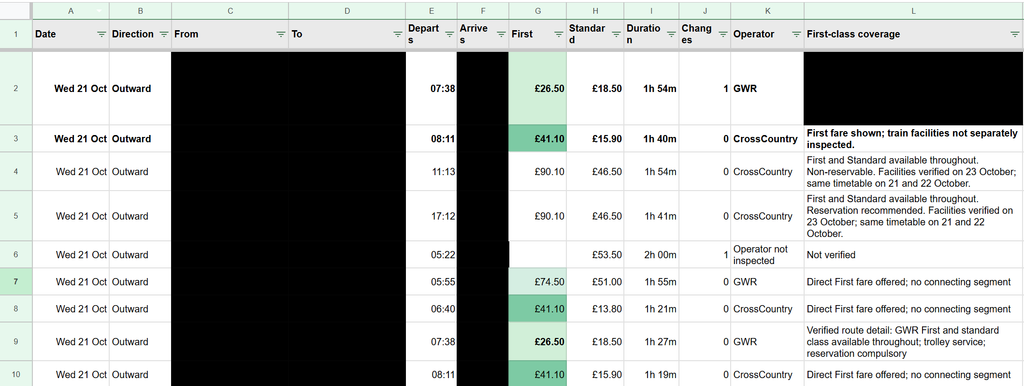
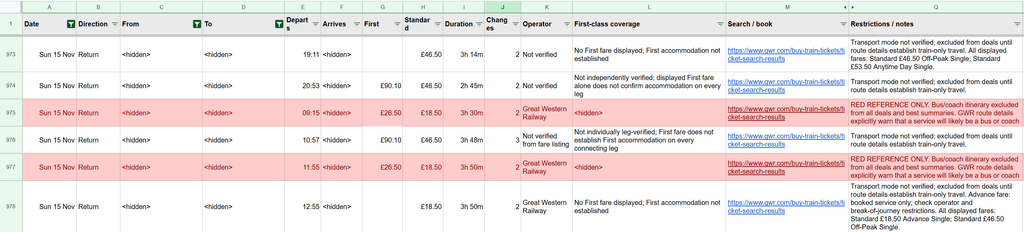
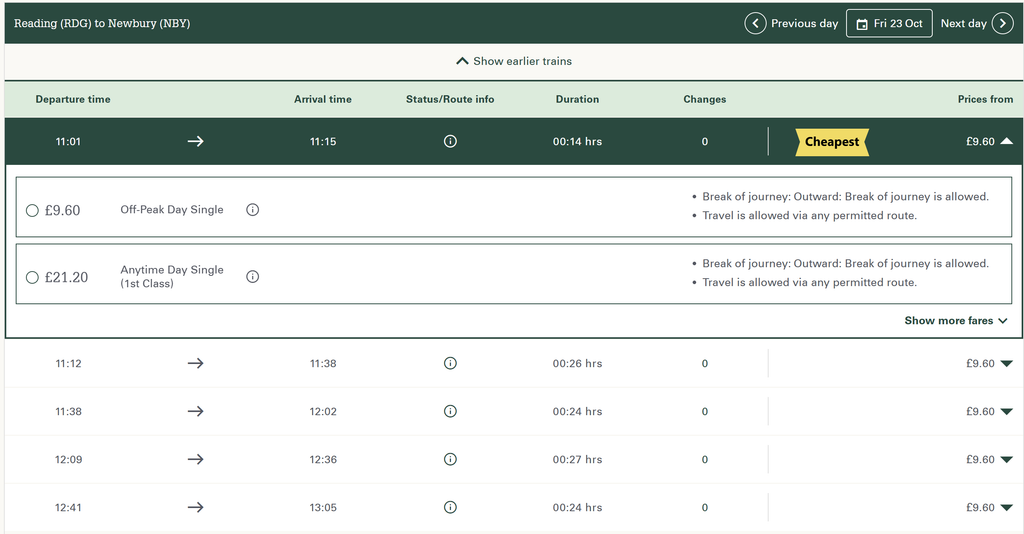
Researching UK train tickets with an AI agent In my last post, I briefly mentioned spending part of a Sunday getting Bob, my dot, to research train tickets and collect the results in Google Sheets. There was quite a bit hidden in that sentence, time to unpack it a little, and think about how much better train ticket purchases could be if you actually want to optimize for something specific. I had two trips to work out, some flexibility over when to travel, and an interest in reasonably priced First Class tickets (which I often see pop up, but no idea when to really expect them). I do these trips multiple times a month often on regular class tickets, and have been for the past few years, and often end up with all sorts of ticket purchases, advanced ones on the cheap, off peak returns, and many purchased last minute. I wanted to see the options without running slightly different versions of the same search myself, then trying to remember which one had produced the useful fare, over multiple days, multiple possible destination stations etc. I’m expecting after writing this, someone might come and tell me about the perfect UK train ticket purchase and comparison website, but to my knowledge it doesn’t yet exist? I ended up with hundreds of recorded comparisons of individual ticket prices, and four preferred direct trains costing on average Ā£42.90 each (all for first class tickets), totaling Ā£171 (Or Ā£157 with split tickets). The off peak return price for these journeys would be Ā£102.80, so only around Ā£70 (or Ā£50) more for 4 first class trains, which hopefully will mean that I actually get a seat on all of these trains, vs my last trip on Friday where I didn’t even get on the train as it was full… The loose brief The starting point was fairly ordinary. Two trips, approximate dates, one adult and no Railcard. There were three destination stations that would work for me, so fixing the search to one station would have thrown away useful options before we had even started. I also had a rough idea of what would make first class interesting: anything under about Ā£35 was worth listing, and perhaps up to Ā£40, given these are the prices I had seen when I had bought one off first class tickets before. That gave the agent something more useful than a request to find the cheapest ticket. The return dates were flexible too, which took another round of conversation to explore properly. A useful outward journey was only half the job. I wanted to compare both directions across the dates I could actually travel, with the same attention to stations, price and timing. Already, doing this by hand, you are looking at 4 different searches for locations for the outward journey, multiplied by the number of days i might be able to travel, plus additional clicking to actually see all availbile times, and the same for the return. The spreadsheet I asked for a spreadsheet because this quickly became more information than I wanted to compare in a chat. A cheap result looks useful in isolation. Put its departure, arrival, journey length and changes next to a few alternatives, and it becomes much easier to judge. This is ultimately what is missing when it comes to every ticket purchasing flow I have experienced, the comparison. It’s something that flight comparisons seem to achieve a little better, but UK trains suck. The wider collection ended up with 503 comparison rows for the first trip and 1,000 for the second. Those are recorded itinerary comparisons, including some separately priced combinations. They are not 1,503 distinct trains, and they are certainly not a complete catalogue of every available fare. Quickly comparing these numbers to how many results you typically get on a single trainline.com ticket search today, I see 8 trains on desktop, so getting this much data would have taken me 187 searches or page loads? The sheet let me move between a broad view of the options and a smaller set of recommendations, filtering based on my new opinions as I saw all of the data, and tweaking my requirements given things that were cropping up. I could ask Bob to expand a date range, check another station, or explain why a particular result looked unusually cheap, then have that reflected in the same place. And entertainingly, this surfaced at least one round of engineering works on a Sunday, where first class tickets look cheap, but you’ll be on a bus. According to the agent, figuring out all of the details of the routes meant opening the journey details. A price and an overall duration were not enough to establish whether the whole itinerary was by train. It also meant accepting that some rows in the broad collection were still unverified, and would need looping back to later if they looked appealing enough. First class needed similar care. A journey can have a first class long distance leg and a standard class local leg, not something that I would really care about, but it’s another data point worth shoving in the spreadsheet. How the data was gathered The fares came from the public GWR booking site, accessed in a browser. The agent took the rendered journey cards and expanded fare panels as structured page text, including the fare labels and restrictions. Loading earlier and later results expanded the search beyond the initially displayed services. Candidate journeys then needed their detail panels opened so the individual legs could be checked for transport mode and class. Separately priced local-leg combinations and return-ticket options needed additional searches. The GWR site looks something like this. This collection came from the booking-site pages, rather than a direct rail fares API integration, though I did briefly look for open APIs for this, coming up short, but there is a possible API that you can apply for for personal use with some sort of small fee? (It is also documented as deprecated though?). I can only assume this is what all of the booking sites actually still use. SOAP FTW! I did try and get the agent to utilize a few different sites, especially sites that offer up split ticket pricings such as TrainSplit Split My Fare or Trainline, however the agent seemed to stall with all of these, claiming that they crashed in the browser before presenting any useful information. However, it seemed to do an OK job figuring out possible splits by itself for some of the specific trains that I had shortlisted. One of the trains I had shortlisted was Ā£45.60, however it found a split first class ticket for Ā£40.60, saving Ā£5. And a second that was Ā£48 reduced down to Ā£38.60, saving Ā£9.40. So another saving of Ā£15 in total. My side My part was mostly describing what I wanted, looking at the results, and saying what needed changing. I could ask for broader return options, rule out buses, distinguish mixed-class travel, and compare a cheaper journey against a more convenient one in ordinary language. After that I could review all of the raw data in a spreadsheet, filter it down, and ultimately make a final decision. There were repeated prompts, retries and corrections along the way. Even with that back and forth, I ended up with the comparisons in a form I could use. I did not need to write the collection or spreadsheet code myself. I could spend my attention on whether Ā£5 was worth an earlier start and a change, while then agent did the repeated searches and kept the output organized. Will I be doing this again? Yes probably… Did it lead me to actually booking my tickets? Not yet, I’ll do that tomorrow! A potential prompt Now this itself is entirely written by GPT 6 Astra, but might potentially serve someone else that wants to perform a similar experiment… Help me find UK train tickets for [number of adults], with [Railcards or none], from [origin] to [destination and acceptable nearby stations]. I can travel out between [dates] and return between [dates]. I prefer First Class below Ā£[target], but show worthwhile options up to Ā£[maximum]. My acceptable departure and arrival times are [times]. I prefer [direct trains / at most X changes], with at least [X] minutes to change. Exclude any journey containing a replacement bus. Check the individual legs, and clearly label mixed-class journeys. Don’t treat a displayed First Class price as proof that every leg has First Class. Start with a small shortlist. Compare through fares with split tickets, preferably on the same train, including booking and split-ticket fees. Explain any seat changes or ticket restrictions. If something cannot be verified, mark it unknown rather than assume. Put the results in [spreadsheet or table], including date, times, duration, changes, class by leg, ticket type, total price, split details, source and checked-at time. Show the best few options and explain their trade-offs. Recheck my chosen journeys before I book. Don’t buy or reserve anything. https://addshore.com/2026/10/researching-uk-train-tickets-with-an-ai-agent/

Welcome to addshore (Unofficial) spacestr profile!

About Me

Unofficial automated RSS/Atom links to addshore's work on hands-on AI-agent research and independently built apps/tools. Original work is credited at the source; follow the source links. Zaps support the independent feed operator, not the author.

Interests

  • No interests listed.

Videos

Music

My store is coming soon!

Friends